
 MEET CLARA - THE AI BEHIND SMARTER SOFTWARE CHOICES



One Platform. Multiple Solutions
This profile is currently managed by the official vendor through the SaaSworthy Vendor Portal. Product details, features, pricing, and media assets are maintained directly by the company.


89% SW Score The SW Score ranks the products within a particular category on a variety of parameters, to provide a definite ranking system. Read more
Featured
98% SW Score The SW Score ranks the products within a particular category on a variety of parameters, to provide a definite ranking system. Read more
Featured
84% SW Score The SW Score ranks the products within a particular category on a variety of parameters, to provide a definite ranking system. Read more
Featured
 Deep Dive with Clara AI
Clientish is an all-in-one client operations platform built for agencies, freelancers, consultants, service businesses, and professional teams. ???? It connects the complete client journey in one platform: Lead → Client → Order → Team → Tasks → Communication → Invoice → Payment → Support → Delivery ???? Clientish helps businesses manage leads and CRM, clients, services, orders, projects, tasks, internal and remote teams, roles and permissions, invoices, subscriptions, payments, support tickets, files, reports, notifications, and communication without relying on multiple disconnected tools. ???? Clients also get their own dedicated portal where they can browse services, place and track orders, submit requirements, request revisions, view and pay invoices, manage subscriptions, open support tickets, exchange files, and communicate with the business. ???? By connecting client management, work delivery, billing, communication, and support, Clientish helps service businesses organize operations and provide a smoother customer experience from the first lead to final delivery.
Read more


Pricing
Platforms Supported
Organization Types Supported
API Support
Modes of Support
Unique Features
Customization
Helps to customize the system for use in industry-specific use casesAI Assistant
AI Assistant helps you provide information and perform specific tasks to significantly improve your success rate. It can perform one or many tasks like analyzing your deals, contacts, and emails, generating the perfect email, and more.Advanced Automation
Allows for building smart automation for repetitive tasks, enhancing efficiency and consistency.Omnichannel Customer Engagement
Unified management of customer interactions across multiple channels, including web, mobile, and social media.Predictive Analytics
Advanced analytics for predicting outcomes based on performance and historical data.IoT Integration
Leveraging Internet of Things devices for enhanced data collection and analysisStandard Features
Order Management
Helps tracking, monitoring, supervising, and meeting deadlines concerning ordered goods in an automated and systematic wayReal-time Data Sync
Allows to synchronize with other systems for up-to-date information across platformsDedicated Phone Line Integration
Incorporating dedicated phone lines for customer support and sales, enabling direct communication and call trackingCustomer Segmentation
Helps to segment contacts and customers into groups based on various criteria such as demographics, behavior, purchase history, hottest leadsOpportunity Management
Opportunity or Pipeline Management allows tracking and managing sales opportunities, including stages of the deal, probability of closing, and associated activities throughout their lifecycle.Sales Force Automation
Streamlined management of the sales cycle from lead to closeTax & Compliance Management
Payment Tracking & Reconciliation
Automated Invoice Capture (OCR)
Invoice Creation & Processing
Approval Workflow Automation
Integration with Accounting Systems
Reporting & Analytics
Vendor Management
Helps to manage necessary data concerning vendors and allows easy accessClient Communication Tools
Offers support through chat, email, or in-app messaging throughout the process.Workflow Builder
Empowers teams to design precise, step-by-step workflows with clarity and ease.CRM Integration
Automatically sends and receives the relevant information to the CRM Software that helps in time managementCustom Workflows
Facility to create workflows with custom stages, process, and status.AI Assistant
AI Assistant helps you provide information and perform specific tasks to significantly improve your success rate. It can perform one or many tasks like analyzing your deals, contacts, and emails, generating the perfect email, and more.Compliance Management
Helps in making an assessment of risks, ensures policy comprehension and that policies/procedures are being followedSubtasks
Helps to create and manage subtasks that forms part of a larger piece of work to be doneDeadline Management
Allows to set, track, and manage deadlines for tasks, projects, or goals. It ensures that tasks are completed on time, promoting efficiency and productivity.Comments (Notes)
To encourage discussion, offer feedback, make a note, or clarify a point within a document or application.Dependency Management
Helps in identifying, documenting, and managing relationships between tasks, resources, and other projects to ensure a project's smooth progression and timely completion.Contact & Account Management
Client Relationship Management
Integration with Financial Systems
Sales Pipeline & Opportunity Management
Compliance & Regulatory Tracking
Reporting & Analytics
Workflow Automation
Automatically execute mundane and repetitive processes or workflow so that employees can focus on productive workFree Trial
Available
No Credit Card Required, Get Started for Free
Starter $23.00 $29.00 per month
Built for freelancers and small teams. Includes up to 10 clients, 30 orders, 30 support tickets, 5 team members, client portal, invoicing, subscription billing, task management, order management, file sharing, and Team Messenger.
Growth $39.00 $49.00 per month
Pro $79.00 $99.00 per month
88% SW Score The SW Score ranks the products within a particular category on a variety of parameters, to provide a definite ranking system. Read more
Featured
89% SW Score The SW Score ranks the products within a particular category on a variety of parameters, to provide a definite ranking system. Read more
Featured
98% SW Score The SW Score ranks the products within a particular category on a variety of parameters, to provide a definite ranking system. Read more
Featured
84% SW Score The SW Score ranks the products within a particular category on a variety of parameters, to provide a definite ranking system. Read more
Featured
98% SW Score The SW Score ranks the products within a particular category on a variety of parameters, to provide a definite ranking system. Read more

92% SW Score The SW Score ranks the products within a particular category on a variety of parameters, to provide a definite ranking system. Read more

92% SW Score The SW Score ranks the products within a particular category on a variety of parameters, to provide a definite ranking system. Read more
91% SW Score The SW Score ranks the products within a particular category on a variety of parameters, to provide a definite ranking system. Read more

91% SW Score The SW Score ranks the products within a particular category on a variety of parameters, to provide a definite ranking system. Read more

91% SW Score The SW Score ranks the products within a particular category on a variety of parameters, to provide a definite ranking system. Read more

91% SW Score The SW Score ranks the products within a particular category on a variety of parameters, to provide a definite ranking system. Read more

90% SW Score The SW Score ranks the products within a particular category on a variety of parameters, to provide a definite ranking system. Read more
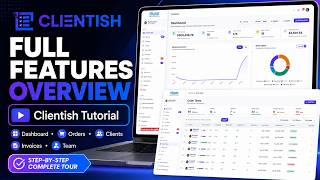
Clientish Full Ov...
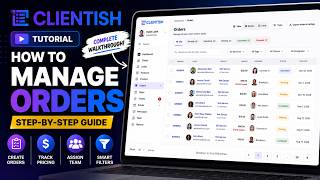
Orders Management...
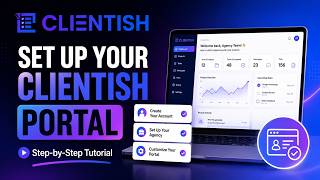
Free Trial Setup

Clientish Dashboard

Clientish Orders

Invoices & Payments

Lead & Client Man...

Team Member Manag...
Does Clientish include CRM and lead management?
Yes. Clientish helps businesses manage leads, contacts, client information, and sales opportunities from one place. You can organize leads, track their progress, and convert them into clients when they are ready.
How does Clientish help with client management?
Clientish keeps client details, orders, tasks, invoices, payments, files, support requests, and communication connected in one platform. Clients also get their own portal to view services, track orders, pay invoices, submit requirements, and contact your team.
Can I manage orders and services in Clientish?
Yes. You can create services, receive and manage client orders, collect requirements, assign work to team members, track progress, and manage delivery from the same workspace.
Can Clientish create and manage invoices and payments?
Yes. Clientish supports invoicing, payment tracking, subscriptions, and multiple payment options. You can create invoices, monitor payment status, and allow clients to manage payments from their portal.
Does Clientish include task management and team collaboration?
Yes. Clientish lets you create and assign tasks, set priorities, track progress, manage deadlines, add comments, and collaborate with internal and remote team members. This keeps client work organized from start to finish.
Can I manage internal and remote team members in Clientish?
Yes. Clientish supports internal team members and remote members with separate roles, permissions, and access. This helps businesses control who can view and manage different parts of the workspace.
Does Clientish support customer support and ticket management?
Yes. Clientish includes support tickets so clients can submit questions or requests, while your team can organize, respond to, and track those conversations from one place.
Can I manage files and documents in Clientish?
Yes. Clientish allows businesses and clients to upload, share, and manage files related to clients, orders, tasks, and support, helping keep important documents organized.
What integrations does Clientish support?
Clientish supports integrations for payments, email, communication, and Google services, including options such as Stripe, PayPal, Paddle, Mailchimp, SMTP, Google Drive, Google Calendar, and Google reCAPTCHA.
Does Clientish include Live Chat for client communication?
Yes. Clientish includes Live Chat to help businesses communicate directly with clients from within the platform. This makes it easier to answer questions, provide updates, and keep conversations connected to the client relationship.
Can I create and manage proposals in Clientish?
Yes. Clientish includes Proposals to help businesses prepare and manage proposals for potential or existing clients. This keeps the sales and client-management process connected in one platform.
What is Team Messenger in Clientish?
Team Messenger helps internal team members communicate and collaborate without relying on separate messaging tools. Teams can stay connected while managing client work, tasks, orders, and other daily operations.
Can Clientish manage recurring subscriptions?
Yes. Clientish supports subscription management, allowing businesses to manage recurring client billing and keep subscription information connected with invoices, payments, and client accounts.
Does Clientish support coupons and discounts?
Yes. Clientish includes coupon management, allowing businesses to create and manage promotional coupons that can be used with eligible services or offers.
Does Clientish provide reports and business insights?
Yes. Clientish includes reports and analytics to help businesses understand important operational information and monitor areas such as clients, orders, invoices, payments, tasks, and other business activities.
What is Clientish used for?
Clientish is CRM Software. Clientish offers the following functionalities:
Learn more about Clientish features.
What are the top alternatives for Clientish?
Does Clientish provide API?
No, Clientish does not provide API.
Vendor Details
Founded : 2026Contact Details
Not available
https://clientish.co/
Social Media Handles









SaaSworthy may receive compensation from some vendors featured on this page. This does not influence our editorial evaluation or ratings. [email protected]

Looking for the right SaaS
We can help you choose the best SaaS for your specific requirements. Our in-house experts will assist you with their hand-picked recommendations.

Want more customers?
Our experts will research about your product and list it on SaaSworthy for FREE.


