
 MEET CLARA - THE AI BEHIND SMARTER SOFTWARE CHOICES


92% SW Score The SW Score ranks the products within a particular category on a variety of parameters, to provide a definite ranking system. Read more
B2B sales CRM that keeps itself up to date
This profile is currently managed by the official vendor through the SaaSworthy Vendor Portal. Product details, features, pricing, and media assets are maintained directly by the company.


92% SW Score The SW Score ranks the products within a particular category on a variety of parameters, to provide a definite ranking system. Read more
Featured
98% SW Score The SW Score ranks the products within a particular category on a variety of parameters, to provide a definite ranking system. Read more
Featured
84% SW Score The SW Score ranks the products within a particular category on a variety of parameters, to provide a definite ranking system. Read more
Featured
 Deep Dive with Clara AI
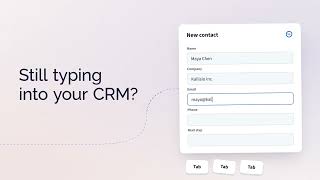
Salesflare is a sales CRM for small and medium-sized B2B teams that want less CRM admin and more time to build relationships. It automatically captures contacts, companies, emails, meetings and relationship data, keeping customer records useful without constant manual updates. Sales teams can manage leads and opportunities in visual pipelines, send individual emails and automated email sequences, track engagement, and see when leads need follow-up. Shared customer timelines bring conversations and activity together, while relationship strength shows who on the team knows each contact best. Good AI starts with good data. Because Salesflare captures customer context automatically, its AI can work from richer, more up-to-date information to summarize timelines, suggest next steps, prepare meetings and help write emails. Salesflare works with Gmail, Google Workspace, Outlook, Microsoft 365 and LinkedIn. Teams can also connect it with ChatGPT, Claude, Zapier, Make and API-based workflows. It is especially suited to relationship-driven B2B businesses such as agencies, consultancies and software companies. Web, iOS and Android apps help teams stay on top of follow-up at their desks or on the move.
Read more


Pricing
SW Score Breakdown
Platforms Supported
Organization Types Supported
API Support
Modes of Support


Unique Features
AI Assistant
AI Assistant helps you provide information and perform specific tasks to significantly improve your success rate. It can perform one or many tasks like analyzing your deals, contacts, and emails, generating the perfect email, and more.Advanced Automation
Allows for building smart automation for repetitive tasks, enhancing efficiency and consistency.Omnichannel Customer Engagement
Unified management of customer interactions across multiple channels, including web, mobile, and social media.Predictive Analytics
Advanced analytics for predicting outcomes based on performance and historical data.IoT Integration
Leveraging Internet of Things devices for enhanced data collection and analysisCustomization
Helps to customize the system for use in industry-specific use casesStandard Features
Real-time Data Sync
Allows to synchronize with other systems for up-to-date information across platformsDedicated Phone Line Integration
Incorporating dedicated phone lines for customer support and sales, enabling direct communication and call trackingCustomer Segmentation
Helps to segment contacts and customers into groups based on various criteria such as demographics, behavior, purchase history, hottest leadsOpportunity Management
Opportunity or Pipeline Management allows tracking and managing sales opportunities, including stages of the deal, probability of closing, and associated activities throughout their lifecycle.Sales Force Automation
Streamlined management of the sales cycle from lead to closeOrder Management
Helps tracking, monitoring, supervising, and meeting deadlines concerning ordered goods in an automated and systematic wayIntegration with Third-party Apps
Cloud Storage & File Sharing
Email & Calendar Integration
Communication Tools
Offers support through Email, SMS, or In-app announcementsVersion History & Backup
Document Creation
Access Control & Permissions
Real-time Collaboration
Helps more than one person to work on the same file simultaneouslyEmail/Call Sequencing
Arranges email and call lists into different segments or sequences that maintain data in a systematic manner.CRM Integration
Automatically sends and receives the relevant information to the CRM Software that helps in time managementCall List Management
Maintains a systematic order of all the important phone numbers of clients.Inbox Integration
Integrates with your email inbox and assembles all the sales activities into one unified place.Sales Activity Automation
Allows sales executives to set up and send follow up messages to the customers automatically.Team Management
Ensures all the members of the sales teams satisfy clients by upgrading activities and answering questions in real-time.Email Automation
Automates the emailing process by sending out targeted messages to clients based on time and specific actions.Call Recording
Facility to record calls with a set of conditions and compliancePerformance Analytics (Sales)
Sales managers can track and monitor the performance of sales teams to eliminate errors or enhance performance.Email Scrapper
Extracts email addresses from business websites, local directories, review sites, etc. and add them automatically to lead listLead Source Tracking
Helps to track the marketing channel or source of every individual website visitor.Lead Segmentation
Leads are categorized by name, site behavior, campaign parameters, geo-location, etc.Lead Database
A database that includes the contact details for prospects and businessesLead Capture
Provides webhooks and integrations to capture lead informationReports
Comes with reporting capabilities and features custom pre-built reportsScheduled Alerts
Notify you of tasks like follow-up activities and new leads that have entered the system.Visitor Insight
Insight into on-site visitor behavior to get a full understanding of what interests them.Technology Tracking
Identify new targets by finding accounts that use specific technologies.CRM Integration
Automatically sends and receives the relevant information to the CRM Software that helps in time managementLead Enrichment
Append missing data in real-time to increase the lead qualityLead Database
A database that includes the contact details for prospects and businessesTechnographics
Detailed insights into the tools and software a company relies on.Intent Data Tracking
Signals of buying intent from online behaviorOrganizational Charting
Helps in designing a chart that visually represents the internal structure of an organizationIntegration with CRM & Sales Tools
Task & Activity Tracking
Real-time Communication (Chat & Meet)
File Storage & Sharing
Document Collaboration
Contact & Lead Management
Email & Calendar Integration
Workflow Automation
Automatically execute mundane and repetitive processes or workflow so that employees can focus on productive workMobile App
Helps your team to stay top on the business everywhereSend Time Optimization
Helps to find the best sending time to engage with your customerEmail Scheduling
Scheduling an email on a specific time or auto-responding to an actionContact List Import
Ability to import contacts from TXT, EXCEL, CSV formats and also can enter manuallyDocument Library
Central repository to manage your assets like Images, PDF files, etc.,List Segmentation
Segregates the customers into smaller groups enabling the user to send targeted emailsEvent Triggered Email
Sends emails to targeted customers based on their activitiesInstagram Ads
Has an inbuilt tool to set up an Instagram marketing campaignFacebook Ads
Has an inbuilt tool to set up a Facebook marketing campaignGoogle Remarketing Ads
Allows for retargeting your customers via Google Display Network to increase conversionsAbandoned Cart Email
Sends email to customers who have failed to check out their cart itemsDelivery by Time Zone
Subscribers receive the email at the exact time they are in their timezone.Sign Up Forms
Build sign up forms to allow website visitors to join your mailing listFree Stock Photos
Provides a library of free stock photos for commercial useRSS to Email
Helps users to receive any new updates or the latest news from the websitePredesigned Email Templates
Provides a library of templates to build an emailClick Map
Allows tracking user click activity and how they interact with emailReal-time Email Editor
Helps to view the email while editing at the same timeDrag and Drop Editor
Lets you customize the elements with images, web forms, boxes, tables, etc. by simple drag and drop interfaceAuto-Responders
Ability to send automated emails to the contacts subscribing to the list.Free Trial
Available
No Credit Card Required, Get Started for Free
Growth $29.00 $39.00 per user / month
Features
Pro $49.00 $64.00 per user / month
Features
Enterprise $99.00 $124.00 per user / month
Minimum of 5 Users
Features
Screenshots of Vendor Pricing Page

Learn more about Salesflare Pricing
86% SW Score The SW Score ranks the products within a particular category on a variety of parameters, to provide a definite ranking system. Read more
Featured
92% SW Score The SW Score ranks the products within a particular category on a variety of parameters, to provide a definite ranking system. Read more
Featured
98% SW Score The SW Score ranks the products within a particular category on a variety of parameters, to provide a definite ranking system. Read more
Featured
84% SW Score The SW Score ranks the products within a particular category on a variety of parameters, to provide a definite ranking system. Read more
Featured
78% SW Score The SW Score ranks the products within a particular category on a variety of parameters, to provide a definite ranking system. Read more
87% SW Score The SW Score ranks the products within a particular category on a variety of parameters, to provide a definite ranking system. Read more

95% SW Score The SW Score ranks the products within a particular category on a variety of parameters, to provide a definite ranking system. Read more

88% SW Score The SW Score ranks the products within a particular category on a variety of parameters, to provide a definite ranking system. Read more
93% SW Score The SW Score ranks the products within a particular category on a variety of parameters, to provide a definite ranking system. Read more

86% SW Score The SW Score ranks the products within a particular category on a variety of parameters, to provide a definite ranking system. Read more

77% SW Score The SW Score ranks the products within a particular category on a variety of parameters, to provide a definite ranking system. Read more

85% SW Score The SW Score ranks the products within a particular category on a variety of parameters, to provide a definite ranking system. Read more

78% SW Score The SW Score ranks the products within a particular category on a variety of parameters, to provide a definite ranking system. Read more

77% SW Score The SW Score ranks the products within a particular category on a variety of parameters, to provide a definite ranking system. Read more

How to get starte...
Salesflare CRM: L...

Visual B2B sales ...

Customer timeline...

Salesflare CRM in...

Automated email s...

LinkedIn prospect...
What is Salesflare used for?
Salesflare helps small and medium-sized B2B sales teams manage leads, relationships and follow-up with less CRM admin. It automatically captures contact and company data and logs connected email, meeting and call activity. Teams can manage visual pipelines, send email sequences, track engagement and use shared customer timelines to decide whom to follow up with next.
How much does Salesflare cost?
Salesflare starts at $29 per user per month when billed annually. Growth costs $29 annually or $39 billed monthly; Pro costs $49 annually or $64 billed monthly; Enterprise costs $99 annually or $124 billed monthly, with a minimum of five users. All prices are in USD per user per month. See https://salesflare.com/pricing for current plans and features.
Does Salesflare offer a free plan?
Salesflare does not have a free plan. It offers a free trial of up to 30 days, with no credit card required, so you can try it with your team before choosing a paid subscription.
What are the top alternatives for Salesflare?
Common alternatives include HubSpot, Pipedrive, Salesforce and Zoho CRM. The right choice depends on your team and workflow. Salesflare is especially suited to small and medium-sized B2B sales teams that want automatic contact and activity capture to reduce CRM admin and make relationship-based follow-up easier.
Does Salesflare provide API?
Yes. Salesflare provides an API for connecting other tools and building custom workflows. The documentation is at https://api.salesflare.com/docs. You can also connect apps through Zapier and Make.
How does Salesflare use AI?
Who is Salesflare best suited for?
What does Salesflare capture automatically?
Does Salesflare work with Gmail, Outlook and LinkedIn?
Can Salesflare automate email follow-up?
What is Salesflare used for?
Salesflare is CRM Software. Salesflare offers the following functionalities:
Learn more about Salesflare features.
What are the top alternatives for Salesflare?
Does Salesflare provide API?
Yes, Salesflare provides API.
Vendor Details
Antwerp, Flemish Region Founded : 2014Contact Details
+1 917 997 0116
https://salesflare.com/
Social Media Handles
























SaaSworthy may receive compensation from some vendors featured on this page. This does not influence our editorial evaluation or ratings. [email protected]

Looking for the right SaaS
We can help you choose the best SaaS for your specific requirements. Our in-house experts will assist you with their hand-picked recommendations.

Want more customers?
Our experts will research about your product and list it on SaaSworthy for FREE.


