
 MEET CLARA - THE AI BEHIND SMARTER SOFTWARE CHOICES



70% SW Score The SW Score ranks the products within a particular category on a variety of parameters, to provide a definite ranking system. Read more
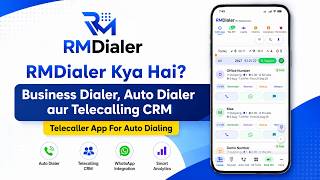
SIM-based auto dialer, telecalling CRM and auto WhatsApp in one Android app. No cloud lines, no per-minute charges.
This profile is currently managed by the official vendor through the SaaSworthy Vendor Portal. Product details, features, pricing, and media assets are maintained directly by the company.

 Deep Dive with Clara AI
RMDialer is the Business Call Dialer: an auto dialer and telecalling CRM for Android that runs on your own SIM instead of a cloud calling line. There are no per-minute charges, no virtual number and no IVR, and your customer sees your real business number. It replaces the stack most telecalling teams run today. The auto dialer calls your whole lead list one number at a time, hands-free, and moves on after a gap you set. The lead management CRM sits inside the same app, so every number is a record with custom statuses, custom fields, remarks and full call history. Follow-up reminders ring like an alarm. WhatsApp messages send themselves after a call ends, using templates with variables. Leads import automatically from Excel, Google Sheets, a REST API, IndiaMART, JustDial, and Facebook or Instagram lead ads, de-duplicated and tagged with their source. Owners assign leads to the team and watch live call analytics, lost-lead tracking and per-caller reports from the Web CRM in any browser, while calling happens on the Android phones. Also included: caller ID and spam screening, bulk WhatsApp campaigns, WhatsApp live chat with lead context, paid-client and renewal tracking, and full backup and restore on a new phone. One plan, every feature. From ₹159 per user per month on yearly billing, or $29 per user per year outside India. Free 3-day trial, no credit card. Founded in 2020 and based in Bikaner, Rajasthan, RMDialer is used by 3,500+ businesses across 12+ countries and ships in 40 languages.
Read more


Pricing
SW Score Breakdown
Platforms Supported
Organization Types Supported
API Support
Modes of Support
CRM Integration
Automatically sends and receives the relevant information to the CRM Software that helps in time managementCall List Management
Maintains a systematic order of all the important phone numbers of clients.Sales Activity Automation
Allows sales executives to set up and send follow up messages to the customers automatically.Team Management
Ensures all the members of the sales teams satisfy clients by upgrading activities and answering questions in real-time.Performance Analytics (Sales)
Sales managers can track and monitor the performance of sales teams to eliminate errors or enhance performance.Call Recording
Facility to record calls with a set of conditions and complianceEmail/Call Sequencing
Arranges email and call lists into different segments or sequences that maintain data in a systematic manner.Inbox Integration
Integrates with your email inbox and assembles all the sales activities into one unified place.Email Automation
Automates the emailing process by sending out targeted messages to clients based on time and specific actions.AI Assistant
AI Assistant helps you provide information and perform specific tasks to significantly improve your success rate. It can perform one or many tasks like analyzing your deals, contacts, and emails, generating the perfect email, and more.Advanced Automation
Allows for building smart automation for repetitive tasks, enhancing efficiency and consistency.Real-time Data Sync
Allows to synchronize with other systems for up-to-date information across platformsOmnichannel Customer Engagement
Unified management of customer interactions across multiple channels, including web, mobile, and social media.Predictive Analytics
Advanced analytics for predicting outcomes based on performance and historical data.Dedicated Phone Line Integration
Incorporating dedicated phone lines for customer support and sales, enabling direct communication and call trackingIoT Integration
Leveraging Internet of Things devices for enhanced data collection and analysisCustomer Segmentation
Helps to segment contacts and customers into groups based on various criteria such as demographics, behavior, purchase history, hottest leadsOpportunity Management
Opportunity or Pipeline Management allows tracking and managing sales opportunities, including stages of the deal, probability of closing, and associated activities throughout their lifecycle.Sales Force Automation
Streamlined management of the sales cycle from lead to closeCustomization
Helps to customize the system for use in industry-specific use casesOrder Management
Helps tracking, monitoring, supervising, and meeting deadlines concerning ordered goods in an automated and systematic wayAutomation & Workflow Triggers
Integration with CRM & Marketing Tools
Lead Qualification & Scoring
Data Collection & Storage
Lead Capture Forms & Landing Pages
Real-Time Alerts & Notifications
Reporting & Analytics
Multi-channel Capture (Web, Chat, Social)
Free Trial
Available
No Credit Card Required, Get Started for Free
Yearly Plan All Included $29.00 $29.00 per user / year
CALLING
1. Business call management Replaces your phone dialer. Every call
logged with the lead behind the number.
2. Auto dialer Progressive: dials your list one number
at a time, hands-free, with a gap you set.
3. Caller ID & spam protection Names on unknown numbers, spam flagged
before you answer. Your leads never blocked.
4. Call analytics & lost-lead Per-caller reports, connect rates, and
tracking which leads went cold and why.
LEADS & CRM
5. Lead management CRM Inside the dialer. Custom statuses, custom
fields, remarks, full call history.
6. Follow-up reminders Ring like an alarm, not a silent notification.
7. Auto-import leads Google Sheets, REST API, Excel, IndiaMART,
JustDial, Facebook & Instagram lead ads.
De-duplicated and source-tagged.
8. Paid clients & renewals Track each sale, paid vs due, renewal dates.
9. Auto WhatsApp after call Sends itself when the call ends. Templates
with variables, cooldowns, quiet hours.
10. Bulk WhatsApp campaigns To leads, call log, CRM contacts or pasted
numbers. Official WhatsApp Business API.
11. WhatsApp live chat Two-way inbox with the lead's details beside
the conversation.
TEAM & DATA
12. Backup & restore Sign in on a new phone, everything returns.
13. Web CRM (browser) Assign leads, set permissions, live reports
and exports on Windows, Mac or Linux.
14. Team management Lead assignment, per-user permissions,
transfer history.
15. 40 languages Each team member uses their own; the data
stays shared.
Monthly Plan All Included $29.00 $4.00 per user / month
98% SW Score The SW Score ranks the products within a particular category on a variety of parameters, to provide a definite ranking system. Read more

95% SW Score The SW Score ranks the products within a particular category on a variety of parameters, to provide a definite ranking system. Read more

95% SW Score The SW Score ranks the products within a particular category on a variety of parameters, to provide a definite ranking system. Read more

92% SW Score The SW Score ranks the products within a particular category on a variety of parameters, to provide a definite ranking system. Read more

91% SW Score The SW Score ranks the products within a particular category on a variety of parameters, to provide a definite ranking system. Read more

90% SW Score The SW Score ranks the products within a particular category on a variety of parameters, to provide a definite ranking system. Read more

88% SW Score The SW Score ranks the products within a particular category on a variety of parameters, to provide a definite ranking system. Read more

88% SW Score The SW Score ranks the products within a particular category on a variety of parameters, to provide a definite ranking system. Read more

88% SW Score The SW Score ranks the products within a particular category on a variety of parameters, to provide a definite ranking system. Read more
88% SW Score The SW Score ranks the products within a particular category on a variety of parameters, to provide a definite ranking system. Read more

What Is RMDialer

Call log with lea...

Auto dialer sessi...

Two-tap after-cal...

Auto WhatsApp tri...

Auto Assigned lea...
Is RMDialer a cloud dialer? Do I need a virtual number or IVR?
Is RMDialer a predictive dialer, a power dialer or a progressive dialer?
Which phones does RMDialer support?
How much does RMDialer cost?
What is RMDialer Auto Dialer Telecalling CRM used for?
RMDialer Auto Dialer Telecalling CRM is Auto Dialer Software. RMDialer Auto Dialer Telecalling CRM offers the following functionalities:
Learn more about RMDialer Auto Dialer Telecalling CRM features.
What are the top alternatives for RMDialer Auto Dialer Telecalling CRM?
Does RMDialer Auto Dialer Telecalling CRM provide API?
Yes, RMDialer Auto Dialer Telecalling CRM provides API.
Vendor Details
Not available
Contact Details
Not available
https://rmdialer.com/
Social Media Handles
SaaSworthy may receive compensation from some vendors featured on this page. This does not influence our editorial evaluation or ratings. [email protected]

Looking for the right SaaS
We can help you choose the best SaaS for your specific requirements. Our in-house experts will assist you with their hand-picked recommendations.

Want more customers?
Our experts will research about your product and list it on SaaSworthy for FREE.


