MEET CLARA - THE AI BEHIND SMARTER SOFTWARE CHOICES
|
98% SW Score The SW Score ranks the products within a particular category on a variety of parameters, to provide a definite ranking system. Read more 
View Details
|
94% SW Score The SW Score ranks the products within a particular category on a variety of parameters, to provide a definite ranking system. Read more 
View Details
|
93% SW Score The SW Score ranks the products within a particular category on a variety of parameters, to provide a definite ranking system. Read more 
View Details
|
Featured
84% SW Score The SW Score ranks the products within a particular category on a variety of parameters, to provide a definite ranking system. Read more 
MileIQ |
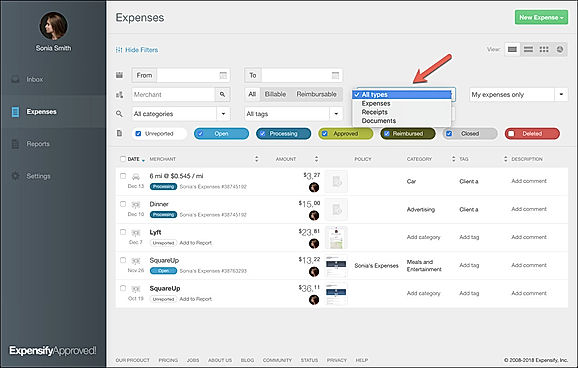
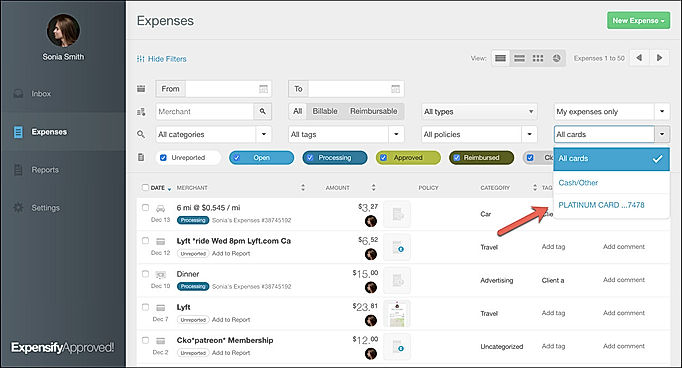
| Description | Expensify is a US-based software company that offers expense management software for both individual and group use. The products are available as a web service that can be used with any computer browser and comes in the form of mobile application as well. It carries all essential functionality like allowing employees/user to upload receipts and request reimbursement. All expenses are recorded automatically, which in turn, are used to prepare expense reports based on the projects, types of expenses, etc. One can approve reimbursement directly from the software without any need to use a third-party money transfer application. The app tracks every expense incurred on food, travel, fuel, etc and uses artificial intelligence to extract information such as merchant’s name and date of expense from the uploaded receipt. Moreover, it also allows users to download their respective expense report. Expensify integrates with applications like Xero, Workday, Intacct and a few more. The company also has several partners like Uber, TripActions and Locomote that enable the user to automatically import expenses incurred for taking services from these partner companies. Read more | Pleo us an advanced expense management solution that offers smart business cards that automate expenditure reports and make business spending easier. It lets you provide each employee with a corporate ID card and set spending restrictions for each user individually. With Pleo, you can create Pleo cards with restrictions for your employees with a single click and you can immediately disable or enable them. The platform automates cost management so you and your team can focus your time and resources on the things that matter most. It keeps track of all of your team's spending in real time. Furthermore, it enables the admins to view all recurring software expenses in one location, allowing your staff to pay only for the tools they use. Pleo allows the users to be free of expenditure reports, stacks of receipts, and swapping business cards. It can be used to pay for the tools and services that your company needs and you can check out what everyone is signing up for too with Pleo. Pleo can be integrated with your accounting software. Read more | Soldo is a prepaid company card and automated expense management software. It can be used to take care of day to day cash related issues along with online procurement facilities. Businesses can also depend on the same to monitor digital advertisement related funds and sanction employee travel plans in an organised way. Companies leveraging on Soldo and its smart functionalities get to streamline an effortless spend management system, inclusive of metrics like prepaid company cards, effortless bookkeeping, simplified reporting structure and real-time tracking facilities. They can also enjoy active integrations with external platforms like QuickBooks Online, Xero and NetSuite on the go. Soldo and its integrated set of exclusive services like on-spot receipt capture and enriched data transaction facility, live customer support, 2% FX fees for foreign transactions, CSV data import compatibility, accurate spending controls inclusive of specific limits, budgets and rules, user-specific roles and permissions along with custom onboarding and product training options facilitate seamless business management. Read more | MileIQ simplifies mileage tracking for deductions and expenses with its automatic, user-friendly, and highly accurate app. Whether a self-employed professional seeking mileage deductions or a large business managing expense reports, MileIQ has the needs. Available on iOS and Android, the app tracks the miles seamlessly while one can stay focused on driving. With a swipe, one can classify trips as personal or business and generate custom reports with a tap. Use tax-compliant mileage rates or set custom rates to match the requirements. MileIQ allows one to set work hours, automatically categorizing business drives for added convenience. Easily name frequent locations to streamline trip classification and reporting. Designed to track every mile for every vehicle, MileIQ makes managing mileage simple, efficient, and stress-free. Read more |
| Pricing Options |
|
|
|
|
| SW Score & Breakdown |
98% SW Score The SW Score ranks the products within a particular category on a variety of parameters, to provide a definite ranking system. Read more
|
94% SW Score The SW Score ranks the products within a particular category on a variety of parameters, to provide a definite ranking system. Read more
|
93% SW Score The SW Score ranks the products within a particular category on a variety of parameters, to provide a definite ranking system. Read more
|
84% SW Score The SW Score ranks the products within a particular category on a variety of parameters, to provide a definite ranking system. Read more
|
| Total Features |
14 Features
|
11 Features
|
13 Features
|
7 Features
|
| Common Features for All |
Bank Feed Sync
Card Spending Tracker
Expense Approval
Mileage Tracking
Multi-level Approval
Multiple Reporting Currency
Receipt Management
Receipt Scanner
Reconciliation Summary
Reimbursement Management
Spend Control
Tax Claim
Third-party Integration
Time & Expense Tracking
|
Bank Feed Sync
Card Spending Tracker
Expense Approval
Mileage Tracking
Multi-level Approval
Multiple Reporting Currency
Receipt Management
Receipt Scanner
Reconciliation Summary
Reimbursement Management
Spend Control
Tax Claim
Third-party Integration
Time & Expense Tracking
|
Bank Feed Sync
Card Spending Tracker
Expense Approval
Mileage Tracking
Multi-level Approval
Multiple Reporting Currency
Receipt Management
Receipt Scanner
Reconciliation Summary
Reimbursement Management
Spend Control
Tax Claim
Third-party Integration
Time & Expense Tracking
|
Bank Feed Sync
Card Spending Tracker
Expense Approval
Mileage Tracking
Multi-level Approval
Multiple Reporting Currency
Receipt Management
Receipt Scanner
Reconciliation Summary
Reimbursement Management
Spend Control
Tax Claim
Third-party Integration
Time & Expense Tracking
|
| Organization Types Supported |
|
|
|
|
| Platforms Supported |
|
|
|
|
| Modes of Support |
|
|
|
|
| API Support |
|
|
|
|
| User Rating |
|
|
|
|
| Rating Distribution |
|
|
|
|
| User Sentiments |
Easy to Use Interface, Receipt Scanning Accuracy, Mobile App Functionality, Fast Reimbursements Inconsistent Smartscan Feature, Confusing Expense Reporting System, Limited Credit Card Compatibility, Unreliable Mobile App Performance |
Excellent Customer Service, Easy to Use Interface, Extensive Integrations, Time-Saving Efficiency Occasional App Instability, Limited Offline Functionality, Inconsistent Receipt Fetching, Limited Card Acceptance In Specific Locations |
Excellent Customer Support, Ease of Use, Efficient Expense Tracking, Comprehensive Spend Management Features Account Blocking Issues, Mobile Application Instability, Limited Payment Acceptance, Unclear Communication Regarding Account Closure |
Not Available
|
| Review Summary |
Overall, Expensify garners praise for its user-friendly interface, robust expense tracking capabilities, and seamless integration with various accounting software. Reviewers appreciate its mobile app for its convenience and real-time expense capture. However, some users express concerns regarding occasional glitches and limited customization options. Expensify's customer support receives mixed feedback, with some users commending their responsiveness, while others encounter delays and unsatisfactory resolutions. Overall, Expensify is viewed favorably for its ease of use and expense management features, but it could benefit from enhanced customization and more consistent customer support. |
Users appreciate Pleo's user-friendly interface, ease of use, and ability to streamline expense management. They find it particularly helpful for tracking and categorizing expenses, setting spending limits, and generating reports. Additionally, Pleo's integration with various accounting and financial tools is highly valued. However, some users have mentioned occasional technical glitches and a limited range of features compared to more comprehensive expense management solutions. Overall, Pleo is well-received for its user-friendly design, efficient expense tracking, and integration capabilities. |
Users generally express contentment with the features and functionality provided by Soldo, highlighting its user-friendly interface, ease of use, and efficient expense management capabilities. The mobile app is particularly praised for its convenience and accessibility. However, some users have reported occasional technical difficulties and a lack of certain features, resulting in mixed reviews and a need for improvement in certain areas. |
User reviews of MileIQ highlight its effectiveness as an automated mileage tracker, particularly for business expenses. Users praise its simplicity, seamless background tracking, and ability to differentiate personal and business miles. However, some users express concerns about the free version's limited trip tracking, occasional GPS inaccuracies, and difficulty manually adding drives. While some find the price reasonable for its benefits, others feel the cost outweighs its shortcomings, particularly in light of similar free products. |
| Read All User Reviews | Read All User Reviews | Read All User Reviews | Read All User Reviews |
AI-Generated from the text of User Reviews
| Pricing Options |
|
|
|
|
|
Pricing Plans
Monthly Plans
Annual Plans
|
Collect $5.00 $5.00 per user / month Control $9.00 $9.00 per user / month |
Essential $39.00 $45.00 per month Advanced $89.00 $99.00 per month Beyond $179.00 $199.00 per month |
Soldo Uno Free Soldo Pro Others Soldo Premium Others Soldo Custom Custom |
Free Free Unlimited (For Individuals) $7.50 $8.99 per month Teams Lite $6.67 $8.00 per user / month Teams $7.50 $9.00 per user / month Teams Pro $8.33 $10.00 per user / month |
|
View Detailed Pricing
|
View Detailed Pricing
|
View Detailed Pricing
|
View Detailed Pricing
|
Get personalized recommendations from our experts on call
Trusted by more than 5 Million users across the globe.
Thank you for the enquiry. One of our software analysts will contact you soon.
| Screenshots |
+ 1 More
|

+ 2 More
|

+ 5 More
|

+ 2 More
|
| Videos |

|

+ 1 More
|

+ 2 More
|

+ 3 More
|
| Company Details | Located in: San Francisco, California Founded in: 2008 | Located in: London, United Kingdom Founded in: 2015 | Located in: London, England Founded in: 2014 | Located in: San Francisco, California Founded in: 2012 |
| Contact Details |
Not available |
Not available |
Not available |
Not available |
| Social Media Handles |
|
|
|
|

Looking for the right SaaS
We can help you choose the best SaaS for your specific requirements. Our in-house experts will assist you with their hand-picked recommendations.

Want more customers?
Our experts will research about your product and list it on SaaSworthy for FREE.