
 MEET CLARA - THE AI BEHIND SMARTER SOFTWARE CHOICES


77% SW Score The SW Score ranks the products within a particular category on a variety of parameters, to provide a definite ranking system. Read more
Estimates, scheduling and invoicing built for plumbing shops
This profile is currently managed by the official vendor through the SaaSworthy Vendor Portal. Product details, features, pricing, and media assets are maintained directly by the company.


 Deep Dive with Clara AI
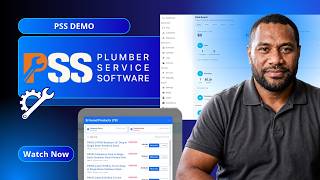
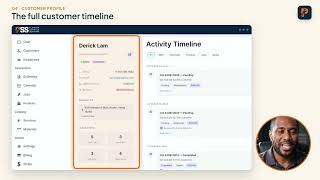
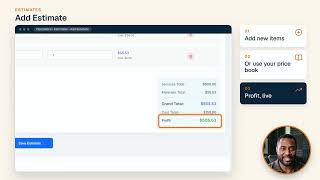
Plumber Service Software (PSS) is an all-in-one field service platform built specifically for plumbing contractors, from solo operators to shops running ten trucks. It brings estimates, job management, scheduling, CRM, two-way customer texting, invoicing and payments into one system, so work flows from quote to cash without paper, spreadsheets or disconnected apps. What sets PSS apart is live supplier pricing. Search real products from Ferguson Home and SupplyHouse, pull in current price and stock status, apply markup presets per item (10%, 25%, 50% or 100%), and drop them straight onto an estimate with no hand-maintained price book to keep up. Every estimate totals services, materials, grand total and profit before it is sent, so shops stop underpricing their best jobs. Jobs then show profit or loss per job, with before and after photos. Approved estimates convert into scheduled work on a drag-and-drop crew calendar, then into branded invoices in one tap. Customers approve quotes and pay by card or ACH through Stripe from their phone, and invoices, customers and payments sync automatically to QuickBooks Online. Each customer has a single profile with a full activity timeline, lifetime value, balance, multiple properties and private notes, plus a shared two-way SMS inbox with a dedicated business phone number included at no extra cost. Pricing is one flat plan per company, $89/month billed annually or $99/month monthly, with unlimited users and technicians, every feature included, no per-technician fees, no feature tiers, no paid add-ons, no setup fees and no contracts. A 14-day free trial unlocks the full platform with no credit card required and setup takes under 10 minutes. Plumber Service Software is a trade name of Wise Workman LLC, a Wyoming limited liability company.
Read more


Pricing
SW Score Breakdown
Platforms Supported
Organization Types Supported
API Support
Modes of Support
Compliance Management
Helps in making an assessment of risks, ensures policy comprehension and that policies/procedures are being followedClaims Management
Helps to organize and keeping track of insurance claims and as such claims made by patients.Real-time Data Sync
Allows to synchronize with other systems for up-to-date information across platformsDedicated Phone Line Integration
Incorporating dedicated phone lines for customer support and sales, enabling direct communication and call trackingAI Assistant
AI Assistant helps you provide information and perform specific tasks to significantly improve your success rate. It can perform one or many tasks like analyzing your deals, contacts, and emails, generating the perfect email, and more.Advanced Automation
Allows for building smart automation for repetitive tasks, enhancing efficiency and consistency.Omnichannel Customer Engagement
Unified management of customer interactions across multiple channels, including web, mobile, and social media.Predictive Analytics
Advanced analytics for predicting outcomes based on performance and historical data.IoT Integration
Leveraging Internet of Things devices for enhanced data collection and analysisCustomer Segmentation
Helps to segment contacts and customers into groups based on various criteria such as demographics, behavior, purchase history, hottest leadsOpportunity Management
Opportunity or Pipeline Management allows tracking and managing sales opportunities, including stages of the deal, probability of closing, and associated activities throughout their lifecycle.Sales Force Automation
Streamlined management of the sales cycle from lead to closeCustomization
Helps to customize the system for use in industry-specific use casesOrder Management
Helps tracking, monitoring, supervising, and meeting deadlines concerning ordered goods in an automated and systematic wayPayment Processing
Helps to manage automated transactions across various online channelsOffline Payments
Helps to record cash and credit payments on retail operationsTax Calculator
Automatically calculates the detailed tax amount at the latest tax slab rateDunning Management
Helps to manage complications of credit card payment decline and inform the customer of failed charges.Payment Reminders
Helps to chase payments as they come due with automated payment remindersRecurring (Subscription Billing)
Billing consumers on a time determined basis for products or services receivedContingency Billing
Handling of bills related to contingenciesPayment Processing
Helps to manage automated transactions across various online channelsEmployee Scheduling
Helps in creating, processing and automating the employee scheduleAppointment Scheduling
Helps in scheduling and managing all necessary appointmentsMulti-Location Scheduling
Helps in managing schedules and confirm reservations/booking from multiple locationsResource Scheduling
Helps in setting strategies to allocate resources to projects or tasks to complete it correctly and also manage its start/end datesReservations
Helps in making as well as canceling reservations online and also assist in rescheduling them (if necessary)Online Scheduling
Helps in automating and monitoring the scheduling tasks virtually automaticallyMeeting Room Booking
Helps managing meeting room schedules and offers a simple interface to book the appropriate booking roomGroup Scheduling
Helps in scheduling group meetings with multiple numbers of attendeesClass Scheduling
Helps tutors or educational institutes at large to schedule academic and or vocational training classesAutomated Scheduling
Helps to automate the scheduling processes to reduce paperwork, provide a comprehensive solution and ensure timely updatesFree Trial
Available
No Credit Card Required, Get Started for Free
Free Trial Free
14-day free trial with every feature unlocked
1 admin + 1 user account during the trial
No credit card required to start
Setup in under 10 minutes
Live supplier pricing, estimates, jobs, scheduling, CRM, SMS and invoicing all included
Keep everything you set up when you subscribe
The Only Plan $89.00 $99.00 per month
$99/month billed monthly, or $1,068/year ($89/month) billed annually, saving $120 a year
One flat price per company: unlimited users and technicians, no per-tech fees
Supplier search with live Ferguson Home and SupplyHouse pricing, stock status and markup presets
Estimates with live profit per estimate, fixed and hourly rates, expiry dates and approval tracking
Jobs with profit/loss per job, before and after photos, type and urgency
Drag-and-drop scheduling by day, week or month with tech assignment
CRM with activity timelines, lifetime value, multiple properties and private notes
Two-way SMS chat with a business phone number included free
Invoicing and payments: send and print, Stripe card payments, partial payments, QuickBooks sync
Team management: employee logins, contract storage, speciality areas, hourly or salaried
No setup fees, no contracts, no paid add-ons and no feature tiers; cancel anytime
88% SW Score The SW Score ranks the products within a particular category on a variety of parameters, to provide a definite ranking system. Read more
Featured
98% SW Score The SW Score ranks the products within a particular category on a variety of parameters, to provide a definite ranking system. Read more
96% SW Score The SW Score ranks the products within a particular category on a variety of parameters, to provide a definite ranking system. Read more

93% SW Score The SW Score ranks the products within a particular category on a variety of parameters, to provide a definite ranking system. Read more

92% SW Score The SW Score ranks the products within a particular category on a variety of parameters, to provide a definite ranking system. Read more

91% SW Score The SW Score ranks the products within a particular category on a variety of parameters, to provide a definite ranking system. Read more

91% SW Score The SW Score ranks the products within a particular category on a variety of parameters, to provide a definite ranking system. Read more
90% SW Score The SW Score ranks the products within a particular category on a variety of parameters, to provide a definite ranking system. Read more

90% SW Score The SW Score ranks the products within a particular category on a variety of parameters, to provide a definite ranking system. Read more

90% SW Score The SW Score ranks the products within a particular category on a variety of parameters, to provide a definite ranking system. Read more
89% SW Score The SW Score ranks the products within a particular category on a variety of parameters, to provide a definite ranking system. Read more

Plumber Service S...
Plumber CRM | Cus...
Plumber Estimatio...
Plumber Schedulin...

Plumber Business ...
Plumber Job Manag...
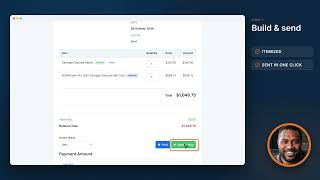
Plumber Invoice M...
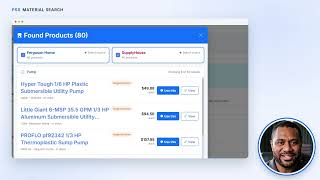
Plumber Material ...

Main Dashboard

Estimates

Jobs

Invoices
Does it really sync with QuickBooks?
Is it really unlimited users?
What does Plumber Service Software cost?
What exactly is included in the free trial?
What happens when the trial ends?
What is the difference between monthly and annual billing?
Are there setup fees, contracts or add-ons?
How hard is it to switch from what I am using now?
I am a solo plumber. Is this overkill for me?
Am I locked into a long contract?
Do my technicians need to be tech-savvy to use it?
Is my data safe, and is it mine?
How does it compare with larger field service platforms?
Do I need to talk to sales to get started?
What is Plumber Service Software used for?
Plumber Service Software is Field Service Management Software. Plumber Service Software offers the following functionalities:
Learn more about Plumber Service Software features.
What are the top alternatives for Plumber Service Software?
Does Plumber Service Software provide API?
No, Plumber Service Software does not provide API.
Vendor Details
Not available
Contact Details
Not available
https://plumberservicesoftware.com/
Social Media Handles


SaaSworthy may receive compensation from some vendors featured on this page. This does not influence our editorial evaluation or ratings. [email protected]

Looking for the right SaaS
We can help you choose the best SaaS for your specific requirements. Our in-house experts will assist you with their hand-picked recommendations.

Want more customers?
Our experts will research about your product and list it on SaaSworthy for FREE.


