get-free-advice
Clara Icon MEET CLARA - THE AI BEHIND SMARTER SOFTWARE CHOICES
Get Started
/*
Loading...
*/

92% SW Score The SW Score ranks the products within a particular category on a variety of parameters, to provide a definite ranking system. Read more

Trello logo
Project Management Software

4.1 202 user ratings

View Details

97% SW Score The SW Score ranks the products within a particular category on a variety of parameters, to provide a definite ranking system. Read more

ClickUp logo
Project Management Software

4.8 19,928 user ratings

Free Forever ➔

91% SW Score The SW Score ranks the products within a particular category on a variety of parameters, to provide a definite ranking system. Read more

OpenProject logo
View Details

87% SW Score The SW Score ranks the products within a particular category on a variety of parameters, to provide a definite ranking system. Read more

Microsoft Project logo
View Details

Overview

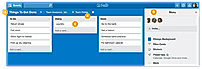
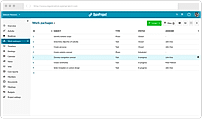
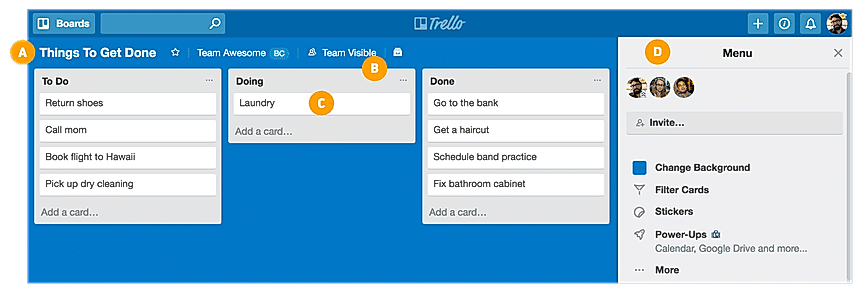
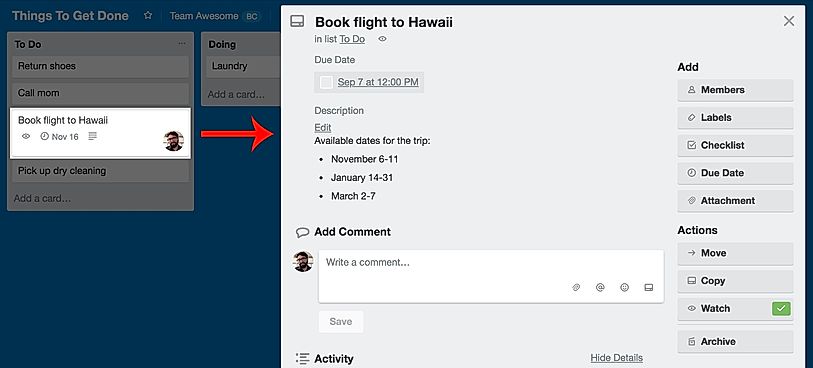
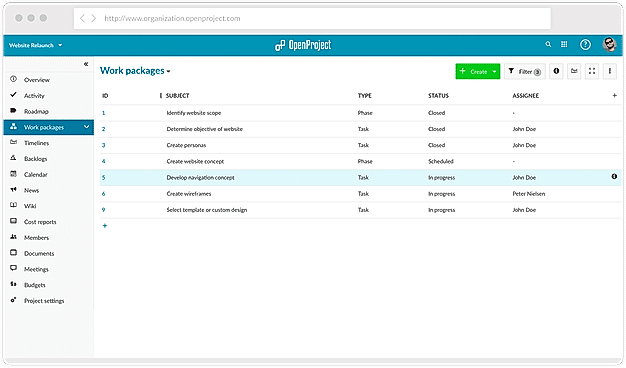
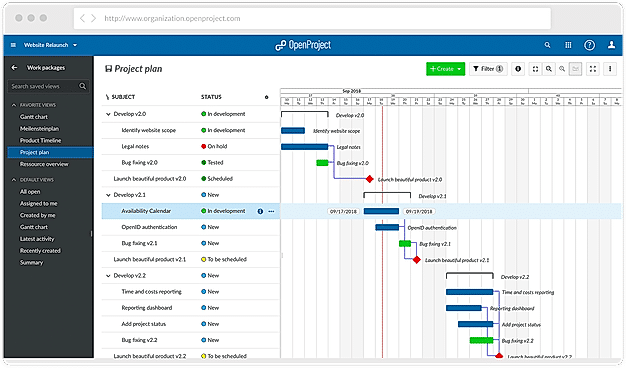
Description Organizes your projects and day-to-day tasks through creating notecards on dashboard. The software can also be used as a trip planner, a side project, a community bulletin, an event or an idea repository. Tasks and ideas can be noted on the Trello cards. Alongside, the work progress can also be tracked. The user can sort and organize these cards based upon their categories. A quick overview is displayed on the front of the cards, flipping which, the user can dive into more detailed information such as checklists, due dates, comments, attachments etc. There is a progress meter that adds a checklist to organize your to-do list. You can also attach documents and multimedia files to the cards. Read more ClickUp is a simple, cloud-based collaboration and project management tool created for all user types. With ClickUp, you have all the features needed to help simplify and streamline your processes including sales, marketing, design and development. ClickUp features an agile board view that allows you to monitor every task on your team in one board and assign tasks to various members of the team. Tasks progress can be viewed in form of percentage and can be marked either “resolved” or “in progress” or users can alternatively customize their task progress statuses. A Gantt chart lets you view your tasks in timeline by list or person and automatically add updates in real time. ClickUp organizes task management in a hierarchal manner and allows you to sort tasks according to their priority. This property allows for improved productivity and lets you to structure your projects by assigning tasks to groups and arranging those groups under different categories. The software can be seamlessly integrated to Slack and similar apps through Zapier. The machine learning capability of the software assists project managers give realistic timeframes for completion of projects and lets teams accomplish their tasks before the deadline. Read more OpenProject as an advanced project management software offers a classic, agile and hybrid project management network. It aims to make users’ work simple, productive and pleasant. Admins can assign tasks to their teammates and communicate with them in one place. The software helps to deliver projects on time and make better iterations with development and methodology tools, like Scrum and Kanban. OpenProject, hosts a big community of open source enthusiasts, developers and businesses who help and support each other. Also, the platform assures the highest level of security and creates a protected environment for its users enabling full data ownership. Users get full freedom to run, share, study and modify their projects without limitations. Businesses can find professional support for their self-hosted projects over this platform. It reduces users’ burden by letting the experts do the hosting. Users can find work management solutions regarding various industries, including IT & Technology, Engineering, Healthcare, NGOs, Banking and Finance, etc. Read more Microsoft Project is a smart solution built for enterprises and businesses of all sizes. It’s a powerful project management tool that makes getting started and managing projects simple and easy. Even complex projects can be easily managed with methods and tools that best suit each user’s needs. The tool includes project scheduling and other essential features required for managing processes. Users can easily plan projects with the power of dynamic scheduling tools based on effort needed, allotted team members, and project duration. Managers can create interactive dashboards to view overall status and drill down into the details of the programs and projects using Power BI visualization. Automated workflows can be created with a flexible and secure platform built on Azure. Managers can use projects and teams to empower collaboration and manage projects including file sharing, chats, meetings, and more. Collaboration on projects can be done even when teams are on different continents. Managers can enable team members to update tasks simultaneously so things can be done together and everyone is on the same page. Read more
Pricing Options
  • Free Trial Available
  • Starts at $5.0. Offers Free-forever plan.
  • Free Trial Available
  • Starts at $7.00. Offers Free-forever and Custom plan.
  • Free Trial Available
  • Starts at $7.25. Offers Free-forever and Custom plan.
  • Free Trial Available
  • Starts at $10.0. Offers Custom plan.
SW Score & Breakdown

92% SW Score The SW Score ranks the products within a particular category on a variety of parameters, to provide a definite ranking system. Read more

  • Features The Feature Score % is calculated using the weighted average method, where core features hold more weight in the final calculation. Read more
    100%
  • Reviews
    91%
  • Momentum
    63%
  • Popularity
    87%

97% SW Score The SW Score ranks the products within a particular category on a variety of parameters, to provide a definite ranking system. Read more

  • Features The Feature Score % is calculated using the weighted average method, where core features hold more weight in the final calculation. Read more
    100%
  • Reviews
    77%
  • Momentum
    82%
  • Popularity
    96%

91% SW Score The SW Score ranks the products within a particular category on a variety of parameters, to provide a definite ranking system. Read more

  • Features The Feature Score % is calculated using the weighted average method, where core features hold more weight in the final calculation. Read more
    97%
  • Reviews
    76%
  • Momentum
    67%
  • Popularity
    81%

87% SW Score The SW Score ranks the products within a particular category on a variety of parameters, to provide a definite ranking system. Read more

  • Features The Feature Score % is calculated using the weighted average method, where core features hold more weight in the final calculation. Read more
    96%
  • Reviews
    81%
  • Momentum
    62%
  • Popularity
    70%
SaaSworthy Awards # 5 Highly Rated # 7 Most Popular # 1 Most Worthy # 7 Highly Rated # 7 Fastest Growing # 8 Fastest Growing # 19 Most Popular # 16 Most Popular

Features

Total Features
20 Features
21 Features
17 Features
16 Features
Common Features for All
    AI Assistant AI Assistant helps you provide information and perform specific tasks to significantly improve your success rate. It can perform one or many tasks like analyzing your deals, contacts, and emails, generating the perfect email, and more.
    Budget Management Analyzing financial information to ensure all operations are within budget
    Compliance Management Helps in making an assessment of risks, ensures policy comprehension and that policies/procedures are being followed
    Custom Workflows Facility to create workflows with custom stages, process, and status.
    Document Management Ability to store and manage various information and documents in electronic format.
    IT Project Management IT project management is the process of planning, organizing and delineating responsibility for the completion of an organizations' specific information technology (IT) goals.
    Kanban Board To visualize the workflow of a project typically representing sticky notes on a white board
    Milestone Tracking They act as signposts through the course of your project, as they help to ensure that you're staying on track.
    Percent-Complete Tracking Percentage of work done on estimated items.
    Project Planning Project planning is a discipline for stating how to complete a project within a certain timeframe, usually with defined stages, and with designated resources.
    Project Templates It holds a bundle of built-in templates that can be customized and used in different projects
    Recurring Task Management Helps in monitoring and tackling the tasks or responsibilities that are needed to be managed on a recurrent basis
    Requirement Management Requirements management is the process of collecting, analyzing, refining, and prioritizing product requirements and then planning for their delivery.
    Resource Management Resource management is the process by which businesses manage their various resources effectively. Those resources can be intangible – people and time – and tangible – equipment, materials, and finances.
    Status Tracking Status Tracking refers to the management of projects, which includes but is not limited to measuring and reporting the status of milestones, tasks and activities
    Task Management Task management is the process of managing a task through its life cycle, including planning, testing, tracking, and reporting.
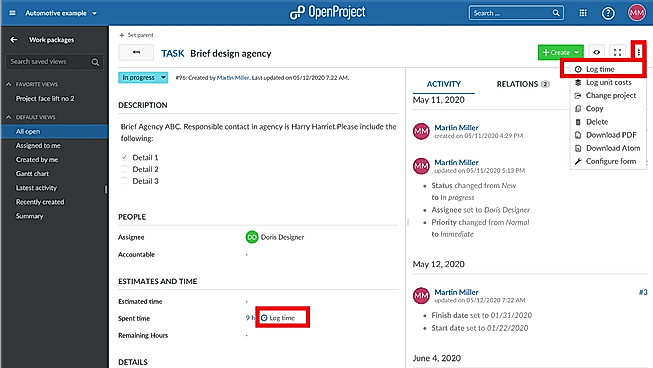
    Time & Expense Tracking Time and Expense is the process of recording and tracking hours worked and expenses as they relate to projects
    Timeline View Allows to plan and prioritize and visualize tasks in a GANTT chart like horizontal time-axis.
  • + 14 More - Show Less
    • AI Assistant AI Assistant helps you provide information and perform specific tasks to significantly improve your success rate. It can perform one or many tasks like analyzing your deals, contacts, and emails, generating the perfect email, and more.
      Budget Management Analyzing financial information to ensure all operations are within budget
      Compliance Management Helps in making an assessment of risks, ensures policy comprehension and that policies/procedures are being followed
      Custom Workflows Facility to create workflows with custom stages, process, and status.
      Document Management Ability to store and manage various information and documents in electronic format.
      IT Project Management IT project management is the process of planning, organizing and delineating responsibility for the completion of an organizations' specific information technology (IT) goals.
      Kanban Board To visualize the workflow of a project typically representing sticky notes on a white board
      Milestone Tracking They act as signposts through the course of your project, as they help to ensure that you're staying on track.
      Percent-Complete Tracking Percentage of work done on estimated items.
      Project Planning Project planning is a discipline for stating how to complete a project within a certain timeframe, usually with defined stages, and with designated resources.
      Project Templates It holds a bundle of built-in templates that can be customized and used in different projects
      Recurring Task Management Helps in monitoring and tackling the tasks or responsibilities that are needed to be managed on a recurrent basis
      Requirement Management Requirements management is the process of collecting, analyzing, refining, and prioritizing product requirements and then planning for their delivery.
      Resource Management Resource management is the process by which businesses manage their various resources effectively. Those resources can be intangible – people and time – and tangible – equipment, materials, and finances.
      Status Tracking Status Tracking refers to the management of projects, which includes but is not limited to measuring and reporting the status of milestones, tasks and activities
      Task Management Task management is the process of managing a task through its life cycle, including planning, testing, tracking, and reporting.
      Time & Expense Tracking Time and Expense is the process of recording and tracking hours worked and expenses as they relate to projects
      Timeline View Allows to plan and prioritize and visualize tasks in a GANTT chart like horizontal time-axis.
  • + 15 More - Show Less
    • AI Assistant AI Assistant helps you provide information and perform specific tasks to significantly improve your success rate. It can perform one or many tasks like analyzing your deals, contacts, and emails, generating the perfect email, and more.
      Budget Management Analyzing financial information to ensure all operations are within budget
      Compliance Management Helps in making an assessment of risks, ensures policy comprehension and that policies/procedures are being followed
      Custom Workflows Facility to create workflows with custom stages, process, and status.
      Document Management Ability to store and manage various information and documents in electronic format.
      IT Project Management IT project management is the process of planning, organizing and delineating responsibility for the completion of an organizations' specific information technology (IT) goals.
      Kanban Board To visualize the workflow of a project typically representing sticky notes on a white board
      Milestone Tracking They act as signposts through the course of your project, as they help to ensure that you're staying on track.
      Percent-Complete Tracking Percentage of work done on estimated items.
      Project Planning Project planning is a discipline for stating how to complete a project within a certain timeframe, usually with defined stages, and with designated resources.
      Project Templates It holds a bundle of built-in templates that can be customized and used in different projects
      Recurring Task Management Helps in monitoring and tackling the tasks or responsibilities that are needed to be managed on a recurrent basis
      Requirement Management Requirements management is the process of collecting, analyzing, refining, and prioritizing product requirements and then planning for their delivery.
      Resource Management Resource management is the process by which businesses manage their various resources effectively. Those resources can be intangible – people and time – and tangible – equipment, materials, and finances.
      Status Tracking Status Tracking refers to the management of projects, which includes but is not limited to measuring and reporting the status of milestones, tasks and activities
      Task Management Task management is the process of managing a task through its life cycle, including planning, testing, tracking, and reporting.
      Time & Expense Tracking Time and Expense is the process of recording and tracking hours worked and expenses as they relate to projects
      Timeline View Allows to plan and prioritize and visualize tasks in a GANTT chart like horizontal time-axis.
  • + 11 More - Show Less
    • AI Assistant AI Assistant helps you provide information and perform specific tasks to significantly improve your success rate. It can perform one or many tasks like analyzing your deals, contacts, and emails, generating the perfect email, and more.
      Budget Management Analyzing financial information to ensure all operations are within budget
      Compliance Management Helps in making an assessment of risks, ensures policy comprehension and that policies/procedures are being followed
      Custom Workflows Facility to create workflows with custom stages, process, and status.
      Document Management Ability to store and manage various information and documents in electronic format.
      IT Project Management IT project management is the process of planning, organizing and delineating responsibility for the completion of an organizations' specific information technology (IT) goals.
      Kanban Board To visualize the workflow of a project typically representing sticky notes on a white board
      Milestone Tracking They act as signposts through the course of your project, as they help to ensure that you're staying on track.
      Percent-Complete Tracking Percentage of work done on estimated items.
      Project Planning Project planning is a discipline for stating how to complete a project within a certain timeframe, usually with defined stages, and with designated resources.
      Project Templates It holds a bundle of built-in templates that can be customized and used in different projects
      Recurring Task Management Helps in monitoring and tackling the tasks or responsibilities that are needed to be managed on a recurrent basis
      Requirement Management Requirements management is the process of collecting, analyzing, refining, and prioritizing product requirements and then planning for their delivery.
      Resource Management Resource management is the process by which businesses manage their various resources effectively. Those resources can be intangible – people and time – and tangible – equipment, materials, and finances.
      Status Tracking Status Tracking refers to the management of projects, which includes but is not limited to measuring and reporting the status of milestones, tasks and activities
      Task Management Task management is the process of managing a task through its life cycle, including planning, testing, tracking, and reporting.
      Time & Expense Tracking Time and Expense is the process of recording and tracking hours worked and expenses as they relate to projects
      Timeline View Allows to plan and prioritize and visualize tasks in a GANTT chart like horizontal time-axis.
  • + 10 More - Show Less
  • Unique Features
      Idea Management Facility to receive insights from internal and external stakeholders
      Issue Management Issue management is the process of identifying and resolving issues. Problems can be resource constraint, technical failures etc.
      Project Portfolio Management Strategically manages a collection of projects to align with an organization's overall goals.
      Idea Management Facility to receive insights from internal and external stakeholders
      Issue Management Issue management is the process of identifying and resolving issues. Problems can be resource constraint, technical failures etc.
      Project Portfolio Management Strategically manages a collection of projects to align with an organization's overall goals.
      Idea Management Facility to receive insights from internal and external stakeholders
      Issue Management Issue management is the process of identifying and resolving issues. Problems can be resource constraint, technical failures etc.
      Project Portfolio Management Strategically manages a collection of projects to align with an organization's overall goals.
      Idea Management Facility to receive insights from internal and external stakeholders
      Issue Management Issue management is the process of identifying and resolving issues. Problems can be resource constraint, technical failures etc.
      Project Portfolio Management Strategically manages a collection of projects to align with an organization's overall goals.

    Technical Details

    Organization Types Supported
    • Freelancers
    • Large Enterprises
    • Medium Business
    • Small Business
    • Freelancers
    • Large Enterprises
    • Medium Business
    • Small Business
    • Freelancers
    • Large Enterprises
    • Medium Business
    • Small Business
    • Freelancers
    • Large Enterprises
    • Medium Business
    • Small Business
    Platforms Supported
    • SaaS/Web/Cloud
    • Mobile - Android
    • Mobile - iOS
    • Installed - Windows
    • Installed - Mac
    • SaaS/Web/Cloud
    • Mobile - Android
    • Mobile - iOS
    • Installed - Windows
    • Installed - Mac
    • SaaS/Web/Cloud
    • Mobile - Android
    • Mobile - iOS
    • Installed - Windows
    • Installed - Mac
    • SaaS/Web/Cloud
    • Mobile - Android
    • Mobile - iOS
    • Installed - Windows
    • Installed - Mac
    Modes of Support
    • 24/7 (Live rep)
    • Business Hours
    • Online
    • 24/7 (Live rep)
    • Business Hours
    • Online
    • 24/7 (Live rep)
    • Business Hours
    • Online
    • 24/7 (Live rep)
    • Business Hours
    • Online
    API Support
    • Available
    • Available
    • Available
    • Available

    Reviews & Ratings

    User Rating
    4.1/5 202 user ratings
    4.8/5 19,928 user ratings
    4.2/5 69 user ratings
    4.2/5 1,659 user ratings
    Rating Distribution
    • Excellent

      56.9%
    • Very Good

      22.8%
    • Average

      5.4%
    • Poor

      2%
    • Terrible

      12.9%
    • Excellent

      81.7%
    • Very Good

      15.6%
    • Average

      1.3%
    • Poor

      0.5%
    • Terrible

      1%
    • Excellent

      40.6%
    • Very Good

      43.5%
    • Average

      10.1%
    • Poor

      2.9%
    • Terrible

      2.9%
    • Excellent

      42.6%
    • Very Good

      40.9%
    • Average

      12.5%
    • Poor

      2.5%
    • Terrible

      1.4%
    User Sentiments

      Ease of Use, Visually Appealing Interface, Kanban Board System, Extensive Integrations

      Limited Features in Free Version, Lack of Advanced Project Management Features , Occasional Performance Issues, Confusing Archiving Functionality

      Customizable Workspaces, Extensive Integrations, User Friendly Interface, Comprehensive Task Management

      Mobile App Performance, Slow Loading Times, Steep Learning Curve, Limited Free Plan Functionality

      Not Available

      Project Planning Capabilities, Ease of Use, Integration with Microsoft Products, Robust Reporting and Analytics

      High Cost, Steep Learning Curve, Limited Third-Party Integrations, Complex for Small Projects

    Review Summary

    Trello is a highly praised project management tool, lauded for its simple and intuitive interface, Kanban-style organization, and ease of collaboration. Users appreciate its visual clarity, the ability to track tasks and deadlines, and its integration with other applications. While some users find the free version limited, most agree that Trello is a valuable resource for both personal and professional tasks, making it a popular choice for teams of all sizes.

    Users appreciate ClickUp's user-friendly interface, customization options, and comprehensive features, making it suitable for teams of various sizes and industries. It excels in project management, task tracking, and collaboration. However, some users have experienced occasional technical glitches and limitations in reporting and integrations. Additionally, the pricing structure can be complex for some users. Overall, ClickUp is a popular choice for project management, offering a range of features and customization options, but users should be aware of potential technical issues and pricing complexities.

    Users appreciate OpenProject's robust features for project management, resource allocation, and collaboration, highlighting its user-friendly interface, customizable dashboards, and comprehensive reporting capabilities. It is praised for its flexibility and scalability, accommodating a wide range of project sizes and industries. However, some users mention occasional glitches and a learning curve for new users. Additionally, some users suggest improvements in mobile app functionality and integration with other tools. Overall, OpenProject is generally well-received for its powerful features, user-friendly design, and adaptability to diverse project needs.

    Overall, user reviews suggest that the software is comprehensive and powerful, with a wide range of features and customization options. Praises were given for its integration with other Microsoft products, as well as its robust reporting and collaboration capabilities. However, some users found it complex and challenging to learn, with a steep learning curve. Additionally, concerns were raised regarding its cost and occasional technical issues.

      Read All User Reviews Read All User Reviews Read All User Reviews Read All User Reviews

    AI-Generated from the text of User Reviews

    Pricing

    Pricing Options
    • Free Trial Available
    • Starts at $5.0. Offers Free-forever plan.
    • Free Trial Available
    • Starts at $7.00. Offers Free-forever and Custom plan.
    • Free Trial Available
    • Starts at $7.25. Offers Free-forever and Custom plan.
    • Free Trial Available
    • Starts at $10.0. Offers Custom plan.
    Pricing Plans
    Monthly Plans Annual Plans

    Free Free

    Standard $5.00 $6.00 per user / month

    Premium $10.00 $12.50 per user / month

    Enterprise $17.50 $17.50 per user / month

    Free Free

    Unlimited $7.00 $10.00 per user / month

    Business $12.00 $19.00 per user / month

    Enterprise Custom

    Community Free

    Basic $7.25 $7.25 per user / month

    Professional $13.50 $13.50 per user / month

    Premium $19.50 $19.50 per user / month

    Corporate Custom

    Microsoft Planner Others

    Project Plan 1 $10.00 $10.00 per user / month

    Planner and Project Plan 3 $30.00 $30.00 per user / month

    Planner and Project Plan 5 $55.00 $55.00 per user / month

    Project Standard 2024 Others

    Project Professional 2024 Others

    Project Server Custom

     
    View Detailed Pricing
    View Detailed Pricing
    View Detailed Pricing
    View Detailed Pricing

    Have Questions? We can help!

    Get personalized recommendations from our experts on call

    Call Me

    Trusted by more than 5 Million users across the globe.

    Thank you for the enquiry. One of our software analysts will contact you soon.

    Screenshots & Videos

    Screenshots Board Basics
    + 5 More
    Project Management
    + 4 More
    Task Management
    + 4 More
    Not Available
    Videos Video Thumbnail
    + 2 More
    Video Thumbnail
    + 4 More
    Video Thumbnail
    + 3 More
    Video Thumbnail

    Vendor information

    Company Details Located in: New York, New York Founded in: 2017 Located in: San Diego, CA Founded in: 2016 Located in: Berlin, Germany Founded in: 2012 Located in: Redmond, Washington
    Contact Details

    Not available

    https://trello.com/

    Not available

    https://clickup.com/

    +49 30 288 777 07

    https://www.openproject.org/

    Not available

    https://www.microsoft.com/en-us/microsoft-365/project/project-management

    Social Media Handles

    We understand SaaS better

    SaaSworthy helps stakeholders choose the right SaaS platform based on detailed product information, unbiased reviews, SW score and recommendations from the active community.

    icon

    Buyers

    Looking for the right SaaS

    We can help you choose the best SaaS for your specific requirements. Our in-house experts will assist you with their hand-picked recommendations.

    icon

    Makers

    Want more customers?

    Our experts will research about your product and list it on SaaSworthy for FREE.

    Get Listed