get-free-advice
Clara Icon MEET CLARA - THE AI BEHIND SMARTER SOFTWARE CHOICES
Get Started
/*
Loading...
*/

87% SW Score The SW Score ranks the products within a particular category on a variety of parameters, to provide a definite ranking system. Read more

OneDesk logo
View Details

93% SW Score The SW Score ranks the products within a particular category on a variety of parameters, to provide a definite ranking system. Read more

ActiveCollab logo
View Details

88% SW Score The SW Score ranks the products within a particular category on a variety of parameters, to provide a definite ranking system. Read more

ProWorkflow logo
View Details

81% SW Score The SW Score ranks the products within a particular category on a variety of parameters, to provide a definite ranking system. Read more

Projectworks logo
View Details

Overview

Description OneDesk is a project management and collaboration solution designed for teams. It provides both a traditional project management view and dashboard, as well as agile status boards. OneDesk allows you to better assign tasks through the use of Gantt charts, as you can connect dependent tasks to see who has take on more work, as well as better calculate when projects and task will finish, and how much they will cost. With the discussions and notifications feature, you can let team members and customers know when the status of tasks changes. You can also track time in projects through the timesheet feature, with real-time time tracking functionality. OneDesk includes reporting functionality, which allows you to create custom reports through the software’s templates. You can also schedule and email reports, as well as export this data. OneDesk integrates with other popular software, including Slack, Jira, Zendesk, and Salesforce. Read more ActiveCollab is a project management tool. It allows users to organize their entire work including tasks, communication, team members, and files with a single app. The collaboration features and centralized communication makes for quicker messaging, comments, feedback and file sharing without the need for scattered emails. Meetings, tasks, and statuses can be viewed at a glance by every authorized personnel. The tool also lets users track times for the team members and use the data to evaluate and estimate timelines. Invoices can be created according to the tracked times for accurate billing. Users can also add branding using the Invoice Designer and send it directly from ActiveCollab. Payment gateways and recurring invoices can be set up as well. Payments can be tracked with statuses such as unsent, sent, partially paid, or paid. Integrations with QuickBooks and Xero enables them to use ActiveCollab time records to generate invoices. Read more ProWorkflow is an easy to use project management software for teams to spend less time managing the projects and more time in delivering the results. The tool makes it super easy for teams to assign tasks to the staff, measure the time that tasks are taking, or reschedule projects that have gone out of scope. They can also send quotations and invoices right through the tool. Users receive a dashboard which gives them an overview of the workload and priorities. They can review project timelines and reschedule projects at the click of a button. And with the mobile tracker, they can easily track time for each task, complete them, and communicate with team members while on the move. Staff, clients, and contractors can also be brought on a single platform for easy collaboration. The timesheet then makes it easy to track every project and task. Additionally, the powerful API can be leveraged to extend the capabilities and integration with other tools. Read more Projectworks is a business management software that helps enterprises automate their workflow. Unlike other business management solutions that do not focus on the needs of specific departments, Projectworks covers all the aspects of running a business and not just the ones for managerial posts. It brings a wide range of tools for the top-to-bottom workforce management, be it the CMO, executive, or a bookkeeper. Admins can manage projects by assigning resources to the team members and monitor the same to evaluate efficiency. The software allows adding real-time budgetary figures on the timesheet so that the project manager is always aware of the expenses and remaining monetary resources available for the completion of a project. Thereafter, staff can access the timesheet to know the tasks assigned and resources made available to them. They can even file expense claims to get remuneration and submit time-off/leave requests to the managers for approval. With the ability to track the performance of the entire workforce individually, managers can estimate an employee’s value and utilize the information into gross margin reports. Projectworks also allows creating invoices for the projects, fixing prices, and managing billing easily. Being mobile-optimized, users can access all these features on their smartphones. Read more
Pricing Options
  • Free Trial Available
  • Starts at $11.99.
  • Free Trial Available
  • Starts at $3.17.
  • Free Trial Available
  • Starts at $18.0. Offers Custom plan.
  • Free Trial Available
  • Starts at $33.3.
SW Score & Breakdown

87% SW Score The SW Score ranks the products within a particular category on a variety of parameters, to provide a definite ranking system. Read more

  • Features The Feature Score % is calculated using the weighted average method, where core features hold more weight in the final calculation. Read more
    99%
  • Reviews
    72%
  • Momentum
    62%
  • Popularity
    76%

93% SW Score The SW Score ranks the products within a particular category on a variety of parameters, to provide a definite ranking system. Read more

  • Features The Feature Score % is calculated using the weighted average method, where core features hold more weight in the final calculation. Read more
    99%
  • Reviews
    90%
  • Momentum
    69%
  • Popularity
    86%

88% SW Score The SW Score ranks the products within a particular category on a variety of parameters, to provide a definite ranking system. Read more

  • Features The Feature Score % is calculated using the weighted average method, where core features hold more weight in the final calculation. Read more
    95%
  • Reviews
    85%
  • Momentum
    62%
  • Popularity
    77%

81% SW Score The SW Score ranks the products within a particular category on a variety of parameters, to provide a definite ranking system. Read more

  • Features The Feature Score % is calculated using the weighted average method, where core features hold more weight in the final calculation. Read more
    87%
  • Reviews
    60%
  • Momentum
    63%
  • Popularity
    72%
SaaSworthy Awards
Not Available
# 18 Fastest Growing # 15 Most Popular
Not Available
Not Available

Features

Total Features
19 Features
19 Features
16 Features
11 Features
Common Features for All
    Budget Management Analyzing financial information to ensure all operations are within budget
    Compliance Management Helps in making an assessment of risks, ensures policy comprehension and that policies/procedures are being followed
    Custom Workflows Facility to create workflows with custom stages, process, and status.
    Document Management Ability to store and manage various information and documents in electronic format.
    IT Project Management IT project management is the process of planning, organizing and delineating responsibility for the completion of an organizations' specific information technology (IT) goals.
    Kanban Board To visualize the workflow of a project typically representing sticky notes on a white board
    Milestone Tracking They act as signposts through the course of your project, as they help to ensure that you're staying on track.
    Percent-Complete Tracking Percentage of work done on estimated items.
    Project Planning Project planning is a discipline for stating how to complete a project within a certain timeframe, usually with defined stages, and with designated resources.
    Project Templates It holds a bundle of built-in templates that can be customized and used in different projects
    Recurring Task Management Helps in monitoring and tackling the tasks or responsibilities that are needed to be managed on a recurrent basis
    Requirement Management Requirements management is the process of collecting, analyzing, refining, and prioritizing product requirements and then planning for their delivery.
    Resource Management Resource management is the process by which businesses manage their various resources effectively. Those resources can be intangible – people and time – and tangible – equipment, materials, and finances.
    Status Tracking Status Tracking refers to the management of projects, which includes but is not limited to measuring and reporting the status of milestones, tasks and activities
    Task Management Task management is the process of managing a task through its life cycle, including planning, testing, tracking, and reporting.
    Time & Expense Tracking Time and Expense is the process of recording and tracking hours worked and expenses as they relate to projects
    Timeline View Allows to plan and prioritize and visualize tasks in a GANTT chart like horizontal time-axis.
  • + 13 More - Show Less
    • Budget Management Analyzing financial information to ensure all operations are within budget
      Compliance Management Helps in making an assessment of risks, ensures policy comprehension and that policies/procedures are being followed
      Custom Workflows Facility to create workflows with custom stages, process, and status.
      Document Management Ability to store and manage various information and documents in electronic format.
      IT Project Management IT project management is the process of planning, organizing and delineating responsibility for the completion of an organizations' specific information technology (IT) goals.
      Kanban Board To visualize the workflow of a project typically representing sticky notes on a white board
      Milestone Tracking They act as signposts through the course of your project, as they help to ensure that you're staying on track.
      Percent-Complete Tracking Percentage of work done on estimated items.
      Project Planning Project planning is a discipline for stating how to complete a project within a certain timeframe, usually with defined stages, and with designated resources.
      Project Templates It holds a bundle of built-in templates that can be customized and used in different projects
      Recurring Task Management Helps in monitoring and tackling the tasks or responsibilities that are needed to be managed on a recurrent basis
      Requirement Management Requirements management is the process of collecting, analyzing, refining, and prioritizing product requirements and then planning for their delivery.
      Resource Management Resource management is the process by which businesses manage their various resources effectively. Those resources can be intangible – people and time – and tangible – equipment, materials, and finances.
      Status Tracking Status Tracking refers to the management of projects, which includes but is not limited to measuring and reporting the status of milestones, tasks and activities
      Task Management Task management is the process of managing a task through its life cycle, including planning, testing, tracking, and reporting.
      Time & Expense Tracking Time and Expense is the process of recording and tracking hours worked and expenses as they relate to projects
      Timeline View Allows to plan and prioritize and visualize tasks in a GANTT chart like horizontal time-axis.
  • + 13 More - Show Less
    • Budget Management Analyzing financial information to ensure all operations are within budget
      Compliance Management Helps in making an assessment of risks, ensures policy comprehension and that policies/procedures are being followed
      Custom Workflows Facility to create workflows with custom stages, process, and status.
      Document Management Ability to store and manage various information and documents in electronic format.
      IT Project Management IT project management is the process of planning, organizing and delineating responsibility for the completion of an organizations' specific information technology (IT) goals.
      Kanban Board To visualize the workflow of a project typically representing sticky notes on a white board
      Milestone Tracking They act as signposts through the course of your project, as they help to ensure that you're staying on track.
      Percent-Complete Tracking Percentage of work done on estimated items.
      Project Planning Project planning is a discipline for stating how to complete a project within a certain timeframe, usually with defined stages, and with designated resources.
      Project Templates It holds a bundle of built-in templates that can be customized and used in different projects
      Recurring Task Management Helps in monitoring and tackling the tasks or responsibilities that are needed to be managed on a recurrent basis
      Requirement Management Requirements management is the process of collecting, analyzing, refining, and prioritizing product requirements and then planning for their delivery.
      Resource Management Resource management is the process by which businesses manage their various resources effectively. Those resources can be intangible – people and time – and tangible – equipment, materials, and finances.
      Status Tracking Status Tracking refers to the management of projects, which includes but is not limited to measuring and reporting the status of milestones, tasks and activities
      Task Management Task management is the process of managing a task through its life cycle, including planning, testing, tracking, and reporting.
      Time & Expense Tracking Time and Expense is the process of recording and tracking hours worked and expenses as they relate to projects
      Timeline View Allows to plan and prioritize and visualize tasks in a GANTT chart like horizontal time-axis.
  • + 10 More - Show Less
    • Budget Management Analyzing financial information to ensure all operations are within budget
      Compliance Management Helps in making an assessment of risks, ensures policy comprehension and that policies/procedures are being followed
      Custom Workflows Facility to create workflows with custom stages, process, and status.
      Document Management Ability to store and manage various information and documents in electronic format.
      IT Project Management IT project management is the process of planning, organizing and delineating responsibility for the completion of an organizations' specific information technology (IT) goals.
      Kanban Board To visualize the workflow of a project typically representing sticky notes on a white board
      Milestone Tracking They act as signposts through the course of your project, as they help to ensure that you're staying on track.
      Percent-Complete Tracking Percentage of work done on estimated items.
      Project Planning Project planning is a discipline for stating how to complete a project within a certain timeframe, usually with defined stages, and with designated resources.
      Project Templates It holds a bundle of built-in templates that can be customized and used in different projects
      Recurring Task Management Helps in monitoring and tackling the tasks or responsibilities that are needed to be managed on a recurrent basis
      Requirement Management Requirements management is the process of collecting, analyzing, refining, and prioritizing product requirements and then planning for their delivery.
      Resource Management Resource management is the process by which businesses manage their various resources effectively. Those resources can be intangible – people and time – and tangible – equipment, materials, and finances.
      Status Tracking Status Tracking refers to the management of projects, which includes but is not limited to measuring and reporting the status of milestones, tasks and activities
      Task Management Task management is the process of managing a task through its life cycle, including planning, testing, tracking, and reporting.
      Time & Expense Tracking Time and Expense is the process of recording and tracking hours worked and expenses as they relate to projects
      Timeline View Allows to plan and prioritize and visualize tasks in a GANTT chart like horizontal time-axis.
  • + 6 More - Show Less
  • Unique Features
      Idea Management Facility to receive insights from internal and external stakeholders
      Issue Management Issue management is the process of identifying and resolving issues. Problems can be resource constraint, technical failures etc.
      Project Portfolio Management Strategically manages a collection of projects to align with an organization's overall goals.
      Idea Management Facility to receive insights from internal and external stakeholders
      Issue Management Issue management is the process of identifying and resolving issues. Problems can be resource constraint, technical failures etc.
      Project Portfolio Management Strategically manages a collection of projects to align with an organization's overall goals.
      Idea Management Facility to receive insights from internal and external stakeholders
      Issue Management Issue management is the process of identifying and resolving issues. Problems can be resource constraint, technical failures etc.
      Project Portfolio Management Strategically manages a collection of projects to align with an organization's overall goals.
      Idea Management Facility to receive insights from internal and external stakeholders
      Issue Management Issue management is the process of identifying and resolving issues. Problems can be resource constraint, technical failures etc.
      Project Portfolio Management Strategically manages a collection of projects to align with an organization's overall goals.

    Technical Details

    Organization Types Supported
    • Freelancers
    • Large Enterprises
    • Medium Business
    • Small Business
    • Freelancers
    • Large Enterprises
    • Medium Business
    • Small Business
    • Freelancers
    • Large Enterprises
    • Medium Business
    • Small Business
    • Freelancers
    • Large Enterprises
    • Medium Business
    • Small Business
    Platforms Supported
    • SaaS/Web/Cloud
    • Mobile - Android
    • Mobile - iOS
    • Installed - Windows
    • Installed - Mac
    • SaaS/Web/Cloud
    • Mobile - Android
    • Mobile - iOS
    • Installed - Windows
    • Installed - Mac
    • SaaS/Web/Cloud
    • Mobile - Android
    • Mobile - iOS
    • Installed - Windows
    • Installed - Mac
    • SaaS/Web/Cloud
    • Mobile - Android
    • Mobile - iOS
    • Installed - Windows
    • Installed - Mac
    Modes of Support
    • 24/7 (Live rep)
    • Business Hours
    • Online
    • 24/7 (Live rep)
    • Business Hours
    • Online
    • 24/7 (Live rep)
    • Business Hours
    • Online
    • 24/7 (Live rep)
    • Business Hours
    • Online
    API Support
    • Available
    • Available
    • Available
    • Available

    Reviews & Ratings

    User Rating
    4.6/5 7 user ratings
    4.3/5 394 user ratings
    4.5/5 276 user ratings
    Not Available
    Rating Distribution
    • Excellent

      57.1%
    • Very Good

      42.9%
    • Average

      0%
    • Poor

      0%
    • Terrible

      0%
    • Excellent

      49.7%
    • Very Good

      28.9%
    • Average

      18.8%
    • Poor

      1.8%
    • Terrible

      0.8%
    • Excellent

      60.1%
    • Very Good

      32.6%
    • Average

      6.5%
    • Poor

      0.4%
    • Terrible

      0.4%
    Not Available
    User Sentiments
      Not Available

      User-friendly interface, Extensive Integrations, Efficient Task Management, Seamless Collaboration

      Limited Customization, Mobile App Functionality, Occasional Bugs, Inconsistent Customer Support

      Ease of Use, Great Customer Support, Effective Time Tracking & Reporting, Comprehensive Project Management

      Limited Search Functionality, Reporting Complexities, Slow Loading Times, Lack of Message Editing

      Not Available
    Review Summary
    Not Available

    ActiveCollab garners mixed reviews from users across various platforms. While it is praised for its ease of use, project management capabilities, and task tracking features, it also receives criticism for its limited customization options, occasional technical glitches, and lack of advanced features found in competing software. Some users appreciate its intuitive interface and helpful customer support, but others express frustration with its pricing structure and the need for additional plugins to access certain functionalities.

    ProWorkflow is generally praised for its user-friendly interface, customizable features, and robust project management capabilities. Reviewers appreciate the ability to easily create and manage tasks, set dependencies, track progress, and collaborate with team members. The software's intuitive design is often highlighted as a key advantage, making it suitable for users of all skill levels. Additionally, ProWorkflow's reporting and analytics feature are often commended for providing valuable insights into project performance and resource allocation. However, some users have reported occasional glitches and bugs that can hinder the overall experience.

    Not Available
      Read All User Reviews Read All User Reviews Read All User Reviews

    AI-Generated from the text of User Reviews

    Pricing

    Pricing Options
    • Free Trial Available
    • Starts at $11.99.
    • Free Trial Available
    • Starts at $3.17.
    • Free Trial Available
    • Starts at $18.0. Offers Custom plan.
    • Free Trial Available
    • Starts at $33.3.
    Pricing Plans
    Monthly Plans Annual Plans

    Standard $11.99 $13.99 per user / month

    Premium $13.99 $15.99 per user / month

    Enterprise $15.99 $18.99 per user / month

    Plus $3.17 $3.67 per month

    Pro $8.00 $9.00 per user / month

    Pro+Get Paid $11.75 $14.00 per user / month

    Professional $18.00 $20.00 per user / month

    Advanced $27.00 $30.00 per user / month

    Enterprise Custom

    Standard $33.30 $37.00 per user / month

     
    View Detailed Pricing
    View Detailed Pricing
    View Detailed Pricing
    View Detailed Pricing

    Have Questions? We can help!

    Get personalized recommendations from our experts on call

    Call Me

    Trusted by more than 5 Million users across the globe.

    Thank you for the enquiry. One of our software analysts will contact you soon.

    Screenshots & Videos

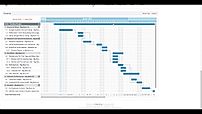
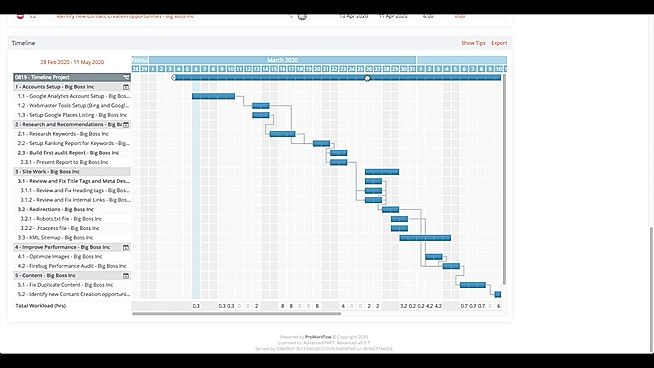
    Screenshots Tasks Tree view
    + 4 More
    Task
    + 4 More
    Drum Roll Not Available
    Videos Video Thumbnail
    + 2 More
    Video Thumbnail
    + 4 More
    Video Thumbnail
    + 1 More
    Video Thumbnail

    Vendor information

    Company Details Located in: Montreal, Canada Founded in: 2009 Located in: Norfolk, Virginia Founded in: 2007 Located in: Auckland, New Zealand Founded in: 2002 Located in: San Diego, California
    Contact Details

    +1 855-663-3375

    https://www.onedesk.com/

    1-844-869-2677

    https://activecollab.com/

    +1 408-780-9189

    https://www.proworkflow.com/

    Not available

    https://projectworks.io/

    Social Media Handles

    We understand SaaS better

    SaaSworthy helps stakeholders choose the right SaaS platform based on detailed product information, unbiased reviews, SW score and recommendations from the active community.

    icon

    Buyers

    Looking for the right SaaS

    We can help you choose the best SaaS for your specific requirements. Our in-house experts will assist you with their hand-picked recommendations.

    icon

    Makers

    Want more customers?

    Our experts will research about your product and list it on SaaSworthy for FREE.

    Get Listed