MEET CLARA - THE AI BEHIND SMARTER SOFTWARE CHOICES
|
88% SW Score The SW Score ranks the products within a particular category on a variety of parameters, to provide a definite ranking system. Read more 
Visit Website
|
89% SW Score The SW Score ranks the products within a particular category on a variety of parameters, to provide a definite ranking system. Read more 
Visit Website
|
87% SW Score The SW Score ranks the products within a particular category on a variety of parameters, to provide a definite ranking system. Read more 
Visit Website
|
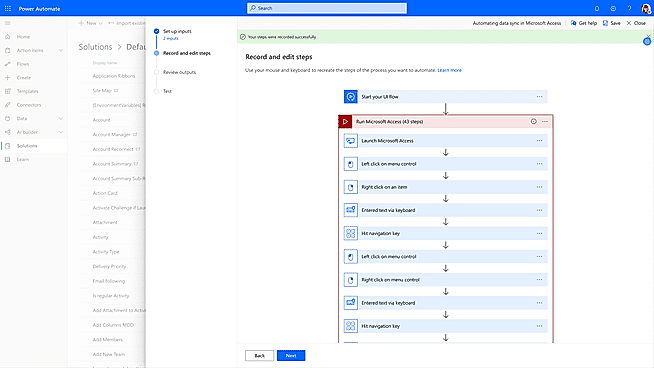
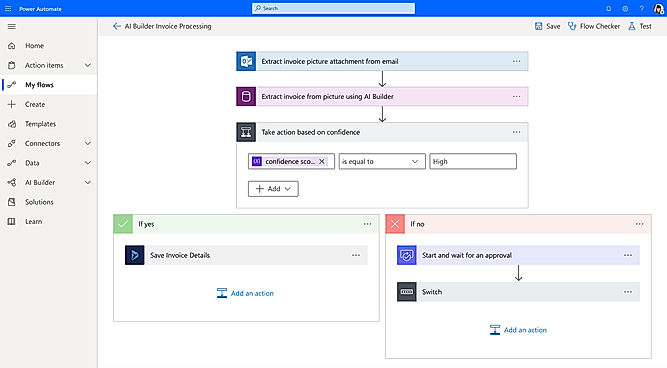
| Description | Process Street is a task management software but can help users with diverse business solutions, as it contains different useful features. This cloud-based task manager comes equipped with business process management features, quality management features, document management features, forms automation features, necessary integration features, and workflow management features. This software is highly beneficial to users in doing task assigning, task scheduling, task tracking and also helps in doing recurring tasks management. The reporting and analytics feature helps users in measuring the task management process and make informed decisions. This can be run on multiple devices. Read more | Kissflow is an automated workflow software which enables processing of business processes by generating and creating innumerable business applications which in turn accelerates workflow, saves on time, increases efficiency at the workplace, and above all, increases accountability at every level and department. It comes with 45 pre-installed applications and users can innovate and build their own applications as per their specification and requirement at the work front. On a single dashboard, it shows the progress reports, as well as the bottlenecks, quickly and intelligently so that immediate necessary actions can be taken without hampering the workflow. Kissflow makes customization of your chosen automated application which works best to the benefit of your business. With Kissflow, you can use diagrams to showcase your workflow, set deadlines, establish conditions and even model your process just as you want it to be. You can now initiate workflows with a single click and even check the status and reports instantly. Read more | Nintex is a workflow automation software that enables optimization, management and automation of business processes using drag and drop designer tools. It creates documents, forms, maps and so on, which in turn enable managing communication and uninterrupted workflow among various departments and teams by syncing and performing tasks in collaboration under one platform. It enables complete control of various tasks on a single dashboard, thereby avoiding cumbersome and different spreadsheets for different work processes. Say goodbye to time-consuming workflow processes and replace them with efficient and meaningful tasking. You can now create your own connectors to sync with the Nintex framework to maintain and view systematic records of your business processes. Its analytical tools help to optimize overall performance of your day-to-day business activities. Read more | Build time-saving workflows into everything from individual tasks to large-scale systems with seamless integration using hundreds of pre-built connectors. Enable everyone to build secure workflows with a no-code guided experience and cloud-based data loss prevention, identity, and access management services. Automate time-consuming manual tasks with built-in AI capabilities, giving you more time to focus on strategic, high-value opportunities. Build powerful end-to-end business solutions by connecting Power Automate across the entire Microsoft Power Platform and to Office 365, Dynamics 365, Azure, and hundreds of other apps to drive innovation across your entire organization. Read more |
| Pricing Options |
|
|
|
|
| SW Score & Breakdown |
|
88% SW Score The SW Score ranks the products within a particular category on a variety of parameters, to provide a definite ranking system. Read more
|
89% SW Score The SW Score ranks the products within a particular category on a variety of parameters, to provide a definite ranking system. Read more
|
87% SW Score The SW Score ranks the products within a particular category on a variety of parameters, to provide a definite ranking system. Read more
|
| Organization Types Supported |
|
|
|
|
| Platforms Supported |
|
|
|
|
| Modes of Support |
|
|
|
|
| API Support |
|
|
|
|
| User Rating |
|
|
|
Not Available
|
| Rating Distribution |
|
|
|
Not Available
|
| User Sentiments |
User-friendly interface, Workflow customization, Extensive integrations, Comprehensive process documentation Steep learning curve, Confusing UI navigation, Limited mobile app functionality, High pricing |
Ease of Use, Excellent Customer Support, Workflow Customization, Extensive Integrations Mobile App Functionality, Occasional Slow Performance, Limited Reporting Features, Occasional Bugs and Errors |
Ease of Use, Drag and Drop Interface, Extensive Integrations, Workflow Automation Occasional Bugs, High Cost, Limited Customizations, Inadequate Documentation |
Not Available
|
| Review Summary |
Overall, users find the software easy to use, customizable, and helpful in streamlining their workflows and processes. They appreciate its user-friendly interface, drag-and-drop functionality, and ability to create detailed process maps. Many users also mention the software's positive impact on collaboration and communication within their teams. However, some users have reported occasional technical issues and a learning curve when first using the software. Additionally, some users have expressed concerns about the pricing structure and the lack of certain features. |
Users generally appreciate KiSSFLOW's user-friendly interface, customizable features, and ability to automate processes. Many reviewers highlight its suitability for businesses of various sizes and industries. The platform is praised for its no-code/low-code capabilities, allowing users to create workflows without extensive technical expertise. Additionally, its integration options and customer support receive positive feedback. However, some users mention limitations in reporting and analytics capabilities and occasional glitches in the software. Overall, reviewers find KiSSFLOW to be a capable and adaptable workflow automation tool that can streamline operations and improve efficiency. |
Nintex is lauded for its user-friendly interface, customizable templates, and robust features that empower users to create sophisticated workflows and automate business processes without coding. It excels in providing solutions for document automation, workflow management, and mobile app development. Users appreciate its seamless integration with Microsoft 365 and SharePoint, enabling efficient collaboration and streamlined processes. Commendations are also given for its exemplary customer support, comprehensive training resources, and active user community. Many reviewers highlight the platform's adaptability to diverse industries and its ability to scale with growing business needs. |
Not Available
|
| Read All User Reviews | Read All User Reviews | Read All User Reviews |
AI-Generated from the text of User Reviews
| Pricing Options |
|
|
|
|
|
Pricing Plans
Monthly Plans
Annual Plans
|
Startup $100.00 $100.00 per month Pro $1,500.00 $1,500.00 per month Enterprise Custom |
Basic $1,500.00 $1,500.00 per month Enterprise Custom |
Nintex Custom |
Power Automate Premium $15.00 $15.00 per user / month Power Automate Process $150.00 $150.00 per month Power Automate Hosted Process $215.00 $215.00 per month |
|
View Detailed Pricing
|
View Detailed Pricing
|
View Detailed Pricing
|
View Detailed Pricing
|
Get personalized recommendations from our experts on call
Trusted by more than 5 Million users across the globe.
Thank you for the enquiry. One of our software analysts will contact you soon.
| Screenshots | Not Available |

|

+ 3 More
|
+ 1 More
|
| Videos |

+ 3 More
|
+ 2 More
|
+ 3 More
|
+ 2 More
|
| Company Details | Located in: San Francisco, CA 94105 Founded in: 2014 | Located in: Mountain View, California | Located in: Bellevue, Washington | Located in: Redmond, Washington |
| Contact Details |
Not available |
+1 (650) 396-7692 |
+1 (425) 324 2400 |
Not available https://www.microsoft.com/en-us/power-platform/products/power-automate |
| Social Media Handles |
|
|
|
|

Looking for the right SaaS
We can help you choose the best SaaS for your specific requirements. Our in-house experts will assist you with their hand-picked recommendations.

Want more customers?
Our experts will research about your product and list it on SaaSworthy for FREE.