get-free-advice
Icon Icon HAPPY THANKSGIVING · SERVE UP BIG SAVINGS ON TOP-RATED SAAS TOOLS
Icon Grab your deals →
Icon HAPPY THANKSGIVING · SERVE UP BIG SAVINGS ON TOP-RATED SAAS TOOLS Icon Grab your deals →
/*
Loading...
*/

About if.team

Clara AI Deep Dive with Clara AI

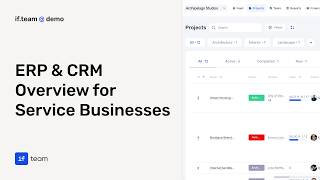
if.team is an all-in-one system for project-based companies: agencies, architecture and design studios, IT teams, consulting firms and nonprofits. Projects. Plan work in List, Kanban, Gantt, Calendar, Planner and Workload views. Each project keeps its tasks, team, documents and budget together. Time and costs. The team logs hours, and if.team calculates project costs from hourly rates. You see budget burn and profitability of every project in real time. Finances. Cash flow, P&L, expenses, payroll and bank transactions in one register, with PrivatBank and Monobank integrations. CRM. Leads, separate sales pipelines, a client base and quotes. A won lead becomes a project together with its tasks, hours and costs. Team. Roles and access rights, schedules, time off and workload by person. Also included: recruiting, a document hub, team and client chats, automations, and mobile apps for iOS and Android. Connect ChatGPT, Claude or Gemini via MCP and ask about projects, hours and finances in plain language. Pricing is per company, not per user: from $30/month for 3 members. Every plan starts with a 7-day free trial.

Read more

Screenshots & Videos

Project finances: budget, costs and profit
CRM: sales pipeline and leads
Team workload by person and project
Video Thumbnail

Pricing

SW Score Breakdown The SW Score breakdown shows individual score for product features.Read more

  • Features The Feature Score % is calculated using the weighted average method, where core features hold more weight in the final calculation. Read more
    60%
  • Reviews
    60%
  • Momentum
    60%
  • Popularity
    60%

Platforms Supported

  • Browser Based (Cloud)
  • Mobile App (Android, iOS)

Organization Types Supported

  • All (Small, Medium, Large)

API Support

  • Available

Modes of Support

  • Business Hours, Online

if.team Features

Professional Services Automation Features

  • Features: The Feature Score % is calculated using the weighted average method, where core features hold more weight in the final calculation. Read more
    60%

Client & Contract Management

Revenue & Profitability Tracking

Project Planning & Scheduling

Project & Resource Management

Reporting & Analytics

Workflow Automation

Automatically execute mundane and repetitive processes or workflow so that employees can focus on productive work

Time & Expense Tracking

Time and Expense is the process of recording and tracking hours worked and expenses as they relate to projects

Billing & Invoicing

Business Management Features

Employee Management

Helps in automating, managing and accessing the data related to the employed staffs, records vital data, etc. in the enterprise

Scheduling

Manages and helps to prepare schedules in an appropriate and timely manner

Financial Management

Handles functions like management of cash and utilisation of funds

CRM

Handles your contact database, follows up with potential customers and keeps them engaged

Time & Expense Tracking

Time and Expense is the process of recording and tracking hours worked and expenses as they relate to projects

Project Management

Helps in managing the projects necessary for streamlining and enhancing the customer relationship management tasks.

Marketing Management

Documents, tracks and also helps to access all data pertaining to the marketing department

Training Management

Automates the documenting processes involved in training management and records the performance of employees during training sessions

Order Management

Helps tracking, monitoring, supervising, and meeting deadlines concerning ordered goods in an automated and systematic way

Vendor Management

Helps to manage necessary data concerning vendors and allows easy access

Inventory Management

Helps in recording inventory to optimize and fulfill the requirement.

Performance Metrics

Helps in measuring the performance, activities, and behavior of the employees/students individually or collectively as a team

Purchasing

Acquiring goods or services required for the business at minimal cost

Billing and Invoicing

This feature helps in issuing and handling the invoice and bills.

CRM Features

AI Assistant

AI Assistant helps you provide information and perform specific tasks to significantly improve your success rate. It can perform one or many tasks like analyzing your deals, contacts, and emails, generating the perfect email, and more.

Advanced Automation

Allows for building smart automation for repetitive tasks, enhancing efficiency and consistency.

Opportunity Management

Opportunity or Pipeline Management allows tracking and managing sales opportunities, including stages of the deal, probability of closing, and associated activities throughout their lifecycle.

Reporting (Analytics)

Provides insightful reports and important business metrics to track and measure the outcomes and progress.

Collaboration Tools

Interactive tools meant to make the application highly collaborative and encourage teamwork

Lead Management

A systemized and organized way of managing all your leads and their conversation.

Quotes (Proposals)

Create effective sales proposals by generating multiple quotes per opportunity

Project Management

Helps in managing the projects necessary for streamlining and enhancing the customer relationship management tasks.

Contact Management

Organizing customer data in a centralized location and handling contact details, demographics, transactions, etc.

Document Management

Ability to store and manage various information and documents in electronic format.

Real-time Data Sync

Allows to synchronize with other systems for up-to-date information across platforms

Omnichannel Customer Engagement

Unified management of customer interactions across multiple channels, including web, mobile, and social media.

Predictive Analytics

Advanced analytics for predicting outcomes based on performance and historical data.

Dedicated Phone Line Integration

Incorporating dedicated phone lines for customer support and sales, enabling direct communication and call tracking

IoT Integration

Leveraging Internet of Things devices for enhanced data collection and analysis

Customer Segmentation

Helps to segment contacts and customers into groups based on various criteria such as demographics, behavior, purchase history, hottest leads

Sales Force Automation

Streamlined management of the sales cycle from lead to close

Customization

Helps to customize the system for use in industry-specific use cases

Territory Management

Helps to assign, manage sales territories and conveniently track their progress

Order Management

Helps tracking, monitoring, supervising, and meeting deadlines concerning ordered goods in an automated and systematic way

List Management

Enables management of multiple lists and communications with them

Customer Support

Ensures after-sales interactions with your customers and solve queries related to your products and services

Marketing Automation

Develop customer relationships, automate marketing programs and measure your marketing ROI

Referral Tracking

Track and manage your referred customers.

Lead Scoring

Lets you manage your prospective leads by scoring them on the basis of their response.

Product Catalog

Lets your sales representatives, as well as customers, view details and prices of each product.

Call Logging

Call Logging helps to register call details such as call duration, date and time of calls, notes, etc.

Project-Based ERP Features

Project Planning & Management

Resource & Capacity Management

Budgeting & Cost Control

Financial Management

Handles functions like management of cash and utilisation of funds

Time & Expense Tracking

Time and Expense is the process of recording and tracking hours worked and expenses as they relate to projects

Procurement & Inventory Management

Billing & Invoicing

Project Management Features

AI Assistant

AI Assistant helps you provide information and perform specific tasks to significantly improve your success rate. It can perform one or many tasks like analyzing your deals, contacts, and emails, generating the perfect email, and more.

Timeline View

Allows to plan and prioritize and visualize tasks in a GANTT chart like horizontal time-axis.

Kanban Board

To visualize the workflow of a project typically representing sticky notes on a white board

Time & Expense Tracking

Time and Expense is the process of recording and tracking hours worked and expenses as they relate to projects

Task Management

Task management is the process of managing a task through its life cycle, including planning, testing, tracking, and reporting.

Status Tracking

Status Tracking refers to the management of projects, which includes but is not limited to measuring and reporting the status of milestones, tasks and activities

Resource Management

Resource management is the process by which businesses manage their various resources effectively. Those resources can be intangible – people and time – and tangible – equipment, materials, and finances.

Project Planning

Project planning is a discipline for stating how to complete a project within a certain timeframe, usually with defined stages, and with designated resources.

Project Portfolio Management

Strategically manages a collection of projects to align with an organization's overall goals.

Milestone Tracking

They act as signposts through the course of your project, as they help to ensure that you're staying on track.

Budget Management

Analyzing financial information to ensure all operations are within budget

Document Management

Ability to store and manage various information and documents in electronic format.

Project Templates

It holds a bundle of built-in templates that can be customized and used in different projects

Idea Management

Facility to receive insights from internal and external stakeholders

Custom Workflows

Facility to create workflows with custom stages, process, and status.

Compliance Management

Helps in making an assessment of risks, ensures policy comprehension and that policies/procedures are being followed

Recurring Task Management

Helps in monitoring and tackling the tasks or responsibilities that are needed to be managed on a recurrent basis

Requirement Management

Requirements management is the process of collecting, analyzing, refining, and prioritizing product requirements and then planning for their delivery.

Percent-Complete Tracking

Percentage of work done on estimated items.

IT Project Management

IT project management is the process of planning, organizing and delineating responsibility for the completion of an organizations' specific information technology (IT) goals.

Issue Management

Issue management is the process of identifying and resolving issues. Problems can be resource constraint, technical failures etc.

Task Management Features

Subtasks

Helps to create and manage subtasks that forms part of a larger piece of work to be done

Deadline Management

Allows to set, track, and manage deadlines for tasks, projects, or goals. It ensures that tasks are completed on time, promoting efficiency and productivity.

Comments (Notes)

To encourage discussion, offer feedback, make a note, or clarify a point within a document or application.

Mobile Access

Allows accessing the software and product/service related information from a mobile device

Time Tracking

Helps in tracking the task assigned to different team members or teams

Task Tracking

Helps in tracking the task assigned to different team members or teams

Task Scheduling

Helps in scheduling various tasks for proper implementation of the same

Task Assigning

Helps in assigning the tasks to a team member individually or the team collectively

Reporting (Analytics)

Provides insightful reports and important business metrics to track and measure the outcomes and progress.

Progress Tracking

Helps in tracking and measuring the progress and developments of a task assigned

Gantt Charts

Helps in providing an overall glimpse of your work to adjust your plans in a calendar view quickly

Collaboration Tools

Interactive tools meant to make the application highly collaborative and encourage teamwork

Resource Management

Resource management is the process by which businesses manage their various resources effectively. Those resources can be intangible – people and time – and tangible – equipment, materials, and finances.

Dependency Management

Helps in identifying, documenting, and managing relationships between tasks, resources, and other projects to ensure a project's smooth progression and timely completion.

To-do List

It helps add a list of tasks you need to complete or things you want to do.

Task Prioritization

Facility to rank the tasks in the order you will do it

Workflow Management

Helps in managing and ensuring smooth flow of the tasks assigned to a team or organization

Recurring Task Management

Helps in monitoring and tackling the tasks or responsibilities that are needed to be managed on a recurrent basis

Gamification

Helps in applying game mechanics to the work environment for better collaboration and engagement

Alerts

Provides reminders or notifications when a deadline is approaching, an upcoming event or a pending task

Percent-Complete Tracking

Percentage of work done on estimated items.

Time Tracking Features

Timesheet Management

Helps to accurately manage timesheet information for easy accessibility

Multiple Billing Rates

Helps in creating customized billable rates for different team members at job

Mobile Time Tracking

Allows tracking time using a mobile device

Billable & Non-billable Hours

Tracks billable and non-billable hours to help in better estimate making and quote clients accordingly

Employee Database

Helps in providing an organized collection of employee data

Leave Tracking (Vacation)

Assist in keeping track of leave and holidays for easing the payment calculation process

Overtime Calculation

Simplifies the process of calculating extra hours worked for by staff or team members

Offline Time Tracking

Enables one to track time in offline mode as well

Automatic Time Capture

Employs data mining tactics to index, cleanse and derive meanings of time-related information on the basis of timestamps

Billing and Invoicing

This feature helps in issuing and handling the invoice and bills.

Resource Management Features

Real-time Dashboard

Provides easy visualization of the latest data

Time Tracking

Helps in tracking the task assigned to different team members or teams

Resource Scheduling

Helps in setting strategies to allocate resources to projects or tasks to complete it correctly and also manage its start/end dates

Multi-Currency

Enables payment and collection in multiple currencies.

Collaboration

Helps you safely share data with only those who matter and enhances your teamwork

Access Control

Defines application access to various users. Includes role-based system that controls options to be displayed to different users based on their role

Workforce Forecasting

Automatically predict future workforce needs based on historical data and proactively plan for shortcomings. It illustrates the staffing plan for a specific time period to effectively address both understaffing and overstaffing concerns.
if.team Pricing

Free Trial

Available

No Credit Card Required, Get Started for Free

Pricing Options

Premium Plans ( Subscription / Quotation Based )

Screenshots of Vendor Pricing Page

Pricing screenshot

Learn more about  if.team Pricing

if.team Alternatives

View All if.team Alternatives

if.team Reviews

Do You Use if.team?

Be The First One To Review!

Write a Review

Videos on if.team

if.team Screenshots

if.team FAQs

Which companies is if.team for?

For project-based companies with 3 to 125+ people: creative and marketing agencies, architecture, interior and design studios, IT and software teams, event agencies, consulting and law firms, and nonprofits. They use if.team to see hours, costs and profit of every project in one system.

Is there a free trial?

Yes. Every plan starts with a 7-day free trial. Sign up on the website and invite your team to test projects, time tracking and finances on real work.

How is if.team priced?

Per company, not per user. Plans start at $30/month for 3 team members and go up to $875/month for 125 members. Yearly billing saves 20%. Recruiting, Quotes and Automations are paid add-ons. Enterprise with 126+ members gets individual pricing.

Can we migrate from other tools?

Yes. Our customers moved to if.team from ClickUp, FinMap and spreadsheets. Book a demo, and we will show how to move your projects, clients and finances.

Is there a mobile app?

Yes, for iOS and Android. In the app you can work with tasks and projects, track time, chat with the team and get notifications.

Does if.team work with AI assistants?

Yes. Connect ChatGPT, Claude or Gemini via MCP on any plan. Ask which projects lost money and why, who is overloaded next week or how much you earned this quarter, and get answers based on your if.team data.

What is if.team used for?

if.team is Professional Services Automation Software. if.team offers the following functionalities:

  • Client & Contract Management
  • Revenue & Profitability Tracking
  • Project Planning & Scheduling
  • Project & Resource Management
  • Reporting & Analytics
  • Workflow Automation
  • Time & Expense Tracking

Learn more about if.team features.

What are the top alternatives for if.team?

Does if.team provide API?

Yes, if.team provides API.

if.team Contact

Vendor Details

Not available

Contact Details

Not available

https://if.team/en

if.team Integrations

FTC Disclosure

SaaSworthy may receive compensation from some vendors featured on this page. This does not influence our editorial evaluation or ratings. [email protected]

We understand SaaS better

SaaSworthy helps stakeholders choose the right SaaS platform based on detailed product information, unbiased reviews, SW score and recommendations from the active community.

icon

Buyers

Looking for the right SaaS

We can help you choose the best SaaS for your specific requirements. Our in-house experts will assist you with their hand-picked recommendations.

icon

Makers

Want more customers?

Our experts will research about your product and list it on SaaSworthy for FREE.

Get Listed