get-free-advice
Clara Icon MEET CLARA - THE AI BEHIND SMARTER SOFTWARE CHOICES

Get Started
/*
Loading...
*/

85% SW Score The SW Score ranks the products within a particular category on a variety of parameters, to provide a definite ranking system. Read more

Microsoft Project logo
View Details
Featured

88% SW Score The SW Score ranks the products within a particular category on a variety of parameters, to provide a definite ranking system. Read more

Zoho Projects logo

Zoho Projects

Project Management Software

4.2 892 user ratings

Visit Website
Featured

95% SW Score The SW Score ranks the products within a particular category on a variety of parameters, to provide a definite ranking system. Read more

monday.com logo

monday.com

Project Management Software

4.5 2,791 user ratings

Visit Website

Overview

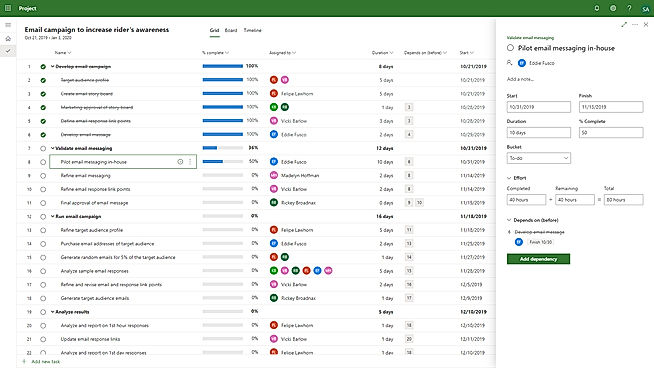
Description Microsoft PPM is a flexible solution for project and project portfolio management, executed through Office 365. This software is useful for individuals, project managers, teams and enterprises. It helps in planning resources, managing schedules, assign and prioritize tasks, collaborating with all the team members effectively, calculating what-if scenarios. It associates a budget with a project work and allocates it as per the task or resource. There is a desktop application available named as Simple Office 365, subscribing to which, the user can get access to their projects from anywhere. Read more Microsoft Project is a smart solution built for enterprises and businesses of all sizes. It’s a powerful project management tool that makes getting started and managing projects simple and easy. Even complex projects can be easily managed with methods and tools that best suit each user’s needs. The tool includes project scheduling and other essential features required for managing processes. Users can easily plan projects with the power of dynamic scheduling tools based on effort needed, allotted team members, and project duration. Managers can create interactive dashboards to view overall status and drill down into the details of the programs and projects using Power BI visualization. Automated workflows can be created with a flexible and secure platform built on Azure. Managers can use projects and teams to empower collaboration and manage projects including file sharing, chats, meetings, and more. Collaboration on projects can be done even when teams are on different continents. Managers can enable team members to update tasks simultaneously so things can be done together and everyone is on the same page. Read more Helps in planning projects, assigning tasks, keeping track on the work progress, managing documents, communicating seamlessly with the team to get the work done on time. Navigates the workflow through mapping out Gantt Charts and time management sheets. Also useful for project budgeting and allocating it as per the resources available. Additionally, it tracks issues associated with the project and manages resolving them. Maintains a database in which, the whereabouts of the employees can be seen along with their skills and availability. You can add unlimited members to your project without spending any extra money. Moreover, a mobile application also available to manage your task on-the-go. Read more With monday.com, managers can better keep their team aligned from one collaborative workspace. This flexible platform allows you to truly centralize your data, leveraging native integrations, third-party apps, and helpful widgets. With an overview of all ongoing processes, you can quickly gauge the status of essential tasks and follow up with the relevant team member efficiently. Essentially, on monday.com, executives have the flexibility to build the perfect tools for their team using intuitive drag-and-drop technology. Simply select one of over 200 templates, and customize it using the 20 editable columns to support any of your workflows. Then if your team grows, your workflows can easily scale with you, empowering your team to new heights with complete visibility. Read more
Pricing Options
  • Free Trial Available
  • Starts at $10.00. Offers Custom plan.
  • Free Trial Available
  • Starts at $10.0. Offers Custom plan.
  • Free Trial Available
  • Starts at $4.0. Offers Free-forever and Custom plan.
  • Free Trial Available
  • Starts at $9.00. Offers Free-forever and Custom plan.
SW Score & Breakdown

85% SW Score The SW Score ranks the products within a particular category on a variety of parameters, to provide a definite ranking system. Read more

  • Features The Feature Score % is calculated using the weighted average method, where core features hold more weight in the final calculation. Read more
    96%
  • Reviews
    60%
  • Momentum
    60%
  • Popularity
    63%

88% SW Score The SW Score ranks the products within a particular category on a variety of parameters, to provide a definite ranking system. Read more

  • Features The Feature Score % is calculated using the weighted average method, where core features hold more weight in the final calculation. Read more
    100%
  • Reviews
    60%
  • Momentum
    60%
  • Popularity
    65%

95% SW Score The SW Score ranks the products within a particular category on a variety of parameters, to provide a definite ranking system. Read more

  • Features The Feature Score % is calculated using the weighted average method, where core features hold more weight in the final calculation. Read more
    100%
  • Reviews
    74%
  • Momentum
    72%
  • Popularity
    69%
SaaSworthy Awards
Not Available
# 19 Most Popular # 16 Most Popular # 4 Fastest Growing # 18 Most Popular # 3 Most Worthy # 4 Highly Rated

Technical Details

Organization Types Supported
  • Freelancers
  • Large Enterprises
  • Medium Business
  • Small Business
  • Freelancers
  • Large Enterprises
  • Medium Business
  • Small Business
  • Freelancers
  • Large Enterprises
  • Medium Business
  • Small Business
  • Freelancers
  • Large Enterprises
  • Medium Business
  • Small Business
Platforms Supported
  • SaaS/Web/Cloud
  • Mobile - Android
  • Mobile - iOS
  • Installed - Windows
  • Installed - Mac
  • SaaS/Web/Cloud
  • Mobile - Android
  • Mobile - iOS
  • Installed - Windows
  • Installed - Mac
  • SaaS/Web/Cloud
  • Mobile - Android
  • Mobile - iOS
  • Installed - Windows
  • Installed - Mac
  • SaaS/Web/Cloud
  • Mobile - Android
  • Mobile - iOS
  • Installed - Windows
  • Installed - Mac
Modes of Support
  • 24/7 (Live rep)
  • Business Hours
  • Online
  • 24/7 (Live rep)
  • Business Hours
  • Online
  • 24/7 (Live rep)
  • Business Hours
  • Online
  • 24/7 (Live rep)
  • Business Hours
  • Online
API Support
  • NA
  • Available
  • Available
  • Available

Reviews & Ratings

User Rating
Not Available
4.2/5 1,659 user ratings
4.2/5 892 user ratings
4.5/5 2,791 user ratings
Rating Distribution
Not Available
  • Excellent

    42.6%
  • Very Good

    40.9%
  • Average

    12.5%
  • Poor

    2.5%
  • Terrible

    1.4%
  • Excellent

    42.6%
  • Very Good

    44.8%
  • Average

    7.4%
  • Poor

    0.7%
  • Terrible

    4.5%
  • Excellent

    72.9%
  • Very Good

    15.8%
  • Average

    1.9%
  • Poor

    2%
  • Terrible

    7.3%
User Sentiments

    Gantt Chart Functionality, Project Scheduling Capabilities, Ease of Use, Extensive Integrations with Microsoft Products

    Steep Learning Curve, Limited Third-Party Integrations, High Cost, Occasional Software Glitches

    Project Planning Capabilities, Ease of Use, Integration with Microsoft Products, Robust Reporting and Analytics

    High Cost, Steep Learning Curve, Limited Third-Party Integrations, Complex for Small Projects

    User-friendly Interface, Extensive Project Management Features, Comprehensive Collaboration Features, Seamless Integrations with Other Zoho Apps

    Limited Third-Party Integrations, Occasional Performance Issues/Slow Loading Times, Limited Mobile App Functionality, Complex Customization Options

    User-friendly Interface, Extensive Customization, Effective Team Collaboration, Robust Automations

    Mobile App Functionality, Limited Sub-Item Functionality, Inconsistent Notifications, Slow Loading Times

Review Summary

Microsoft Project is lauded for its robust features, including Gantt charts, resource management, budgeting, and reporting capabilities. Users appreciate its intuitive interface, ease of use, and seamless integration with other Microsoft products. Additionally, its compatibility with various platforms and devices, including mobile apps, is a significant advantage. However, some users mention occasional bugs, limited customization options, and a steep learning curve for advanced features. Overall, Microsoft Project is a reliable and comprehensive project management solution suitable for businesses of all sizes and industries.

Overall, user reviews suggest that the software is comprehensive and powerful, with a wide range of features and customization options. Praises were given for its integration with other Microsoft products, as well as its robust reporting and collaboration capabilities. However, some users found it complex and challenging to learn, with a steep learning curve. Additionally, concerns were raised regarding its cost and occasional technical issues.

Reviewers generally agree that Zoho Projects is a user-friendly and affordable project management tool with a wide range of features. It is praised for its intuitive interface, ease of use, and customizable features. Many users appreciate its Gantt charts, timesheets, and reporting capabilities. However, some reviewers mention occasional bugs and limitations in certain functionalities. Additionally, the mobile app is sometimes criticized for its lack of features and stability. Overall, Zoho Projects is a solid choice for teams seeking a user-friendly and feature-rich project management solution.

Overall, users praise the user-friendly interface, customization options, and ability to manage projects and tasks efficiently. They also appreciate the integrations with other tools and the mobile app. However, some users mention occasional glitches and a learning curve for new users. While customer support is generally well-received, some users report slow response times. Nevertheless, the majority of users find the platform valuable for project management and collaboration, highlighting its flexibility, ease of use, and positive impact on their productivity.

  Read All User Reviews Read All User Reviews Read All User Reviews

AI-Generated from the text of User Reviews

Pricing

Pricing Options
  • Free Trial Available
  • Starts at $10.00. Offers Custom plan.
  • Free Trial Available
  • Starts at $10.0. Offers Custom plan.
  • Free Trial Available
  • Starts at $4.0. Offers Free-forever and Custom plan.
  • Free Trial Available
  • Starts at $9.00. Offers Free-forever and Custom plan.
Pricing Plans
Monthly Plans Annual Plans

Project Plan 1 (Cloud-based Solutions) $10.00 $10.00 per user / month

Project Plan 3 (Cloud-based Solutions) $30.00 $30.00 per user / month

Project Plan 5 (Cloud-based Solutions) $55.00 $55.00 per user / month

Project Standard 2021 (On-Premise Solutions) $679.99 $679.99 One-Time License

Project Professional 2021 (On-Premise Solutions) $1,129.99 $1,129.99 One-Time License

Project Server (On-Premise Solutions) Custom

Microsoft Planner Others

Project Plan 1 $10.00 $10.00 per user / month

Planner and Project Plan 3 $30.00 $30.00 per user / month

Planner and Project Plan 5 $55.00 $55.00 per user / month

Project Standard 2024 Others

Project Professional 2024 Others

Project Server Custom

Free Free

Premium $4.00 $5.00 per user / month

Enterprise $9.00 $10.00 per user / month

Projects Plus Custom

Free Free

Basic $9.00 $12.00 per user / month

Standard $12.00 $14.00 per user / month

Pro $19.00 $24.00 per user / month

Enterprise Custom

 
View Detailed Pricing

Have Questions? We can help!

Get personalized recommendations from our experts on call

Call Me

Trusted by more than 5 Million users across the globe.

Thank you for the enquiry. One of our software analysts will contact you soon.

Screenshots & Videos

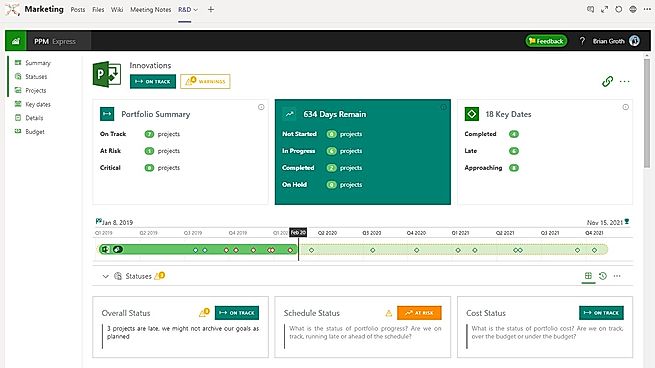
Screenshots PPM Express
+ 1 More
Not Available Blueprint
+ 11 More
Columns
+ 20 More
Videos Video Thumbnail Video Thumbnail Video Thumbnail
+ 4 More
Video Thumbnail
+ 3 More

Vendor information

Company Details Located in: Redmond, Washington Located in: Redmond, Washington Located in: Pleasanton, California - 94588 Located in: New York, NY 10003 Founded in: 2012
Contact Details

1 (800) 642-7676

https://www.microsoft.com/en-us/microsoft-365/project/project-portfolio-management

Not available

https://www.microsoft.com/en-us/microsoft-365/project/project-management

+1 844-584-2497

https://www.zoho.com/projects/

Not available

https://monday.com

Social Media Handles

Not available

We understand SaaS better

SaaSworthy helps stakeholders choose the right SaaS platform based on detailed product information, unbiased reviews, SW score and recommendations from the active community.

icon

Buyers

Looking for the right SaaS

We can help you choose the best SaaS for your specific requirements. Our in-house experts will assist you with their hand-picked recommendations.

icon

Makers

Want more customers?

Our experts will research about your product and list it on SaaSworthy for FREE.

Get Listed