MEET CLARA - THE AI BEHIND SMARTER SOFTWARE CHOICES
MEET CLARA - THE AI BEHIND SMARTER SOFTWARE CHOICES
MEET CLARA - THE AI BEHIND SMARTER SOFTWARE CHOICES
|
91% SW Score The SW Score ranks the products within a particular category on a variety of parameters, to provide a definite ranking system. Read more 
View Details
|
96% SW Score The SW Score ranks the products within a particular category on a variety of parameters, to provide a definite ranking system. Read more 
View Details
|
89% SW Score The SW Score ranks the products within a particular category on a variety of parameters, to provide a definite ranking system. Read more 
View Details
|
89% SW Score The SW Score ranks the products within a particular category on a variety of parameters, to provide a definite ranking system. Read more 
View Details
|
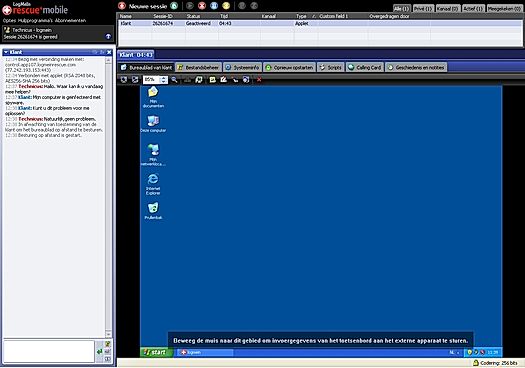
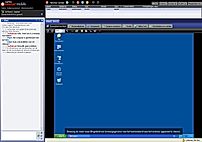
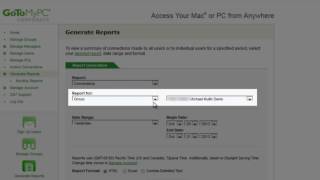
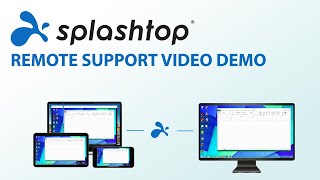
| Description | GoToMyPC remote access software ensure high-speed connection and user access control. It offers multi-platform remote support across multiple devices. Users will find it possible to do print documents stored in remote computers using a connected printer nearby. One can reboot anytime an unattended system and also ensure its instant reconnection from remote locations. Smart remote diagnostic tools help in identifying the issues faster. LogMeIn comes designed thoughtfully with an array of suitable features like remote control, clipboard sync, whiteboard drawing, remote deployment, wakeon LAN, file storage, file sharing, multi-monitor navigation, endpoint management etc. Read more | TeamViewer solutions are now smarter with AI, offering fast and reliable support to track issues, identify trends, and resolve problems before they impact users. With AI-powered features, users can proactively address issues, ensuring seamless IT support on a secure-by-design platform. Troubleshoot customer machinery remotely in seconds using Smart Service, or rely on TeamViewer’s secure remote connectivity to solve problems quickly and efficiently. As the world’s largest and fastest remote connection network, TeamViewer provides everything required to manage computers, servers, and devices from anywhere. It’s the ultimate enterprise remote support tool, offering industrial-grade remote control, desktop sharing, online meetings, network monitoring, malware protection, and secure file transfers. Whether for IT professionals or businesses, TeamViewer ensures unmatched reliability and security in remote support, making it the only tool to stay connected and in control. Read more | Splashtop Remote Support is endpoint management and remote support software developed specifically for MSPs to facilitate easy connection of their client’s computers with remote access. It simplifies the process of remotely accessing, monitoring, and managing several computers. It is an ideal software for entrepreneurs, corporate teams, and IT professionals as it allows them to make use of its features to control their systems remotely, and hassle-free. Splashtop is a high-tech, powerful, and dependable remote desktop connectivity manager. It's tailored to managed service providers, IT experts, and help desk personnel. Splashtop Remote Support uses a strong high-performance engine to provide the best possible experience. You can also use it to simultaneously see numerous remote screens from multi-monitor setups. Security features such as TLS and 256-bit AES encryption, device authentication, and two-step verification secures all remote sessions. User satisfaction with Splashtop remote access is at an all-time high. It is the best in the market and has no competition. You can use choose this amazing product without an iota of doubt. You get a free trial, a mobile application for iOS, Android, Mac, and Windows, and some affordable premium plans starting at just $25 per month. Read more | Rescue Enterprise Remote Support software is designed to tackle any challenge. Start a remote support session instantly on any device—mobile, tablet, or computer—with Rescue. Access system information, control devices, push configurations, and integrate with apps, whether in or outside the network. Built-in features like permission-based security, PIN validation, IP restrictions, data residency, SSO, AD Sync, and 256-bit AES encryption ensure top-notch protection. Rescue empowers help desk technicians to resolve issues quickly, even on inactive devices, minimizing interruptions. Its customizable interface allows enterprises to personalize every element of customer support, from branding and chat tools to the SDK and over 10 connection methods. Manage everything in a centralized command center, enabling custom security settings, session recording, real-time performance monitoring, and building unlimited user groups. Seamlessly integrate Rescue into the processes to deliver efficient, secure, and uninterrupted remote desktop support for the customers and employees.. Read more |
| Pricing Options |
|
|
|
|
| SW Score & Breakdown |
91% SW Score The SW Score ranks the products within a particular category on a variety of parameters, to provide a definite ranking system. Read more
|
96% SW Score The SW Score ranks the products within a particular category on a variety of parameters, to provide a definite ranking system. Read more
|
89% SW Score The SW Score ranks the products within a particular category on a variety of parameters, to provide a definite ranking system. Read more
|
89% SW Score The SW Score ranks the products within a particular category on a variety of parameters, to provide a definite ranking system. Read more
|
| SaaSworthy Awards |
Not Available
|
# 2 Most Worthy # 1 Fastest Growing |
Not Available
|
Not Available
|
| Total Features |
7 Features
|
9 Features
|
8 Features
|
9 Features
|
| Common Features for All |
Access Control
Feedback Collection
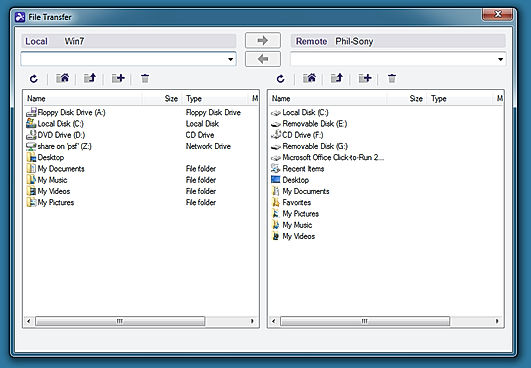
File Transfer
Live Chat
Remote Control
Screen Sharing
Session Recording
|
Access Control
Feedback Collection
File Transfer
Live Chat
Remote Control
Screen Sharing
Session Recording
|
Access Control
Feedback Collection
File Transfer
Live Chat
Remote Control
Screen Sharing
Session Recording
|
Access Control
Feedback Collection
File Transfer
Live Chat
Remote Control
Screen Sharing
Session Recording
|
| Unique Features |
Diagnostic Tools
Session Transfer
|
Diagnostic Tools
Session Transfer
|
Diagnostic Tools
Session Transfer
|
Diagnostic Tools
Session Transfer
|
| Organization Types Supported |
|
|
|
|
| Platforms Supported |
|
|
|
|
| Modes of Support |
|
|
|
|
| API Support |
|
|
|
|
| User Rating |
|
|
|
|
| Rating Distribution |
|
|
|
|
| User Sentiments |
Ease of Use, Secure remote access, Remote printing functionality, Reliable connectivity High cost, Occasional connectivity issues, Lag/slow performance, Short inactivity timeout |
Ease of Use, Fast and Reliable Connection, Excellent Customer Service, Free for Personal Use Complex New User Interface, Falsely Flagged as Commercial Use, Occasional Connection Issues, Slow File Transfer Speeds |
Ease of Use, Fast Connection Speeds, Reliable Remote Access, Cost-Effective Pricing Occasional Software Crashes, Mobile App Limitations, Inconsistent Remote Printing Functionality, Technical Limitations with Third-Party Integrations |
Remote Access, Ease of Use, Unattended Access, Robust Features Connectivity Issues, Pricing, Mobile Support, Clunky UI |
| Review Summary |
Reviewers praise GotoMyPC's remote access capabilities, highlighting its ease of use, fast connection speeds, and reliable performance. They appreciate the ability to access their computers from anywhere, enabling them to work remotely or collaborate with colleagues. The software's compatibility with various devices and operating systems is also seen as a major advantage. However, some users have reported occasional connection issues and glitches, emphasizing the need for stable internet connectivity. Additionally, the pricing plans may be perceived as relatively expensive compared to alternatives. |
TeamViewer is generally well-received by users for its remote access and support capabilities, receiving positive feedback for its ease of use, cross-platform compatibility, and reliable performance. The software is lauded for its user-friendly interface, making it accessible to users of varying technical expertise. Additionally, users appreciate the range of features offered, including screen sharing, file transfer, and remote control, which enhance collaboration and troubleshooting processes. However, some users have reported occasional connectivity issues and concerns regarding the cost of certain features. Overall, TeamViewer is considered a dependable and effective solution for remote access and support, with a user-friendly interface and a comprehensive set of features. |
Splashtop Remote Support is generally well-received by users. Reviewers appreciate its ease of use, reliability, and wide range of features for remote desktop access and support. The software is praised for its fast connection speeds, simple user interface, and compatibility with various devices. Additionally, Splashtop's customer support is often commended for being responsive and helpful. However, some users have reported occasional connection issues and difficulties with certain features. Overall, Splashtop Remote Support is considered a reliable and user-friendly solution for remote access and support. |
Overall, users appreciate LogMeIn Rescue for its remote access capabilities, ease of use, and quick setup. The software's ability to resolve issues promptly, its compatibility with various devices, and the option for unattended access are also praised. However, some users have faced occasional connection issues, limitations in file transfer functionality, and concerns about the pricing structure. Additionally, there have been reports of rare instances of slow response times or lags during remote sessions. |
| Read All User Reviews | Read All User Reviews | Read All User Reviews | Read All User Reviews |
AI-Generated from the text of User Reviews
| Pricing Options |
|
|
|
|
|
Pricing Plans
Monthly Plans
Annual Plans
|
Personal $35.00 $35.00 per user / month Pro $33.00 $33.00 per month Corporate $280.00 $280.00 per month |
TeamViewer Remote Access $24.90 $24.90 per month TeamViewer Business (For Single Users) $50.90 $50.90 per month TeamViewer Premium $112.90 $112.90 per month TeamViewer Corporate $229.90 $229.90 per month TeamViewer Tensor Custom |
Solo (Remote Work & Access) $3.00 $3.00 per month Pro (Remote Work & Access) $8.25 $8.25 per user / month Performance (Remote Work & Access) $13.00 $13.00 per user / month Enterprise (Remote Work & Access) Custom SOS (Remote IT & Support) $22.00 $22.00 per month Enterprise (Remote IT & Support) Custom |
Remote Device Support $108.25 $108.25 per month Live Lens Custom |
|
View Detailed Pricing
|
View Detailed Pricing
|
View Detailed Pricing
|
View Detailed Pricing
|
Get personalized recommendations from our experts on call
Trusted by more than 5 Million users across the globe.
Thank you for the enquiry. One of our software analysts will contact you soon.
| Screenshots | Not Available |
+ 1 More
|
+ 2 More
|
|
| Videos |
+ 1 More
|
+ 2 More
|
+ 2 More
|

|
| Company Details | Located in: California, United States | Located in: Göppingen, Germany Founded in: 2005 | Located in: San Jose, CA - 95129 Founded in: 2006 | Located in: Boston, Massachusetts |
| Contact Details |
Not available |
+49 7161 305898581 |
+1-408-861-1088 |
Not available |
| Social Media Handles |
|
|
|
|

Looking for the right SaaS
We can help you choose the best SaaS for your specific requirements. Our in-house experts will assist you with their hand-picked recommendations.

Want more customers?
Our experts will research about your product and list it on SaaSworthy for FREE.