MEET CLARA - THE AI BEHIND SMARTER SOFTWARE CHOICES

PostgreSQL Data Access Components |
90% SW Score The SW Score ranks the products within a particular category on a variety of parameters, to provide a definite ranking system. Read more 
View Details
|
85% SW Score The SW Score ranks the products within a particular category on a variety of parameters, to provide a definite ranking system. Read more 
Visit Website
|
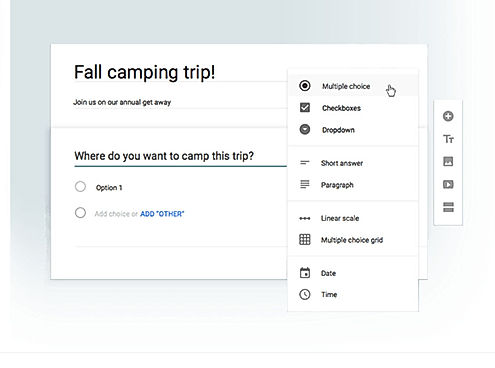
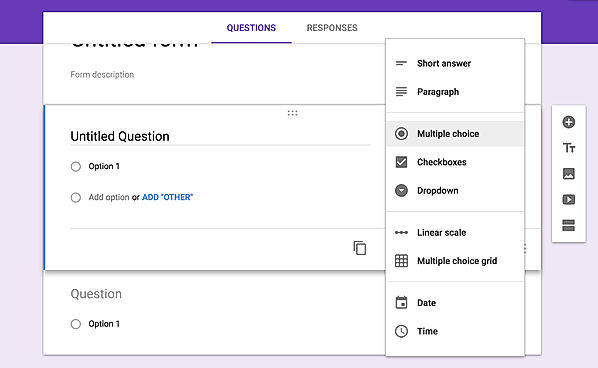
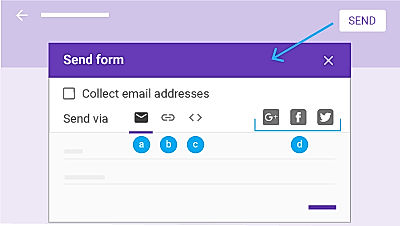
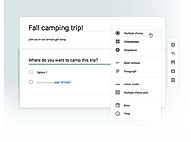
| Description | Google excels in the online form builder arena like any other field. Google Forms come as a part of the Google Drive Suite that features tools like Docs, Sheets, etc. There is a pretty good number of pre-installed themes to choose from to cater to all the segments, be it survey, registration, contact, etc. It has a straightforward building user interface and much easy to use. The users can include multiple question types, including short answers, multiple choices, dropdowns, checkboxes, etc. It even has a photo and video field. Each of the fields has a copy button, in case the users need to add a similar question to different forms. Responses can be received over the email or collected in Google Sheets. After the form has been made, the users can add collaborators by sharing and can even embed it in websites using the code. Hence, with ease of usage, it is definitely the easiest way to get going with the survey or registration. Read more | Microsoft Access is a powerful database management system from Microsoft designed to provide a graphical user interface and software-development tools in combination with the relational Access Database Engine. It is a part of the Microsoft 365 suite of applications, which is either available in the Professional and higher editions or can be purchased as a separate product. Microsoft Access is a great choice for businesses of all sizes who require a comprehensive database management solution. It provides users with intuitive tools to easily store, manage, and analyze data. It is highly extensible and customizable, allowing users to tailor it to their needs. Microsoft Access also offers a wide range of features and capabilities, making it an ideal choice for those who want to manage large amount of data in an efficient and organized manner. Read more |
| Pricing Options |
|
|
| SW Score & Breakdown |
90% SW Score The SW Score ranks the products within a particular category on a variety of parameters, to provide a definite ranking system. Read more
|
85% SW Score The SW Score ranks the products within a particular category on a variety of parameters, to provide a definite ranking system. Read more
|
| SaaSworthy Awards | # 7 Highly Rated # 19 Fastest Growing |
Not Available
|
| Organization Types Supported |
|
|
| Platforms Supported |
|
|
| Modes of Support |
|
|
| API Support |
|
|
| User Rating |
|
Not Available
|
| Rating Distribution |
|
Not Available
|
| User Sentiments |
Ease of Use, Free of Cost, Data Collection efficiency, Integration with Google Sheets Limited Design Customization, Lack of Advanced Features, Limited Offline Functionality, Limited Question Types |
Not Available
|
| Review Summary |
Overall, Google Forms is a user-friendly and versatile form builder that allows users to easily create and customize forms for various purposes. It offers a wide range of features, including templates, drag-and-drop functionality, conditional logic, and collaboration tools. Users appreciate its ease of use, integration with other Google products, and the ability to share and collaborate on forms. However, some users have reported occasional issues with data loss, limited customization options, and the lack of advanced features found in more comprehensive form builder tools. |
User reviews highlight Microsoft Access as a valuable tool for small and medium-sized organizations, particularly for managing data locally and creating custom databases. Its strengths lie in its user-friendly interface, readily available templates, and integration with other Microsoft Office products. Users praise Access's versatility, making it suitable for various tasks from contact management to inventory tracking. However, common concerns include limited scalability for large datasets, potential data corruption issues, and a somewhat dated interface. While Access can be a good starting point for database management, users often find themselves seeking more robust solutions as their needs evolve. |
| Pros & Cons |
|
|
| Read All User Reviews |
AI-Generated from the text of User Reviews
| Pricing Options |
|
|
|
Pricing Plans
Monthly Plans
Annual Plans
|
Google Forms Free |
Microsoft 365 Business Basic $6.00 $6.00 per user / month Microsoft 365 Apps for business $8.25 $8.25 per user / month Microsoft 365 Business Standard $12.50 $12.50 per user / month Microsoft 365 Business Premium $22.00 $22.00 per user / month Microsoft 365 Family $8.33 $9.99 per month Microsoft 365 Personal $5.80 $6.99 per month |
|
View Detailed Pricing
|
View Detailed Pricing
|
Get personalized recommendations from our experts on call
Trusted by more than 5 Million users across the globe.
Thank you for the enquiry. One of our software analysts will contact you soon.
| Screenshots |
+ 3 More
|

+ 2 More
|
| Videos |

+ 2 More
|
Not Available |
| Company Details | Located in: United States | Founded in: 2019 |
| Contact Details |
Not available |
Not available |
| Social Media Handles |
Not available |
Not available |
What are the key features of Google Forms?
What are the alternatives to Google Forms?
Can I collaborate on forms in Google Forms?
What are the key features of Microsoft Access?
What are the alternatives to Microsoft Access?
What are the key features of Google Forms?
What are the key features of Microsoft Access?
What are the alternatives to Google Forms?
What are the alternatives to Microsoft Access?
What are the key differences between Google Forms and Microsoft Access?

Looking for the right SaaS
We can help you choose the best SaaS for your specific requirements. Our in-house experts will assist you with their hand-picked recommendations.

Want more customers?
Our experts will research about your product and list it on SaaSworthy for FREE.