MEET CLARA - THE AI BEHIND SMARTER SOFTWARE CHOICES



Ayoa |
95% SW Score The SW Score ranks the products within a particular category on a variety of parameters, to provide a definite ranking system. Read more 
View Details
|
85% SW Score The SW Score ranks the products within a particular category on a variety of parameters, to provide a definite ranking system. Read more 
View Details
|
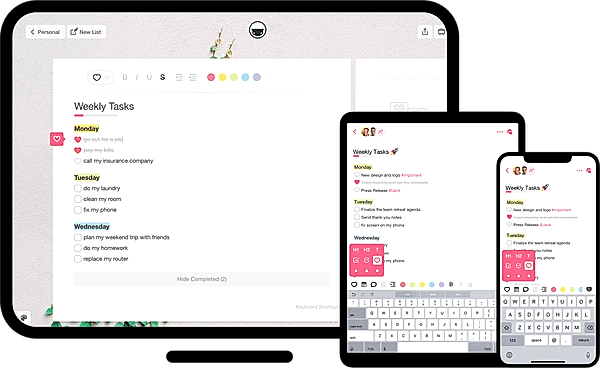
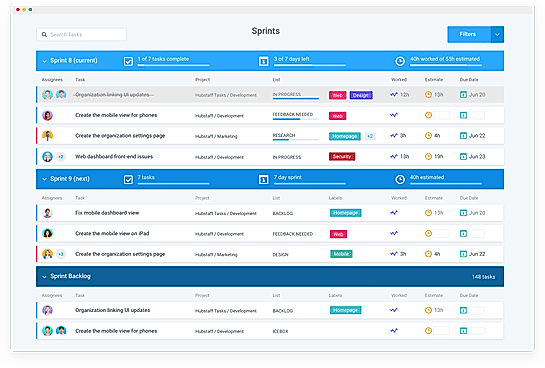
| Description | Taskade allows users to create tasks, manage notes, and collaborate via video calls in a single power-packed tool. The tool is available on all platforms, including mobile, web, and desktop. This includes Android, iOS, Chrome, Firefox, Mac, and Windows. All the user has to do is go to the app or website and start making lists at the click of a button. It lets users to neatly segregate the tasks into different lists such as the important (or priority) list, the Todo list, and even Notes. For users who want to get started right away, Taskade provides some handy templates based on the use cases or need of the hour. This includes the ability to plan the week ahead with the Weekly tasks lists. Users can even use a Bullet Journal to organize tasks or deploy a Brainstorming list that lets them funnel all great ideas into a simple list. Read more | Hubstaff Tasks is a piece of software that allows members of a team to collaborate, organize projects, and prioritize tasks. Custom workflows may be quickly set up so that you can move jobs forward with a single click and bypass all the processes of alerting and assigning others. You may construct projects and plan your week at the same time with Hubstaff Tasks. Keeping team members on track and focused on main priorities is also important. Using a combination of automation and collaboration tools, you may develop Kanban boards that prevent repetitive, time-consuming processes. When a task progresses to the next step, you can construct workflows that assign the task to the appropriate individual automatically. You can check who is allocated to each work and add followers to receive regular project updates. You'll know how long each task took, making it simple to compare the hours performed to your estimations. Display only the Sprints in which you participated, or filter them by specific team members and teams, using toggle filters. Additionally, you may see how many days, tasks, and projected hours are left in each Sprint by using visual deadlines. Read more |
| Pricing Options |
|
|
| SW Score & Breakdown |
95% SW Score The SW Score ranks the products within a particular category on a variety of parameters, to provide a definite ranking system. Read more
|
85% SW Score The SW Score ranks the products within a particular category on a variety of parameters, to provide a definite ranking system. Read more
|
| SaaSworthy Awards | # 9 Fastest Growing # 10 Most Popular |
Not Available
|
| Total Features |
10 Features
|
7 Features
|
| Common Features for All |
Alerts
Collaboration Tools
Gantt Charts
Progress Tracking
Recurring Task Management
Reporting (Analytics)
Task Assigning
Task Scheduling
Task Tracking
Time Tracking
|
Alerts
Collaboration Tools
Gantt Charts
Progress Tracking
Recurring Task Management
Reporting (Analytics)
Task Assigning
Task Scheduling
Task Tracking
Time Tracking
|
| Organization Types Supported |
|
|
| Platforms Supported |
|
|
| Modes of Support |
|
|
| API Support |
|
|
| User Rating |
|
|
| Rating Distribution |
|
|
| User Sentiments |
User-Friendly Interface, Cross-Platform Functionality, Extensive Template Library, Seamless Team Collaboration Limited Third-Party Integrations, Occasional Software Glitches, Insufficient AI Credits, Limited Customization Options |
Not Available
|
| Review Summary |
Users praise Taskade for its user-friendly interface, ease of use, and collaborative features. They appreciate the ability to create and share tasks, notes, and projects with team members in real-time. The platform's intuitive design and seamless integration with other tools enhance productivity and streamline workflows. However, some users have expressed concerns about occasional glitches and the need for more customization options. Overall, Taskade is highly regarded for its simplicity, collaboration capabilities, and positive impact on team productivity. |
Not Available
|
| Read All User Reviews | Read All User Reviews |
AI-Generated from the text of User Reviews
| Pricing Options |
|
|
|
Pricing Plans
Monthly Plans
Annual Plans
|
Free Free Taskade Pro $10.00 $20.00 per month Taskade for Teams $50.00 $100.00 per month Enterprise Custom |
Free Free Premium $4.17 $5.00 per user / month |
|
View Detailed Pricing
|
View Detailed Pricing
|
Get personalized recommendations from our experts on call
Trusted by more than 5 Million users across the globe.
Thank you for the enquiry. One of our software analysts will contact you soon.
| Screenshots |
|
|
| Videos |
+ 2 More
|
|
| Company Details | Located in: New York, NY Founded in: 2017 | Located in: Indianapolis , Indiana |
| Contact Details |
+1 415-888-9177 |
Not available |
| Social Media Handles |
|
|

Looking for the right SaaS
We can help you choose the best SaaS for your specific requirements. Our in-house experts will assist you with their hand-picked recommendations.

Want more customers?
Our experts will research about your product and list it on SaaSworthy for FREE.