MEET CLARA - THE AI BEHIND SMARTER SOFTWARE CHOICES



98% SW Score The SW Score ranks the products within a particular category on a variety of parameters, to provide a definite ranking system. Read more
More Than Scheduling, It’s Resource Intelligence
This profile is currently managed by the official vendor through the SaaSworthy Vendor Portal. Product details, features, pricing, and media assets are maintained directly by the company.

 Deep Dive with Clara AI
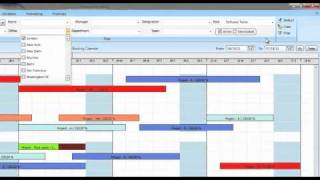
eResource Scheduler is enterprise resource scheduling software built for leaders who want clarity without complexity. It replaces outdated spreadsheets with a live view of schedules, capacity, availability, timesheets, and financials, so planning decisions are made with confidence, not assumptions. The eRS mobile app enables teams to view schedules, enter and approve timesheets, and receive real-time updates anytime, anywhere. From lean teams to global workforces, eRS combines drag and drop scheduling, resource requests, and semi-auto scheduling to surface demand early and expose bottlenecks before they impact delivery. Cost, revenue, and margin tracking stay connected to real allocation data, not after-the-fact reports. Trusted across consulting, engineering, construction, accounting, and creative organizations, eRS is resource management and scheduling software that scales with the business. Teams stay aligned, projects stay predictable, and utilization stays optimized without adding operational noise.
Read more


Pricing
SW Score Breakdown
Platforms Supported
Organization Types Supported
API Support
Modes of Support
Real-time Dashboard
Provides easy visualization of the latest dataWorkforce Forecasting
Automatically predict future workforce needs based on historical data and proactively plan for shortcomings. It illustrates the staffing plan for a specific time period to effectively address both understaffing and overstaffing concerns.Resource Scheduling
Helps in setting strategies to allocate resources to projects or tasks to complete it correctly and also manage its start/end datesWorkforce Forecasting
Automatically predict future workforce needs based on historical data and proactively plan for shortcomings. It illustrates the staffing plan for a specific time period to effectively address both understaffing and overstaffing concerns.Mobile App
Helps your team to stay top on the business everywhereFace Recognition
A biometric verification method that identifies or verifies a person by analysing their unique facial features.Performance Scorecards
Assists in systematically evaluating and displaying employee performance metricsMulti-branch / Location Management
Helps to oversee operations across multiple sites or geographical locations.Location-based Scheduling
Helps to assign shifts based on geographic location preferences or requirements.International Usability
Enables adaptation and functioning across various countriesEmployee Dashboard
Central interface for employees to view tasks, schedules, and performance metrics.Leave Management
Track and approve employee leave requests systematicallyShift Scheduling
Efficiently allocate and manage employee work shifts to optimize productivity and operational effectivenessProcess Automation
Reduce manual tasks through automated systems and workflowsRegulations Enforcement
Allows to implement and monitor adherence to specific industry or legal standardsAI Powered Labor Optimization
Use artificial intelligence to predict and allocate staffing demands efficientlyGeofence
Offers location-based controls and security, crucial for mobile or field workforcesStaff Notification
Alerts the employee via email, text, and push notifications upon any new events or changes.Compliance Management
Helps in making an assessment of risks, ensures policy comprehension and that policies/procedures are being followedBenchmarking
Setting up standards and targets for your team and team members, so that they are performing at their bestWorkforce Forecasting
Automatically predict future workforce needs based on historical data and proactively plan for shortcomings. It illustrates the staffing plan for a specific time period to effectively address both understaffing and overstaffing concerns.Real-time Reporting
Allows users to check campaign real-time status as it happensDrag and drop Builder
Has a pick-and-drop visual interface for easier designingEmployee Timeclock
Seamlessly record time in/out of the shifts and export timesheets to payroll platform.Shift Swapping
Allow employees to exchange shifts with other qualified employees conveniently.Staff Notification
Alerts the employee via email, text, and push notifications upon any new events or changes.Employee Portal
User panel for employees to view, manage their information and requestsAutomated Scheduling
Helps to automate the scheduling processes to reduce paperwork, provide a comprehensive solution and ensure timely updatesReminders
Sends important reminders through email to attendeesFree Trial
Available
No Credit Card Required, Get Started for Free
Scheduling Module (Core) $5.00 $6.25 per user / month
Scheduling Plus $2.00 $3.00 per user / month
Timesheets Module $4.00 $5.00 per user / month
Financial Module $3.00 $4.00 per user / month
Authentication plus $1.60 $2.00 per user / month
Screenshots of Vendor Pricing Page
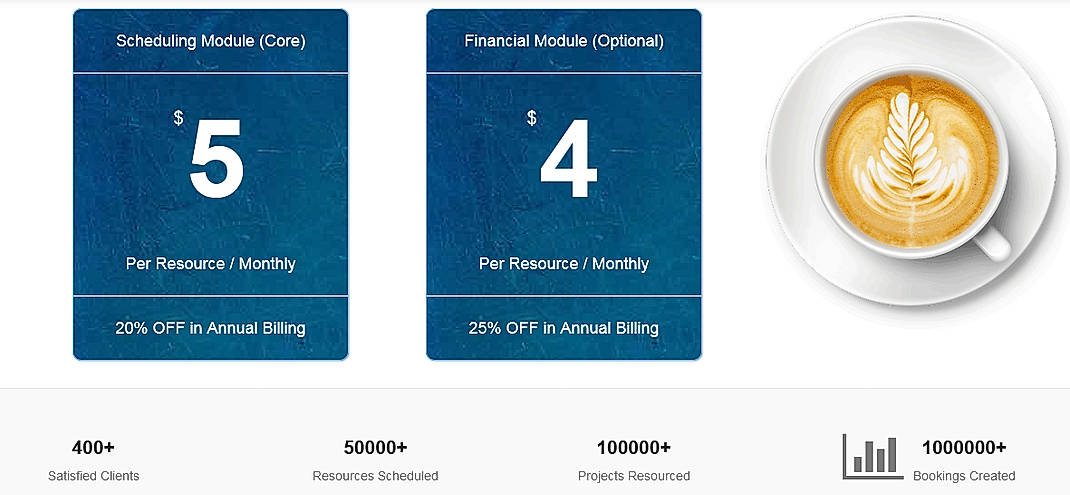
Disclaimer: The pricing details were last updated on 28/12/2020 from the vendor website and may be different from actual. Please confirm with the vendor website before purchasing.
Learn more about eResource Scheduler Pricing
82% SW Score The SW Score ranks the products within a particular category on a variety of parameters, to provide a definite ranking system. Read more

70% SW Score The SW Score ranks the products within a particular category on a variety of parameters, to provide a definite ranking system. Read more

77% SW Score The SW Score ranks the products within a particular category on a variety of parameters, to provide a definite ranking system. Read more
72% SW Score The SW Score ranks the products within a particular category on a variety of parameters, to provide a definite ranking system. Read more

70% SW Score The SW Score ranks the products within a particular category on a variety of parameters, to provide a definite ranking system. Read more
86% SW Score The SW Score ranks the products within a particular category on a variety of parameters, to provide a definite ranking system. Read more

84% SW Score The SW Score ranks the products within a particular category on a variety of parameters, to provide a definite ranking system. Read more

84% SW Score The SW Score ranks the products within a particular category on a variety of parameters, to provide a definite ranking system. Read more

76% SW Score The SW Score ranks the products within a particular category on a variety of parameters, to provide a definite ranking system. Read more

Quick Tour - eRes...

Resource scheduli...

Create requiremen...

Timsheets

Resource capacity...

Resource manageme...
How to choose best resource management software?
The best resource management software for you matches your needs, team size, project types, complexity, and integrations. That said, some tools are widely rated highly and often recommended. Here are examples to watch:
Vendor Details
+1 347-408-1230Contact Details
Not available
https://www.eresourcescheduler.com/
Social Media Handles
This research is curated from diverse authoritative sources; feel free to share your feedback at [email protected]

Looking for the right SaaS
We can help you choose the best SaaS for your specific requirements. Our in-house experts will assist you with their hand-picked recommendations.

Want more customers?
Our experts will research about your product and list it on SaaSworthy for FREE.