MEET CLARA - THE AI BEHIND SMARTER SOFTWARE CHOICES


|
93% SW Score The SW Score ranks the products within a particular category on a variety of parameters, to provide a definite ranking system. Read more 
View Details
|
81% SW Score The SW Score ranks the products within a particular category on a variety of parameters, to provide a definite ranking system. Read more 
View Details
|
Featured
74% SW Score The SW Score ranks the products within a particular category on a variety of parameters, to provide a definite ranking system. Read more 
SuperOps RMM |
Featured
97% SW Score The SW Score ranks the products within a particular category on a variety of parameters, to provide a definite ranking system. Read more 
Zoho Assist |
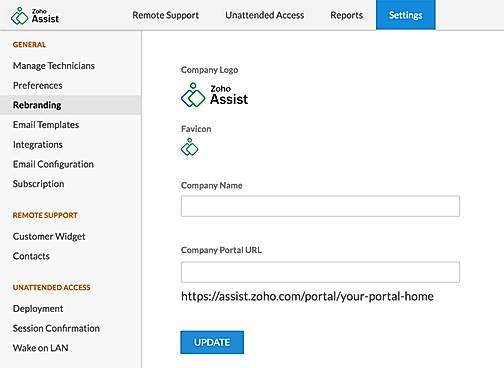
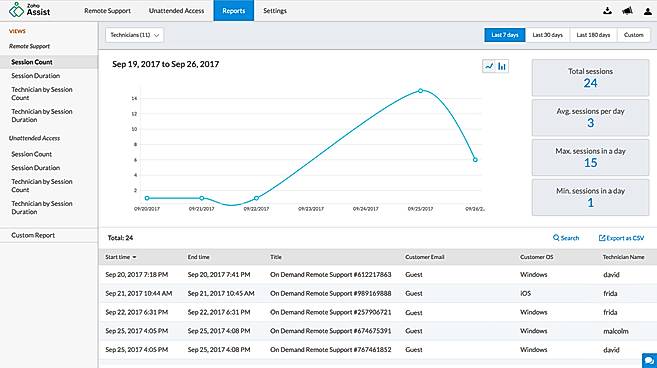
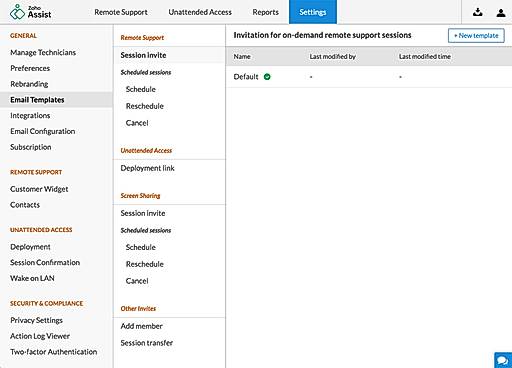
| Description | RemotePC web-based remote access software is an affordable solution for remotely managing the PCs and Mac. It comes with a good set of features as well to support its expected functionalities. Unattended access, remote printing, file transfer, session recording, session transfer, and wake on LAN are some of its main features. The software is multi-platform friendly. Remote control feature helps to manage systems and accessing data even when you are on a tour. RemotePC offers remote access 24*7. It uses TLS v 1.2/AES-256 encryption for sending user authentication data between remote & local systems. Collaboration is supported via chat messages & whiteboard tools.Access is password-protected. Read more | Splashtop Business Access is a remote desktop solution for business professionals and small teams. The cloud infrastructure is hosted on AWS to provide a secure network and computing environment with firewalls, data encryption, and DDoS mitigation. Easily transfer files between computers. You can drag-and-drop files between computers and you can also transfer files without starting a remote session. Select the file you need from your remote computer and print it on your local printer instantly. No need to transfer files or fax printed documents. Read more | SuperOps RMM is the perfect monitoring tool for IT environments, empowering professionals to stay in-the-know and take control of their client’s assets. With the automatic scanning feature provided by the discovery agent, users can easily monitor inventory across clients. This includes tracking custom fields to ensure all asset details, history, files, documents, and associated tickets are up-to-date. Designed to facilitate collaboration and automation, SuperOps RMM allows users to create customized tasks with real-time alerts and notifications on incidents. With spammable workflows, users can save time while still ensuring their clients’ assets are secure and up-to-date. Whether its a small or medium-scale business, SuperOps RMM is the perfect fit for monitoring IT environment and helping to ensure optimal results. Enjoy the convenience of easy tracking and collaboration, as well as the peace-of-mind that comes with real-time alerts and secure asset management. Make the most of IT environment with SuperOps RMM. Read more | Zoho Assist is a web-based remote access software designed to provide seamless remote support and facilitate screen sharing. Compatible with both Android and iOS, it simplifies the management of unmanaged systems. Users can transfer files of up to 100GB between computers and devices across various networks. Real-time collaboration is made effortless, enabling virtual meetings and training sessions with ease. Zoho Assist also features remote rebooting and reconnecting capabilities, allowing users to enjoy unattended remote access with just a click. Additionally, it offers the ability to remotely control power options such as restart, shutdown, log off, and hibernate. Plus, its firewall-friendly design ensures smooth operation. Read more |
| Pricing Options |
|
|
|
|
| SW Score & Breakdown |
93% SW Score The SW Score ranks the products within a particular category on a variety of parameters, to provide a definite ranking system. Read more
|
81% SW Score The SW Score ranks the products within a particular category on a variety of parameters, to provide a definite ranking system. Read more
|
74% SW Score The SW Score ranks the products within a particular category on a variety of parameters, to provide a definite ranking system. Read more
|
97% SW Score The SW Score ranks the products within a particular category on a variety of parameters, to provide a definite ranking system. Read more
|
| SaaSworthy Awards |
Not Available
|
Not Available
|
Not Available
|
# 4 Fastest Growing # 3 Most Searched |
| Organization Types Supported |
|
|
|
|
| Platforms Supported |
|
|
|
|
| Modes of Support |
|
|
|
|
| API Support |
|
|
|
|
| User Rating |
|
|
|
|
| Rating Distribution |
|
|
|
|
| User Sentiments |
Affordable Pricing, Ease of Use, Fast Connection Speed, Cross-Platform Compatibility Occasional Disconnections, Mobile App Usability Issues, Limited Multi-Monitor Support, Unattended Access Setup Challenges |
Ease of Use, Affordable Pricing, Fast Connection Speed, Reliable Remote Access Multiple Monitor Limitations, Occasional Connection Drops, Complex Initial Setup, Slow File Transfer Speeds |
Not Available
|
Affordable Pricing, Ease of Use, Cross-Platform Compatibility, Extensive Integrations Occasional Performance Issues, Unreliable Wake-on-LAN Functionality, Limited Mobile Device Support, Confusing Multi-Monitor Navigation |
| Review Summary |
RemotePC garners praise for its user-friendly interface, smooth remote control capabilities, and reliable performance. Reviewers appreciate the ease of setting up and using the software, even for non-technical users. The ability to remotely access files and applications from anywhere with an internet connection is a major advantage, and users find the software responsive and efficient. Additionally, RemotePC's customer support team is lauded for their promptness, helpfulness, and ability to resolve issues quickly and effectively. |
Users praise Splashtop Business Access for its ease of use, fast performance, and reliable remote access capabilities. It is particularly valued for its ability to provide secure and seamless remote desktop control, file transfer, and remote printing. Reviewers highlight its intuitive user interface, quick setup process, and compatibility with various devices and operating systems. Additionally, its customer support is commended for its responsiveness and helpfulness. However, some users mention occasional connectivity issues and the need for more granular control over user permissions. |
Not Available
|
Reviewers applaud Zoho Assist's user-friendly interface, describing it as intuitive and easy to navigate. They find its remote control features impressive, enabling seamless access and control of customer devices. Additionally, Zoho Assist's ability to transfer files and share screens earns praise for enhancing collaboration. While some users appreciate its affordable pricing, others suggest improvements in documentation and customer support. Overall, Zoho Assist is recognized for its user-friendly interface, efficient remote control, and budget-friendly plans, making it a strong option for remote assistance needs. |
| Read All User Reviews | Read All User Reviews | Read All User Reviews | Read All User Reviews |
AI-Generated from the text of User Reviews
| Pricing Options |
|
|
|
|
|
Pricing Plans
Monthly Plans
Annual Plans
|
Consumer (For 1 Computers) $22.12 $22.12 per year SOHO (For 10 Computers) $6.21 $9.95 per month Team (For 50 Computers) $18.71 $29.95 per month Enterprise (For 100 Computers) $37.46 $59.95 per month |
BUSINESS ACCESS SOLO $5.00 $5.00 per month BUSINESS ACCESS PRO $8.25 $8.25 per user / month BUSINESS ACCESS PRO VOLUME LICENSES $4.54 $4.54 per user / month |
Standard $79.00 $89.00 per user / month Pro $99.00 $119.00 per user / month Super $129.00 $149.00 per user / month |
Free Free Standard (Remote Support) $10.00 $12.00 per user / month Professional (Remote Support) $15.00 $18.00 per user / month Enterprise (Remote Support) $24.00 $28.00 per user / month Standard (Unattended Access) $10.00 $12.00 per user / month Professional (Unattended Access) $15.00 $18.00 per user / month |
|
View Detailed Pricing
|
View Detailed Pricing
|
View Detailed Pricing
|
View Detailed Pricing
|
Get personalized recommendations from our experts on call
Trusted by more than 5 Million users across the globe.
Thank you for the enquiry. One of our software analysts will contact you soon.
| Screenshots | Not Available |
+ 4 More
|
Not Available |

+ 11 More
|
| Videos | Not Available |
+ 2 More
|
Not Available |

+ 1 More
|
| Company Details | Located in: California, United States | Located in: San Jose, California | Located in: Claymont, Delaware Founded in: 2020 | Located in: Pleasanton, CA Founded in: 1996 |
| Contact Details |
1-818-275-5909 |
+1.408.861.1088 |
+1 628-270-9924 |
+1 (888) 900-9646 |
| Social Media Handles |
|
|
Not available |
|

Looking for the right SaaS
We can help you choose the best SaaS for your specific requirements. Our in-house experts will assist you with their hand-picked recommendations.

Want more customers?
Our experts will research about your product and list it on SaaSworthy for FREE.