
 MEET CLARA - THE AI BEHIND SMARTER SOFTWARE CHOICES



This profile is currently managed by the official vendor through the SaaSworthy Vendor Portal. Product details, features, pricing, and media assets are maintained directly by the company.

 Deep Dive with Clara AI
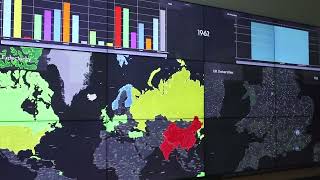
Lygos is an all-in-one video wall solution engineered for visual data analytics in control rooms, operation centers, and executive dashboards. By leveraging standard commercial hardware rather than proprietary equipment, it creates seamless, high-resolution displays exceeding 100 million pixels across distributed clients. The platform excels at aggregating data from multiple sources into interactive, multi-layer GIS maps and live dashboards for business intelligence and operational monitoring. Furthermore, Lygos supports collaborative control via tablets and computers, allowing teams to manage both complex data visualizations and multimedia content in a unified environment.
Read more
Pricing
SW Score Breakdown
Platforms Supported
Organization Types Supported
API Support
Modes of Support
Spatial Analysis
Supports manipulation of geographical data or imagery for better geovisualization in a different context, applications, and operationsMap Creation
Helps in creating maps using less effort and in less timeLabeling
Supports adding labels to certain items for its quick and easy identificationGeocoding
Enables users to convert an address into spatial data to find the coordinates of an address or placeColor Coding
Allows highlighting different significant information by using different colors for easy identification3D Imagery
Supports stereoscopic imaging where a technique is used to record and display images by creating an illusion of depth in themMap Sharing
Allows exchanging the created maps with others for better collaborationInteroperability
This feature enables the system to share resources with other system/software and make good use of the exchanged dataInternet Mapping
Allows to store and display Internet topological data in a systematic wayImage Management
Automates the graphical data management and monitoring tasks for easy accessibilityImage Exporting
Supports export of graphical data at different sizes and formatCensus Data Integration
Helps to collect census data from multiple sources and display it in a unified form in a single databaseFree Trial
Available
No Credit Card Required, Get Started for Free
Basic $250.00 $250.00 per user / year
Basic Plan of Lygos Video Wall Software focuses on multi-media needs on Office Dashboards, Video Walls and TVs on Conference Rooms. It can remotely deploy any media to these screens. Users can create signage loops and interactive presentations.
Professional $500.00 $500.00 per user / year
Expert $750.00 $750.00 per user / year
98% SW Score The SW Score ranks the products within a particular category on a variety of parameters, to provide a definite ranking system. Read more

94% SW Score The SW Score ranks the products within a particular category on a variety of parameters, to provide a definite ranking system. Read more
93% SW Score The SW Score ranks the products within a particular category on a variety of parameters, to provide a definite ranking system. Read more
92% SW Score The SW Score ranks the products within a particular category on a variety of parameters, to provide a definite ranking system. Read more
92% SW Score The SW Score ranks the products within a particular category on a variety of parameters, to provide a definite ranking system. Read more
91% SW Score The SW Score ranks the products within a particular category on a variety of parameters, to provide a definite ranking system. Read more

91% SW Score The SW Score ranks the products within a particular category on a variety of parameters, to provide a definite ranking system. Read more
90% SW Score The SW Score ranks the products within a particular category on a variety of parameters, to provide a definite ranking system. Read more

Introduction to L...

Lygos Video Wall ...
What does Lygos do, exactly?
Can I setup a video wall without specialized equipment?
Can I create a seamless screen area from screens of a video wall connected to separate computers?
Does Lygos Allow Visualizations on Video Walls to be remotely deployed and controlled?
Can a visualization span to multiple screens of a video wall, if the screens are connected to seperate computers?
How often configuration changes to visualizations and maps are reflected to screens of a video wall or other control or management clients?
How often data changes are reflected to screens of a video wall or dashboard?
Can I use the same data source in multiple data visualizations and maps on a video wall?
Can I use multiple data sources in a single visualization?
Can you change the layout of applications deployed to a video wall?
Can I deploy two different instances of same application/visualization type on a Video Wall?
How does an application scale in terms of resolution and zoom level when deployed to a video wall?
Can I Interact or Control Maps on Video Walls from Tablets or PC Clients?
Can I wake, restart or shutdown video wall computer nodes remotely?
Vendor Details
Founded : 2021Contact Details
Not available
https://lygos.io
Social Media Handles
SaaSworthy may receive compensation from some vendors featured on this page. This does not influence our editorial evaluation or ratings. [email protected]

Looking for the right SaaS
We can help you choose the best SaaS for your specific requirements. Our in-house experts will assist you with their hand-picked recommendations.

Want more customers?
Our experts will research about your product and list it on SaaSworthy for FREE.


