get-free-advice
Clara Icon MEET CLARA - THE AI BEHIND SMARTER SOFTWARE CHOICES

Get Started
/*
Loading...
*/

92% SW Score The SW Score ranks the products within a particular category on a variety of parameters, to provide a definite ranking system. Read more

Gorelo logo
View Details

98% SW Score The SW Score ranks the products within a particular category on a variety of parameters, to provide a definite ranking system. Read more

Atera logo
View Details
Featured

98% SW Score The SW Score ranks the products within a particular category on a variety of parameters, to provide a definite ranking system. Read more

NinjaOne (NinjaRMM) logo

NinjaOne (NinjaRMM)

Remote Monitoring and Management ...

4.8 1,987 user ratings

Visit Website
Featured

72% SW Score The SW Score ranks the products within a particular category on a variety of parameters, to provide a definite ranking system. Read more

SuperOps RMM logo
Visit Website

Overview

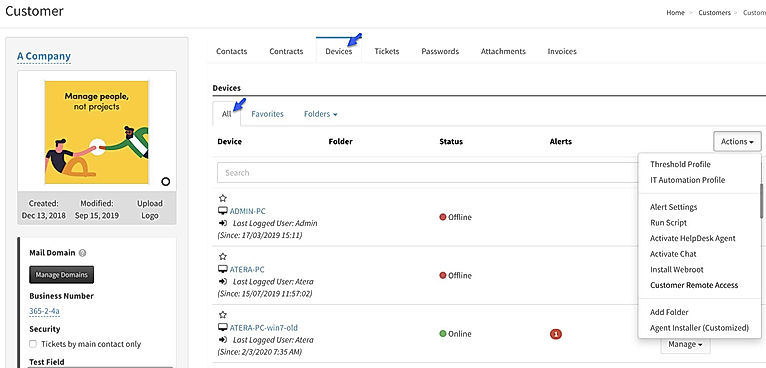
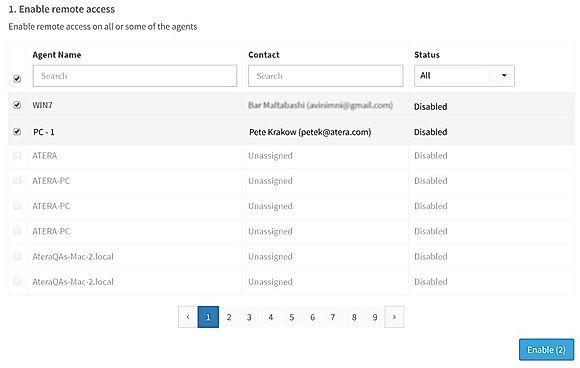
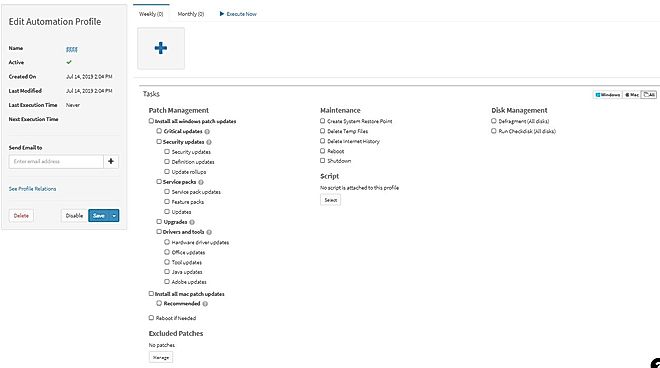
Description Gorelo, as a software, aids in the simplification of IT processes and encourages the team to work more effectively. The software offers contemporary ticketing with customised ticket displays, motion detection, mentions, and other features ensures that IT processes run smoothly. It also collaborates with coworkers and monitors the staff operations through status updates. This allows for simple functioning with minimal effort. This programme contains everything needed for IT operations, from asset and device administration to contractual agreements and invoices. For auditing purposes, users must first create tickets. The ticket is subsequently added to the ticket list, which includes all of the pertinent information such as server difficulties, technological environment, resolution requests, duration, work progress, and so on. Users can also establish a contract and record the essential contract information in the software. They can also develop an asset and list all of their assets on a single platform. In addition, enter all necessary information into the software for ease of reference. Read more Atera is a remote monitoring and management software that provides complete visibility and control over hundreds of networks to MSPs and IT professionals in real-time. The software enables users to offer instant and exceptional IT support to their valuable customers across the globe. One of the main features of Atera is that it sends real-time notifications to users about the potential problems that may happen so that users can prepare themselves in advance. In addition, businesses can also depend on the same to receive real-time status on system resources, networking and IP monitoring, logged in customers, SQL Server, Active Directory and many other essential elements. Further, the IT automation services provided by the software also come in handy to manage a variety of administrative and maintenance tasks that can be applied to workstations and servers in no time. Atera comes with an automated Patch Management system that can be applied to individual devices and groups as per convenience. Finally, the remote maintenance capabilities offered by Atera helps out companies with their service manager, command prompt and task manager facilities. Read more NinjaOne automates the hardest parts of IT, delivering visibility, security, and control over all endpoints for more than 20,000 customers. The NinjaOne platform increases productivity while reducing risk and IT costs. Organizations use NinjaOne, including its wide range of IT and security integrations, for use cases such as endpoint management, patch management, mobile device management, software deployment, remote access, endpoint backup, and more. Read more SuperOps RMM is the perfect monitoring tool for IT environments, empowering professionals to stay in-the-know and take control of their client’s assets. With the automatic scanning feature provided by the discovery agent, users can easily monitor inventory across clients. This includes tracking custom fields to ensure all asset details, history, files, documents, and associated tickets are up-to-date. Designed to facilitate collaboration and automation, SuperOps RMM allows users to create customized tasks with real-time alerts and notifications on incidents. With spammable workflows, users can save time while still ensuring their clients’ assets are secure and up-to-date. Whether its a small or medium-scale business, SuperOps RMM is the perfect fit for monitoring IT environment and helping to ensure optimal results. Enjoy the convenience of easy tracking and collaboration, as well as the peace-of-mind that comes with real-time alerts and secure asset management. Make the most of IT environment with SuperOps RMM. Read more
Pricing Options
  • Free Trial Not Available
  • Starts at $129.0.
  • Free Trial Available
  • Starts at $99.0. Offers Custom plan.
  • Free Trial Available
  • Offers Custom plan.
  • Free Trial Not Available
  • Starts at $79.0.
SW Score & Breakdown

92% SW Score The SW Score ranks the products within a particular category on a variety of parameters, to provide a definite ranking system. Read more

  • Features The Feature Score % is calculated using the weighted average method, where core features hold more weight in the final calculation. Read more
    97%
  • Reviews
    60%
  • Momentum
    69%
  • Popularity
    64%

98% SW Score The SW Score ranks the products within a particular category on a variety of parameters, to provide a definite ranking system. Read more

  • Features The Feature Score % is calculated using the weighted average method, where core features hold more weight in the final calculation. Read more
    100%
  • Reviews
    77%
  • Momentum
    64%
  • Popularity
    65%

98% SW Score The SW Score ranks the products within a particular category on a variety of parameters, to provide a definite ranking system. Read more

  • Features The Feature Score % is calculated using the weighted average method, where core features hold more weight in the final calculation. Read more
    100%
  • Reviews
    60%
  • Momentum
    60%
  • Popularity
    70%

72% SW Score The SW Score ranks the products within a particular category on a variety of parameters, to provide a definite ranking system. Read more

  • Features The Feature Score % is calculated using the weighted average method, where core features hold more weight in the final calculation. Read more
    60%
  • Reviews
    60%
  • Momentum
    60%
  • Popularity
    62%

Features

Total Features
15 Features
17 Features
17 Features
0 Features
Common Features for All
    Access Control Defines application access to various users. Includes role-based system that controls options to be displayed to different users based on their role
    Alerts (Notifications) Triggers an instant notification via Voice, SMS, Email, RSS Feeds, or Push Notifications in case of an event or outage.
    Compliance Tracking Helps in tracking and monitoring and auditing all the regulatory compliance requirements
    Device Discovery Automatic detection and inventory of devices on the network, creating a centralized view of the IT environment.
    IT Asset Management Helps to automate the full IT lifecycle of software and hardware assets on a single platform
    Mobile Device Management (MDM) Integration with mobile device management platforms for monitoring and managing smartphones and tablets.
    Multi-tenant Architecture Support for managing multiple customer environments from a single dashboard, often used by managed service providers (MSPs).
    Patch Management Automates the process of detection, download, and deployment of software updates and security patches across multiple devices.
    Remote Management Remote access and control of servers, workstations, and endpoints for troubleshooting, software deployment, and configuration management.
    Remote Monitoring Helps in real-time monitoring of system performance metrics, network health, and software or application performance.
    Remote Scripting Helps to execute scripts or commands on remote devices to perform tasks, configurations, or troubleshooting.
    Reporting (Analytics) Provides insightful reports and important business metrics to track and measure the outcomes and progress.
    Security Management Helps in managing antivirus, anti-malware management, firewall monitoring, intrusion detection, and enforcement of security policies.
    Self Service Portal Provides the employees with a website where they can update their accounts, make bill payments, avail necessary information and other self-help functions
    Single Sign-On (SSO) Permits one set of login credentials to access multiple applications
    Ticket Management Facilitates in recording and organizing customer complaints into tickets and systematically track their progress until they are resolved
    Workflow Automation Automatically execute mundane and repetitive processes or workflow so that employees can focus on productive work
  • + 12 More - Show Less
    • Access Control Defines application access to various users. Includes role-based system that controls options to be displayed to different users based on their role
      Alerts (Notifications) Triggers an instant notification via Voice, SMS, Email, RSS Feeds, or Push Notifications in case of an event or outage.
      Compliance Tracking Helps in tracking and monitoring and auditing all the regulatory compliance requirements
      Device Discovery Automatic detection and inventory of devices on the network, creating a centralized view of the IT environment.
      IT Asset Management Helps to automate the full IT lifecycle of software and hardware assets on a single platform
      Mobile Device Management (MDM) Integration with mobile device management platforms for monitoring and managing smartphones and tablets.
      Multi-tenant Architecture Support for managing multiple customer environments from a single dashboard, often used by managed service providers (MSPs).
      Patch Management Automates the process of detection, download, and deployment of software updates and security patches across multiple devices.
      Remote Management Remote access and control of servers, workstations, and endpoints for troubleshooting, software deployment, and configuration management.
      Remote Monitoring Helps in real-time monitoring of system performance metrics, network health, and software or application performance.
      Remote Scripting Helps to execute scripts or commands on remote devices to perform tasks, configurations, or troubleshooting.
      Reporting (Analytics) Provides insightful reports and important business metrics to track and measure the outcomes and progress.
      Security Management Helps in managing antivirus, anti-malware management, firewall monitoring, intrusion detection, and enforcement of security policies.
      Self Service Portal Provides the employees with a website where they can update their accounts, make bill payments, avail necessary information and other self-help functions
      Single Sign-On (SSO) Permits one set of login credentials to access multiple applications
      Ticket Management Facilitates in recording and organizing customer complaints into tickets and systematically track their progress until they are resolved
      Workflow Automation Automatically execute mundane and repetitive processes or workflow so that employees can focus on productive work
  • + 14 More - Show Less
    • Access Control Defines application access to various users. Includes role-based system that controls options to be displayed to different users based on their role
      Alerts (Notifications) Triggers an instant notification via Voice, SMS, Email, RSS Feeds, or Push Notifications in case of an event or outage.
      Compliance Tracking Helps in tracking and monitoring and auditing all the regulatory compliance requirements
      Device Discovery Automatic detection and inventory of devices on the network, creating a centralized view of the IT environment.
      IT Asset Management Helps to automate the full IT lifecycle of software and hardware assets on a single platform
      Mobile Device Management (MDM) Integration with mobile device management platforms for monitoring and managing smartphones and tablets.
      Multi-tenant Architecture Support for managing multiple customer environments from a single dashboard, often used by managed service providers (MSPs).
      Patch Management Automates the process of detection, download, and deployment of software updates and security patches across multiple devices.
      Remote Management Remote access and control of servers, workstations, and endpoints for troubleshooting, software deployment, and configuration management.
      Remote Monitoring Helps in real-time monitoring of system performance metrics, network health, and software or application performance.
      Remote Scripting Helps to execute scripts or commands on remote devices to perform tasks, configurations, or troubleshooting.
      Reporting (Analytics) Provides insightful reports and important business metrics to track and measure the outcomes and progress.
      Security Management Helps in managing antivirus, anti-malware management, firewall monitoring, intrusion detection, and enforcement of security policies.
      Self Service Portal Provides the employees with a website where they can update their accounts, make bill payments, avail necessary information and other self-help functions
      Single Sign-On (SSO) Permits one set of login credentials to access multiple applications
      Ticket Management Facilitates in recording and organizing customer complaints into tickets and systematically track their progress until they are resolved
      Workflow Automation Automatically execute mundane and repetitive processes or workflow so that employees can focus on productive work
  • + 14 More - Show Less
    • Access Control Defines application access to various users. Includes role-based system that controls options to be displayed to different users based on their role
      Alerts (Notifications) Triggers an instant notification via Voice, SMS, Email, RSS Feeds, or Push Notifications in case of an event or outage.
      Compliance Tracking Helps in tracking and monitoring and auditing all the regulatory compliance requirements
      Device Discovery Automatic detection and inventory of devices on the network, creating a centralized view of the IT environment.
      IT Asset Management Helps to automate the full IT lifecycle of software and hardware assets on a single platform
      Mobile Device Management (MDM) Integration with mobile device management platforms for monitoring and managing smartphones and tablets.
      Multi-tenant Architecture Support for managing multiple customer environments from a single dashboard, often used by managed service providers (MSPs).
      Patch Management Automates the process of detection, download, and deployment of software updates and security patches across multiple devices.
      Remote Management Remote access and control of servers, workstations, and endpoints for troubleshooting, software deployment, and configuration management.
      Remote Monitoring Helps in real-time monitoring of system performance metrics, network health, and software or application performance.
      Remote Scripting Helps to execute scripts or commands on remote devices to perform tasks, configurations, or troubleshooting.
      Reporting (Analytics) Provides insightful reports and important business metrics to track and measure the outcomes and progress.
      Security Management Helps in managing antivirus, anti-malware management, firewall monitoring, intrusion detection, and enforcement of security policies.
      Self Service Portal Provides the employees with a website where they can update their accounts, make bill payments, avail necessary information and other self-help functions
      Single Sign-On (SSO) Permits one set of login credentials to access multiple applications
      Ticket Management Facilitates in recording and organizing customer complaints into tickets and systematically track their progress until they are resolved
      Workflow Automation Automatically execute mundane and repetitive processes or workflow so that employees can focus on productive work

    Technical Details

    Organization Types Supported
    • Individuals
    • Large Enterprises
    • Medium Business
    • Small Business
    • Individuals
    • Large Enterprises
    • Medium Business
    • Small Business
    • Individuals
    • Large Enterprises
    • Medium Business
    • Small Business
    • Individuals
    • Large Enterprises
    • Medium Business
    • Small Business
    Platforms Supported
    • SaaS/Web/Cloud
    • Mobile - Android
    • Mobile - iOS
    • Installed - Windows
    • Installed - Mac
    • SaaS/Web/Cloud
    • Mobile - Android
    • Mobile - iOS
    • Installed - Windows
    • Installed - Mac
    • SaaS/Web/Cloud
    • Mobile - Android
    • Mobile - iOS
    • Installed - Windows
    • Installed - Mac
    • SaaS/Web/Cloud
    • Mobile - Android
    • Mobile - iOS
    • Installed - Windows
    • Installed - Mac
    Modes of Support
    • 24/7 (Live rep)
    • Business Hours
    • Online
    • 24/7 (Live rep)
    • Business Hours
    • Online
    • 24/7 (Live rep)
    • Business Hours
    • Online
    • 24/7 (Live rep)
    • Business Hours
    • Online
    API Support
    • NA
    • Available
    • Available
    • Available

    Reviews & Ratings

    User Rating
    Not Available
    3.5/5 28 user ratings
    4.8/5 1,987 user ratings
    Not Available
    Rating Distribution
    Not Available
    • Excellent

      53.6%
    • Very Good

      3.6%
    • Average

      7.1%
    • Poor

      10.7%
    • Terrible

      25%
    • Excellent

      84.9%
    • Very Good

      14.5%
    • Average

      0.4%
    • Poor

      0%
    • Terrible

      0.2%
    Not Available
    User Sentiments
      Not Available

      Affordable Pricing, Ease of Use, Comprehensive Feature Set, Extensive Integrations

      Slow Remote Connection Initialization, Limited Mobile App Functionality, Inconsistent User Interface, Weak Reporting

      Ease of Use, Fast and Reliable Remote Access, Comprehensive Patch Management, Excellent Customer Support

      Limited Third-Party Software Patching Support, Limited MacOS Support, Inadequate Reporting Functionality, Occasional Software Bugs

      Not Available
    Review Summary
    Not Available

    Overall, users appreciate Atera's comprehensive features, user-friendly interface, and strong customer support. Many reviewers highlight its effectiveness in streamlining IT tasks, improving technician productivity, and providing remote access capabilities. The remote monitoring and management features are particularly praised for enabling efficient issue identification and resolution. However, some users mention occasional bugs or performance issues that require improvement. Additionally, a few reviewers suggest enhancements to the reporting capabilities and mobile app functionality.

    The general consensus among reviewers is that NinjaRMM is a comprehensive and powerful RMM tool that offers a wide range of features to help MSPs streamline their operations. It is praised for its user-friendly interface, customizable dashboards, and robust reporting capabilities. However, some users have expressed concerns about the occasional occurrence of bugs and glitches, as well as the need for improved documentation and customer support. Overall, NinjaRMM is a solid choice for MSPs seeking a feature-rich and reliable RMM solution, though there is room for improvement in terms of stability and support.

    Not Available
      Read All User Reviews Read All User Reviews

    AI-Generated from the text of User Reviews

    Pricing

    Pricing Options
    • Free Trial Not Available
    • Starts at $129.0.
    • Free Trial Available
    • Starts at $99.0. Offers Custom plan.
    • Free Trial Available
    • Offers Custom plan.
    • Free Trial Not Available
    • Starts at $79.0.
    Pricing Plans
    Monthly Plans Annual Plans

    Gorelo $129.00 $129.00 per user / month

    Pro (MSP) $99.00 $119.00 per user / month

    Growth (MSP) $129.00 $149.00 per user / month

    Power (MSP) $169.00 $199.00 per user / month

    Super Power (MSP) Custom

    Professional (IT Department) $149.00 $169.00 per user / month

    Expert (IT Department) $169.00 $199.00 per user / month

    Master (IT Department) $199.00 $239.00 per user / month

    Enterprise (IT Department) Custom

    NinjaOne Custom

    Standard $79.00 $89.00 per user / month

    Pro $99.00 $119.00 per user / month

    Super $129.00 $149.00 per user / month

     
    View Detailed Pricing
    View Detailed Pricing
    View Detailed Pricing
    View Detailed Pricing

    Have Questions? We can help!

    Get personalized recommendations from our experts on call

    Call Me

    ✔ Trusted by more than 5 Million users across the globe.

    Thank you for the enquiry. One of our software analysts will contact you soon.

    Screenshots & Videos

    Screenshots
    + 1 More
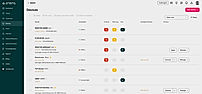
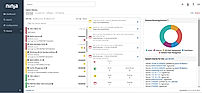
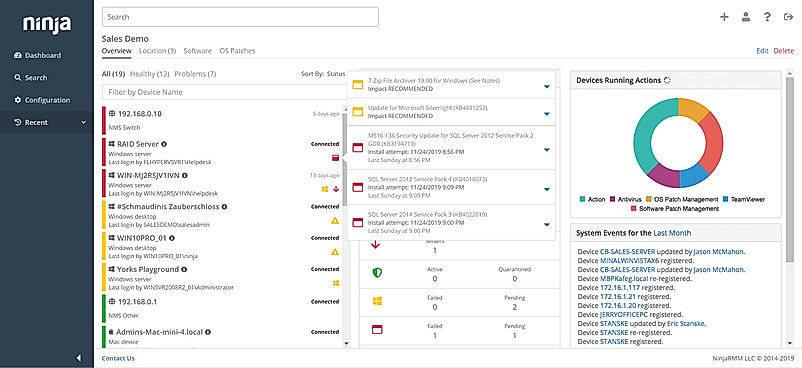
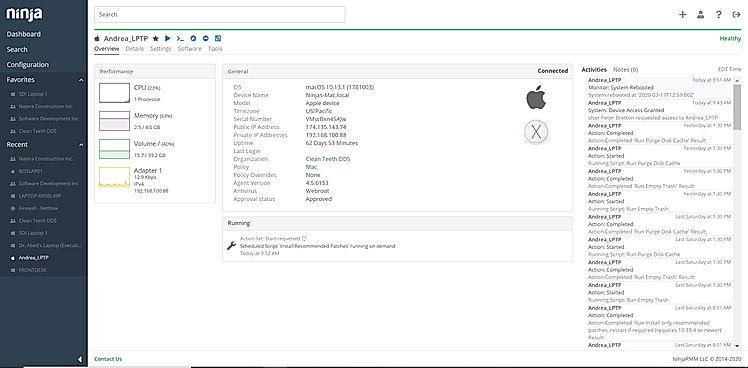
    Dashboard
    + 6 More
    Alerts
    + 3 More
    Not Available
    Videos Not Available Video Thumbnail
    + 2 More
    Video Thumbnail
    + 4 More
    Not Available

    Vendor information

    Company Details Located in: Seattle, WA - 98133 Located in: Tel Aviv, Israel Founded in: 2014 Located in: Austin, TX Located in: Claymont, Delaware Founded in: 2020
    Contact Details

    +1 425-679-9243

    https://www.gorelo.io/

    Not available

    https://www.atera.com/remote-monitoring-and-management/

    +1 888 542-8339

    https://www.ninjaone.com/

    +1 628-270-9924

    https://superops.ai/rmm

    Social Media Handles

    Not available

    We understand SaaS better

    SaaSworthy helps stakeholders choose the right SaaS platform based on detailed product information, unbiased reviews, SW score and recommendations from the active community.

    icon

    Buyers

    Looking for the right SaaS

    We can help you choose the best SaaS for your specific requirements. Our in-house experts will assist you with their hand-picked recommendations.

    icon

    Makers

    Want more customers?

    Our experts will research about your product and list it on SaaSworthy for FREE.

    Get Listed