
 MEET CLARA - THE AI BEHIND SMARTER SOFTWARE CHOICES



This profile is currently managed by the official vendor through the SaaSworthy Vendor Portal. Product details, features, pricing, and media assets are maintained directly by the company.

 Deep Dive with Clara AI
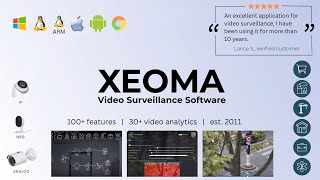
Xeoma transforms your cameras into an intelligent security and analytics system. Here's why security teams and private users choose it: **Cross-platform & universal camera support.** Xeoma runs on Windows, Linux (including ARM), macOS, and Android, and supports 99% of cameras — no vendor lock-in. **Powerful analytics & pro tools.** Deploy AI modules for license plate and face recognition, event detection, visitor-flow analysis, and heatmaps. Add access-control integration, floor plans, automatic archive distribution across drives, an open API, your own cloud service, and much more. With the desktop version, all data stays local on your hardware — privacy and security by design. **Scalable for any business.** Start with a few cameras and grow without limits — up to 3,000 cameras per server, proven in enterprise deployments. Built-in fault tolerance, detailed access rights, and modern compliance-grade data protection make Xeoma a ready platform for large rollouts and unique projects. **Support tailored to you.** More than an out-of-the-box product: our team offers free technical support, answers questions of any complexity, and can develop custom features or solutions built on Xeoma to fit your exact needs.
Read more



Pricing
SW Score Breakdown
Platforms Supported
Organization Types Supported
API Support
Modes of Support
Compliance & Audit Logs
Identity & Credential Management
Visitor Management
Alarm & Incident Management
Video Surveillance (CCTV Integration)
Access Control Management
Real-Time Monitoring & Alerts
Reporting & Analytics
Customization
Helps to customize the system for use in industry-specific use casesIncentive Programs
Helps to easily manage your incentive programs and provide instant rewards to employees.Recognition Tracking
Allows tracking the number and types of recognition that individuals, teams, departments, or the whole company gave or received in a given periodPoints and Rewards
A points-based system that allows users to redeem the achieved points for a reward of their choiceEmployee Discount and Perks
Provides employees with access to a wide variety of consumer products and services at a special discount priceManager-to-peer Recognition
Allowing managers to acknowledge, nominate, recognize and reward employees in the form of awards, digital badges, points, or messagesSocial Recognition
Broadcast individual recognition with team members and managers through a social network-esque feed or a built-in customizable web portalPeer-to-Peer Recognition
Allowing employees to acknowledge each other in the form of digital badges, awards, or messagesEmployee Segmentation
Segregates the employees into small groups by defined criteria such as location, demographics, and position.Pulse Surveys
Helps managers to measure employee satisfaction and health of the company on a time-to-time basisRewards and Recognition
Helps to acknowledge the achievements, accomplishments of an employee, acquaintances, peers, team, and team membersContent Library
It is a catalog of resources that serves as a lead generating toolBadge Management
Facilitates assigning and managing badges to employees, students, visitors and guestsBenchmarking
Setting up standards and targets for your team and team members, so that they are performing at their bestMulti-tenant Architecture
Support for managing multiple customer environments from a single dashboard, often used by managed service providers (MSPs).Security Management
Helps in managing antivirus, anti-malware management, firewall monitoring, intrusion detection, and enforcement of security policies.Remote Management
Remote access and control of servers, workstations, and endpoints for troubleshooting, software deployment, and configuration management.Remote Monitoring
Helps in real-time monitoring of system performance metrics, network health, and software or application performance.Workflow Automation
Automatically execute mundane and repetitive processes or workflow so that employees can focus on productive workAlerts (Notifications)
Triggers an instant notification via Voice, SMS, Email, RSS Feeds, or Push Notifications in case of an event or outage.Remote Scripting
Helps to execute scripts or commands on remote devices to perform tasks, configurations, or troubleshooting.Mobile Device Management (MDM)
Integration with mobile device management platforms for monitoring and managing smartphones and tablets.Device Discovery
Automatic detection and inventory of devices on the network, creating a centralized view of the IT environment.Patch Management
Automates the process of detection, download, and deployment of software updates and security patches across multiple devices.IT Asset Management
Helps to automate the full IT lifecycle of software and hardware assets on a single platformWorkflow & Task Tracking
Productivity Analysis & Reporting
Screen Monitoring & Recording
Real-Time Activity Monitoring
Time Tracking & Attendance Monitoring
Alerts & Anomaly Detection
Data Security & Compliance Monitoring
GPS & Location Tracking
Keystroke Logging & User Activity Tracking
Application & Website Usage Tracking
Free Trial
Available
No Credit Card Required, Get Started for Free
Xeoma Lite $15.00 $15.00 Perpetual license, 1 camera
Basic functionality
Xeoma Standard $33.00 $33.00 Perpetual license, 1 camera
Xeoma Pro $99.00 $99.00 Perpetual license, 1 camera
Free version Free
98% SW Score The SW Score ranks the products within a particular category on a variety of parameters, to provide a definite ranking system. Read more
95% SW Score The SW Score ranks the products within a particular category on a variety of parameters, to provide a definite ranking system. Read more
93% SW Score The SW Score ranks the products within a particular category on a variety of parameters, to provide a definite ranking system. Read more
89% SW Score The SW Score ranks the products within a particular category on a variety of parameters, to provide a definite ranking system. Read more

82% SW Score The SW Score ranks the products within a particular category on a variety of parameters, to provide a definite ranking system. Read more

79% SW Score The SW Score ranks the products within a particular category on a variety of parameters, to provide a definite ranking system. Read more

77% SW Score The SW Score ranks the products within a particular category on a variety of parameters, to provide a definite ranking system. Read more
76% SW Score The SW Score ranks the products within a particular category on a variety of parameters, to provide a definite ranking system. Read more

76% SW Score The SW Score ranks the products within a particular category on a variety of parameters, to provide a definite ranking system. Read more

75% SW Score The SW Score ranks the products within a particular category on a variety of parameters, to provide a definite ranking system. Read more

Xeoma Video Surve...
Scale Your Busine...

Xeoma works on va...

Synchronized play...

All cameras view

AI-powered face r...

Object type recog...
Do you offer a free trial?
Yes — Xeoma's Trial version lets you test every feature, including the AI-powered ones. If you need more time to evaluate, you can request a free demo license from us. And our tech support is always friendly and free of charge.
What is Xeoma?
Xeoma is video surveillance software for any camera-based project — from basic recording to AI-powered systems. Installed on your computer, it connects to cameras across your network for continuous recording, event-triggered alerts, and business insights like people counting or work-time tracking.
Xeoma leads the market for Linux ARM and Android, is a top choice on macOS, and ranks among the best for Windows and Linux — proof of its versatility and reliability.
Which cameras does Xeoma support?
Which operating systems does Xeoma support?
Xeoma runs on all popular operating systems: Windows, Linux, Linux/ARM (Raspberry Pi), macOS, iOS, and Android.
What is Xeoma used for?
Xeoma is Physical Security Software. Xeoma offers the following functionalities:
Learn more about Xeoma features.
What are the top alternatives for Xeoma?
Here`s a list of the best alternatives for Xeoma:
Does Xeoma provide API?
Yes, Xeoma provides API.
Vendor Details
Founded : 2004Contact Details
Not available
https://felenasoft.com/xeoma/en/
Social Media Handles

This research is curated from diverse authoritative sources; feel free to share your feedback at [email protected]

Looking for the right SaaS
We can help you choose the best SaaS for your specific requirements. Our in-house experts will assist you with their hand-picked recommendations.

Want more customers?
Our experts will research about your product and list it on SaaSworthy for FREE.


