
 MEET CLARA - THE AI BEHIND SMARTER SOFTWARE CHOICES



86% SW Score The SW Score ranks the products within a particular category on a variety of parameters, to provide a definite ranking system. Read more
The only web DAM with multi-directional drag-and-drop
This product profile is currently unclaimed.
The listing is published on SaaSworthy, but the official vendor does not yet manage it. Are you part of the ImageDirector team? Claim this profile to manage and update your product information.

 Deep Dive with Clara AI
ImageDirector is a Digital asset management (DAM) has become part of a daily routine for all sizes of organizations. The volume of digital assets poses challenges in storing, managing, retrieving, safekeeping, and sharing files while maintaining control over access and usage rights. The loss, leakage, or infiltration of assets can be catastrophic.
Read morePricing
SW Score Breakdown
Platforms Supported
Organization Types Supported
API Support
Modes of Support
Free Trial
Not available
ONE Custom
Features
CORP Custom
Features
GLOBAL Custom
Features
Screenshots of Vendor Pricing Page
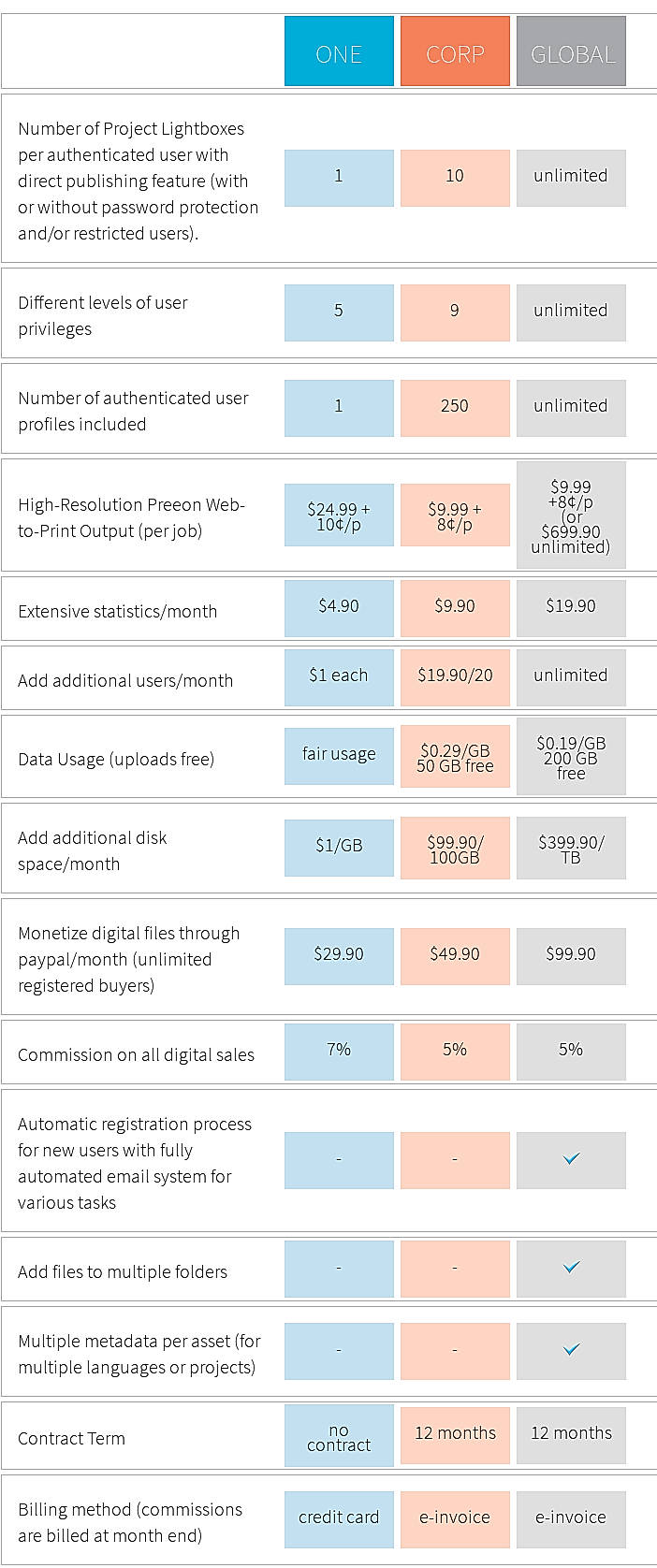
Disclaimer: The pricing details were last updated on 14/06/2021 from the vendor website and may be different from actual. Please confirm with the vendor website before purchasing.
Learn more about ImageDirector Pricing
82% SW Score The SW Score ranks the products within a particular category on a variety of parameters, to provide a definite ranking system. Read more

81% SW Score The SW Score ranks the products within a particular category on a variety of parameters, to provide a definite ranking system. Read more
91% SW Score The SW Score ranks the products within a particular category on a variety of parameters, to provide a definite ranking system. Read more
92% SW Score The SW Score ranks the products within a particular category on a variety of parameters, to provide a definite ranking system. Read more

90% SW Score The SW Score ranks the products within a particular category on a variety of parameters, to provide a definite ranking system. Read more

85% SW Score The SW Score ranks the products within a particular category on a variety of parameters, to provide a definite ranking system. Read more

98% SW Score The SW Score ranks the products within a particular category on a variety of parameters, to provide a definite ranking system. Read more

87% SW Score The SW Score ranks the products within a particular category on a variety of parameters, to provide a definite ranking system. Read more

94% SW Score The SW Score ranks the products within a particular category on a variety of parameters, to provide a definite ranking system. Read more
What is ImageDirector used for?
ImageDirector is Digital Asset Management Software. ImageDirector offers the following functionalities:
Learn more about ImageDirector features.
What are the top alternatives for ImageDirector?
Does ImageDirector provide API?
No, ImageDirector does not provide API.
What is Digital Asset Management?
Digital Asset Management (DAM) is the process of storing, organizing, and distributing digital content from a centralized system. A DAM platform acts as a single source of truth for all types of digital assets, such as images, videos, logos, documents, design files, and marketing materials.
Instead of scattered folders or emails, DAM software provides structured storage with metadata and tags, making files easy to search and retrieve. It also includes version control, permissions, and workflows so that teams can collaborate securely, reuse approved assets, and maintain brand consistency. In short, DAM ensures that the right people can find, use, and share the right content at the right time.
What is the best digital asset management software?
If you want one strong pick, Bynder often ranks at the top in user reviews and vendor comparisons. It combines usability, integration capabilities, and powerful asset control. Other excellent options depend on your needs, like scale, integrations, media types, and user base.
Vendor Details
+41 44 585 36 63Contact Details
Not available
http://www.onison.com/Digital_Asset_Management/2
Social Media Handles
Not available
SaaSworthy may receive compensation from some vendors featured on this page. This does not influence our editorial evaluation or ratings. [email protected]

Looking for the right SaaS
We can help you choose the best SaaS for your specific requirements. Our in-house experts will assist you with their hand-picked recommendations.

Want more customers?
Our experts will research about your product and list it on SaaSworthy for FREE.


