
 MEET CLARA - THE AI BEHIND SMARTER SOFTWARE CHOICES



87% SW Score The SW Score ranks the products within a particular category on a variety of parameters, to provide a definite ranking system. Read more
The universal database client with the highest user satisfaction
This profile is currently managed by the official vendor through the SaaSworthy Vendor Portal. Product details, features, pricing, and media assets are maintained directly by the company.

 Deep Dive with Clara AI
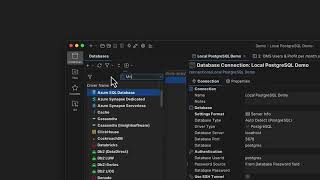
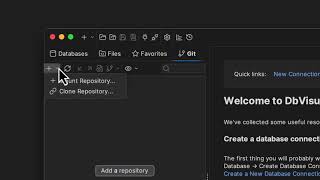
DbVisualizer is a universal database client designed for anyone who works with data, from indie developers and startups to professional teams managing complex database environments, including developers, DBAs, analysts, and data engineers working across relational and NoSQL databases. The platform offers a graphical interface for database development, SQL querying, data exploration, and database administration, making it a strong fit for businesses evaluating database management software. Key features include: * A powerful SQL editor with intelligent autocomplete, visual query builders, variables, and query execution tools * A built-in AI Assistant to ask questions, explain errors, and analyze code * Built-in Git integration for managing SQL scripts and collaborating with your team * Customizable window layouts, key bindings, and UI themes * The ability to mark scripts or database objects as favorites for quick access * Configurable security settings to meet organizational requirements DbVisualizer connects to a wide range of popular databases through JDBC drivers, including MySQL, PostgreSQL, SQL Server, Oracle, Snowflake, SQLite, Cassandra, and BigQuery, and runs on Windows, macOS, and Linux, giving teams flexibility regardless of their tech stack or operating system. With nearly 7 million downloads and Pro users across 150 countries, DbVisualizer has a proven track record of scaling from solo projects to enterprise-grade database management, making it a reliable choice for businesses of any size looking to simplify and streamline their database workflows.
Read more



Pricing
SW Score Breakdown
Platforms Supported
Organization Types Supported
API Support
Modes of Support
Relational Interface
Helps to share or to exchange information between a computer or relational database softwareQueries
Helps to make an inquiry to extract specific data from the database in a format readable for the userPerformance Analysis
Helps to analyze the performance of business and database management using some metricsMonitoring
Helps to monitor the database content and data accessibility in an automated and orderly mannerData Search
Assists in searching the required piece of information or data easily, systematically, and timelyData Migration
Facilitates transferring or shifting data between computer storage types and or file formatsCreation (Development)
Helps to create and adding to the database and developing it automatically and orderlyVirtualization
Helps to create an online database or virtual version of your databaseDatabase Conversion
Helps to craft new relational database structure for offering similar traversal and functionalities as precedingData Replication
Helps to make the data more accessible by storing it in multiple sitesFree Trial
Available
No Credit Card Required, Get Started for Free
Free Free
Features
Pro (Basic support) $199.00 $199.00 per user / year
Features
Pro (PREMIUM SUPPORT) $229.00 $229.00 per user / year
Features
Screenshots of Vendor Pricing Page

Disclaimer: The pricing details were last updated on 06/09/2022 from the vendor website and may be different from actual. Please confirm with the vendor website before purchasing.
Learn more about DbVisualizer Pricing
89% SW Score The SW Score ranks the products within a particular category on a variety of parameters, to provide a definite ranking system. Read more

77% SW Score The SW Score ranks the products within a particular category on a variety of parameters, to provide a definite ranking system. Read more

88% SW Score The SW Score ranks the products within a particular category on a variety of parameters, to provide a definite ranking system. Read more


98% SW Score The SW Score ranks the products within a particular category on a variety of parameters, to provide a definite ranking system. Read more

85% SW Score The SW Score ranks the products within a particular category on a variety of parameters, to provide a definite ranking system. Read more

93% SW Score The SW Score ranks the products within a particular category on a variety of parameters, to provide a definite ranking system. Read more
89% SW Score The SW Score ranks the products within a particular category on a variety of parameters, to provide a definite ranking system. Read more

91% SW Score The SW Score ranks the products within a particular category on a variety of parameters, to provide a definite ranking system. Read more

DbVisualizer AI A...
DbVisualizer - ve...
Version handle sc...

DbVisualizer

DbVisualizer AI A...

DbVisualizer Git ...

ER Diagram

DbVisualizer UI
What is DbVisualizer used for?
DbVisualizer is Database Management Software. DbVisualizer offers the following functionalities:
Learn more about DbVisualizer features.
How much does DbVisualizer cost?
The pricing for DbVisualizer starts at $199.0 per user per year. DbVisualizer has 3 different plans:
Learn more about DbVisualizer pricing.
Does DbVisualizer offer a free plan?
Yes, DbVisualizer offers a free plan.
Learn more about DbVisualizer pricing.
What are the top alternatives for DbVisualizer?
Does DbVisualizer provide API?
Yes, DbVisualizer provides API.
What is a perpetual license?
You retain a perpetual license to keep using DbVisualizer Pro at the version you had when your subscription expired. Renewal, auto or manually, is optional and required to get access to new versions beyond the first subscription term.
What type of support do you offer?
DbVisualizer with Premium support gives you full support during your license period:
If you choose DbVizualizer Pro without Premium support you get 60 days support during your getting started period.
Vendor Details
Stockholm, Sweden Founded : 2003Contact Details
+46 8 6402800
https://www.dbvis.com/
Social Media Handles
This research is curated from diverse authoritative sources; feel free to share your feedback at [email protected]

Looking for the right SaaS
We can help you choose the best SaaS for your specific requirements. Our in-house experts will assist you with their hand-picked recommendations.

Want more customers?
Our experts will research about your product and list it on SaaSworthy for FREE.


