MEET CLARA - THE AI BEHIND SMARTER SOFTWARE CHOICES
MEET CLARA - THE AI BEHIND SMARTER SOFTWARE CHOICES
MEET CLARA - THE AI BEHIND SMARTER SOFTWARE CHOICES

Keeper |
91% SW Score The SW Score ranks the products within a particular category on a variety of parameters, to provide a definite ranking system. Read more 
View Details
|
98% SW Score The SW Score ranks the products within a particular category on a variety of parameters, to provide a definite ranking system. Read more 
|
93% SW Score The SW Score ranks the products within a particular category on a variety of parameters, to provide a definite ranking system. Read more 
View Details
|
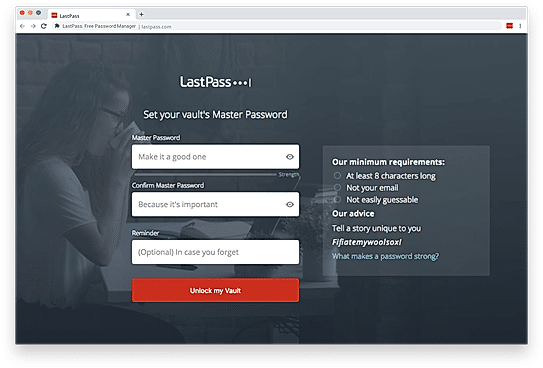
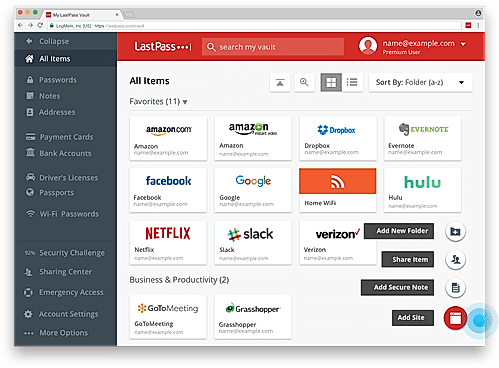
| Description | Lastpass stores your passwords online and prepopulates them automatically when needed. It stores passwords in encrypted form and lets you access them through various options like its browser extensions, mobile apps or simply via logging in to your Lastpass account by using just one master password. In case the master password is missing, LastPass allows a password hint, pre-set by the user, thereby making access simple and hassle-free. It even supports bookmarklets. Lastpass automates form filling and password generation, along with site-sharing, site logging and two-factor authentication through various methods. This particular feature is not very common with other password management softwares. LastPass also offers an enterprise solution that lets the companies share credentials within and outside the organization without disclosing passwords. Last, but not the least, LastPass even allows offline functionality through its apps which are available for smartphones with iOS, Windows and Android as their operating systems. Read more | 1Password remembers all your passwords and offers a strong, multi-key encryption with multi-factor authentication that proves to be an added layer of protection for your business password secrets. As for data confidentiality, integrity and availability, 1Password complies stringently with all industry standards. This password management software can be installed on iOS, Android, Windows, Mac and even via the iCloud. Other features which 1Password supports are multi-factor authentication, autofill with browser extension and even a Travel mode option which is marked as password-safe for travels. Moreover, 1Password offers you a vault where you can store your important documents like passport, PDF documents, and receipts. It also lets you tag the stored data for easy accessibility. In case an application needs you to answer security question to login, you can save their answers to 1Password as well. This software holds a very strong reputation when it comes to password breaching by a third party as it immediately and instantly sends a notification regarding the same. 1Password is one of the most secure password managers and offers everything that you need to secure your privacy. Read more | Azure Key Vault is a security management software that can be and used to safeguard vital cryptographic keys, passwords and other secrets. Enhanced data protection and compliance technology offered by the software help users generate and import encrypted keys within minutes. The software is scalable in nature, users no longer need to deploy dedicated HSMs. They can achieve global redundancy with the particular and maintain a copy of their own HSMs for enhanced durability. Developers can further manage keys used for testing or development. They can maintain complete control of their keys and allow access permission to partners or applications whenever needed. Applications never possess direct access on keys. Moreover, the platform automates and simplifies various tasks related to TLS/SSL certificates. Users are also enabled to enroll and renew their certificates automatically from various supported public certificate authorities. Organizations can boost performance and reduce their cloud applications’ latency by storing their cryptographic keys in the cloud, instead of on-premises. Read more |
| Pricing Options |
|
|
|
| SW Score & Breakdown |
91% SW Score The SW Score ranks the products within a particular category on a variety of parameters, to provide a definite ranking system. Read more
|
98% SW Score The SW Score ranks the products within a particular category on a variety of parameters, to provide a definite ranking system. Read more
|
93% SW Score The SW Score ranks the products within a particular category on a variety of parameters, to provide a definite ranking system. Read more
|
| SaaSworthy Awards | # 1 Most Worthy # 3 Highly Rated | # 2 Most Worthy # 2 Highly Rated |
Not Available
|
| Organization Types Supported |
|
|
|
| Platforms Supported |
|
|
|
| Modes of Support |
|
|
|
| API Support |
|
|
|
| User Rating |
|
|
|
| Rating Distribution |
|
|
|
| User Sentiments |
Secure Password Storage, Cross-Platform Compatibility, Password Generator, Autofill Functionality Browser Extension Issues, Mobile App Usability, Sharing Functionality Complexity, Occasional Syncing Issues |
Excellent Customer Service, Cross-Platform Compatibility, Seamless Browser Integration, Strong Password Generation Subscription Model, Occasional Syncing Issues, Mobile App Shortcomings, Confusing Setup Process |
Affordable Pricing, Robust Security Measures, Seamless Integration with Azure Services, Centralized Key Management Certificate Management Functionality, User Interface Complexity, Limited Features for Large-Scale Use, Occasional Performance Issues |
| Review Summary |
Overall, LastPass is a comprehensive password manager that simplifies secure access to various online accounts. It excels in user-friendliness, offering an intuitive interface and mobile applications for convenient password management across devices. However, some users have reported occasional syncing issues and concerns about the company's recent security breaches. While LastPass provides robust features like multi-factor authentication and password sharing, some users have encountered limitations in sharing passwords with non-LastPass users. Additionally, its pricing plans may not suit all budgets, particularly for larger teams or enterprise-level usage. |
Overall, users praise 1Password's user-friendly interface, robust security features, and seamless integration with various devices and platforms. They appreciate its strong password management capabilities, secure storage of sensitive information, and ease of use. However, some users express concerns regarding occasional syncing issues, limited customization options, and the cost of premium plans. Despite these minor drawbacks, 1Password is generally well-received for its effectiveness in safeguarding passwords and personal data. |
Azure Key Vault is a popular, affordable cloud key management solution from Microsoft. Users praise its secure storage of secrets, certificates, and keys, along with its seamless integration with other Azure services. Key Vault's ease of use, strong security features, and support for HSM-based keys are major advantages. However, some users highlight the need for improved certificate management, including renewal alerts and viewing capabilities. While the UI could be more intuitive, Azure Key Vault remains a reliable choice for managing sensitive information in the cloud. |
| Pros & Cons |
|
|
Not Available
|
| Read All User Reviews | Read All User Reviews | Read All User Reviews |
AI-Generated from the text of User Reviews
| Pricing Options |
|
|
|
|
Pricing Plans
Monthly Plans
Annual Plans
|
Free (Single Users and Families) Free Premium (Single Users and Families) $3.00 $3.00 per month Families (Single Users and Families) $4.00 $4.00 per month Teams (Business Plans) $4.00 $4.00 per user / month Business (Business Plans) $6.00 $6.00 per user / month |
Individual (Password Manager) $2.99 $3.99 per month Families (Password Manager) $4.99 $6.95 per month Teams Starter Pack (Password Manager) $19.95 $24.95 per month Business (Password Manager) $7.99 $9.99 per user / month Extended Access Management Custom |
Standard Others Premium Others |
|
View Detailed Pricing
|
View Detailed Pricing
|
View Detailed Pricing
|
Get personalized recommendations from our experts on call
Trusted by more than 5 Million users across the globe.
Thank you for the enquiry. One of our software analysts will contact you soon.
| Screenshots |
+ 1 More
|

+ 2 More
|
Not Available |
| Videos |

+ 2 More
|

+ 3 More
|
|
| Company Details | Located in: Virginia, United States | Located in: Ontario, Canada | Located in: Redmond, Washington |
| Contact Details |
Not available |
Not available |
Not available |
| Social Media Handles |
|
|
|

Looking for the right SaaS
We can help you choose the best SaaS for your specific requirements. Our in-house experts will assist you with their hand-picked recommendations.

Want more customers?
Our experts will research about your product and list it on SaaSworthy for FREE.