MEET CLARA - THE AI BEHIND SMARTER SOFTWARE CHOICES



Milanote |
93% SW Score The SW Score ranks the products within a particular category on a variety of parameters, to provide a definite ranking system. Read more 
View Details
|
90% SW Score The SW Score ranks the products within a particular category on a variety of parameters, to provide a definite ranking system. Read more 
View Details
|
Featured
94% SW Score The SW Score ranks the products within a particular category on a variety of parameters, to provide a definite ranking system. Read more 
FigJam |
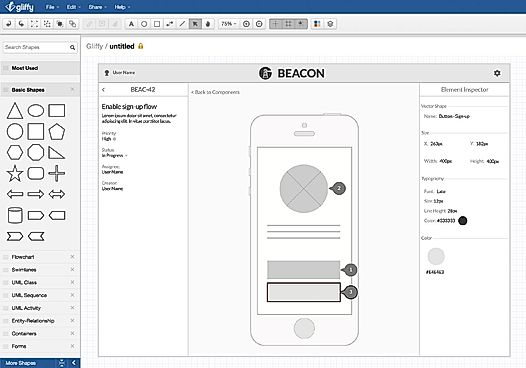
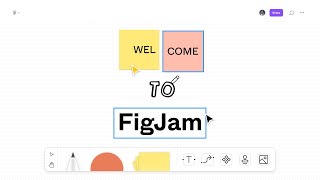
| Description | It provides simple drag and drop options and has numerous templates which makes diagramming easier for you.This software allows you to share diagrams through an URL link. It also has an instant collaboration feature due to which, file access can be given to specific set of users.In addition,it integrates with Atlassian in order to add visuals directly to JIRA and Confluence.It provides a secure cloud storage space to store data which is well assisted with data migration tool.In addition, you can access previous versions in revision history that will help you to preserve and track changes. Read more | Visio online diagram software does not require any extra software and hardware installation. This SaaS diagram software can be easily run on multiple platforms like Mac and Windows. Online support all through the business hours is provided. The software helps in making beautiful flowcharts, org charts,network diagrams and other complex engineering designs. Visio diagram tool features templates also that further ease the process of creating charts and diagrams. You can share and receive comments or get feedback from your teammates to improve your ideas as it supports multi-user collaboration in real-time. It features organization charting but does not come with data import/export facility. Read more | FigJam is an online whiteboard designed specifically for teams to ideate and brainstorm together. It enables you to express yourself and your ideas and to communicate using notes, stamps, dot votes, and drawings. You can ideate, brainstorm, share, and discover your ideas with your team together. FigJam provides various options like markers, shapes, and figures to sketch your ideas and show their workings. You can even use diagrams, shapes, and figures to demonstrate the workings of your mind with your team. It is an extremely easy-to-use and very intuitive app designed to let your ideas flow. You can use emotes with quick expressions, stamps to vote for ideas, and stickers from the default library to give shapes to your thoughts. Users can collect, organize and synthesize their findings using the FigJam whiteboard. They can create engaging and interactive mood boards for their teams. FigJam is currently in beta form and is free to use but from 2022, it will have plans starting from as less as $0 to $15 per editor per month. Read more |
| Pricing Options |
|
|
|
| SW Score & Breakdown |
93% SW Score The SW Score ranks the products within a particular category on a variety of parameters, to provide a definite ranking system. Read more
|
90% SW Score The SW Score ranks the products within a particular category on a variety of parameters, to provide a definite ranking system. Read more
|
94% SW Score The SW Score ranks the products within a particular category on a variety of parameters, to provide a definite ranking system. Read more
|
| SaaSworthy Awards | # 7 Fastest Growing # 4 Most Popular | # 6 Most Popular # 3 Most Worthy |
Not Available
|
| Organization Types Supported |
|
|
|
| Platforms Supported |
|
|
|
| Modes of Support |
|
|
|
| API Support |
|
|
|
| User Sentiments |
User-friendly Interface, Ease of Diagram Creation, Versatile Diagramming Options, Extensive Integrations Limited Customization Options, Occasional Software Glitches, Limited Exporting Options, Lack of Advanced Features in Free Version |
Ease of Use, Extensive Template Library, Robust Diagramming Capabilities, Seamless Integration with Microsoft Products Limited Platform Compatibility, Lack of Real-Time Collaboration Features, Occasional Software Glitches, Steep Learning Curve for Advanced Features |
Not Available
|
| Review Summary |
Overall, users praise Gliffy for its user-friendly interface, ease of use, and extensive library of templates and shapes. They appreciate its drag-and-drop functionality, intuitive controls, and the ability to easily create professional-looking diagrams. Additionally, users commend Gliffy's collaboration features, real-time editing capabilities, and integration with various cloud storage platforms. However, some users express concerns regarding the limited customization options, occasional glitches, and pricing plans. |
Reviewers commend Visio for its user-friendly interface, ease of use, and extensive shape library. They appreciate its collaboration features, such as real-time co-authoring and version control, which streamline teamwork. Additionally, reviewers highlight the seamless integration with other Microsoft products, enabling effortless data import and export, enhancing productivity. However, some users mention limited customization options and occasional compatibility issues when working with files from other software. Overall, Visio is praised for its intuitive nature, effective diagramming capabilities, and robust integration within the Microsoft ecosystem. |
Not Available
|
| Pros & Cons |
|
|
Not Available
|
AI-Generated from the text of User Reviews
| Pricing Options |
|
|
|
|
Pricing Plans
Monthly Plans
Annual Plans
|
Professional $8.00 $10.00 per month Enterprise Custom |
Visio Online Plan 1 $5.00 $5.00 per user / month Visio Online Plan 2 $15.00 $15.00 per user / month |
Starter Team Free Professional $5.00 $5.00 per user / month Organization $5.00 $5.00 per user / month Enterprise $5.00 $5.00 per user / month |
|
View Detailed Pricing
|
View Detailed Pricing
|
View Detailed Pricing
|
Get personalized recommendations from our experts on call
Trusted by more than 5 Million users across the globe.
Thank you for the enquiry. One of our software analysts will contact you soon.
| Screenshots |
+ 4 More
|
Not Available | Not Available |
| Videos |

+ 1 More
|
Not Available |
+ 1 More
|
| Company Details | Located in: San Francisco, California | Located in: Redmond, Washington | Located in: San Francisco, CA |
| Contact Details |
Not available |
Not available |
Not available |
| Social Media Handles |
|
|
Not available |
What are the key differences between Gliffy and Microsoft Visio?
What are the alternatives to Gliffy?
Which SaaS products can Gliffy integrate with?
What are the key features of Microsoft Visio?
How does the collaboration functionality of Gliffy compare to Microsoft Visio?

Looking for the right SaaS
We can help you choose the best SaaS for your specific requirements. Our in-house experts will assist you with their hand-picked recommendations.

Want more customers?
Our experts will research about your product and list it on SaaSworthy for FREE.