
 MEET CLARA - THE AI BEHIND SMARTER SOFTWARE CHOICES



87% SW Score The SW Score ranks the products within a particular category on a variety of parameters, to provide a definite ranking system. Read more
Powerful transcription and subtitles generating software
This product profile is currently unclaimed.
The listing is published on SaaSworthy, but the official vendor does not yet manage it. Are you part of the HappyScribe team? Claim this profile to manage and update your product information.


 Deep Dive with Clara AI
Happy Scribe is an automatic transcription and subtitles generator tool. The software uses an advanced punctuation module to transcript audio sentences into written texts with proper implementation of commas, full stops, and question marks. The transcription is also very fast. Users can get 1 hour of audio transcribed in just 20 minutes. Not only audio, but the software can also transcribe videos. The speaker identification feature automatically creates a new paragraph whenever the speaker is changed. It can also add names of the speakers with just a single click. Happy Scribe highlights the content where it struggled while transcribing audio or video so that one can check and rectify if there is an error. The powerful subtitling tool offers users perfect and detailed subtitles for videos. One can edit and adjust the subtitles according to the time frames right into the software itself. The subtitles can be future customized for good contrast and proper viewing over the frames. The most highlighting part is that all these can be done in over 119 languages, which makes Happy Scribe and feature-packed robust transcription software.
Read more


Pricing
SW Score Breakdown
Platforms Supported
Organization Types Supported
API Support
Modes of Support
Video Capture
Allows recording videos as well besides helping in editing themText Overlay
Enables the users to superimpose one or multiple text elements of varying color & fonts over a video stream.Media Library
Helps in managing the videos, images, audio and as such other media files all in one place.Audio Tools
Allows incorporating audio tools to help to add sound elements to the video creationVideo Stabilization
Helps in stabilizing the shaky or blurred video imagesSupports HD Resolution
Helps in improving the picture quality and clarity to make the video look crisp & clear.Merge video
Allows merging two or more video footages for better video creationSplit Video
Allows splitting video into parts, delete the unnecessary ones for better video creationVideo Speed Controller
Helps in adjusting the speed of the video clipsBrand Overlay
Enables the users to upload images/logos of their choice & overlay those onto the video player for better brand popularization.3D Video Editing
Allows editing 3D videos and make necessary changesSocial Sharing
Offers excellent marketing opportunities and helps to promote the brand or digital content on social media sitesFree Trial
Available
Happy Scribe Others
€12 for one hour
Features
Screenshots of Vendor Pricing Page
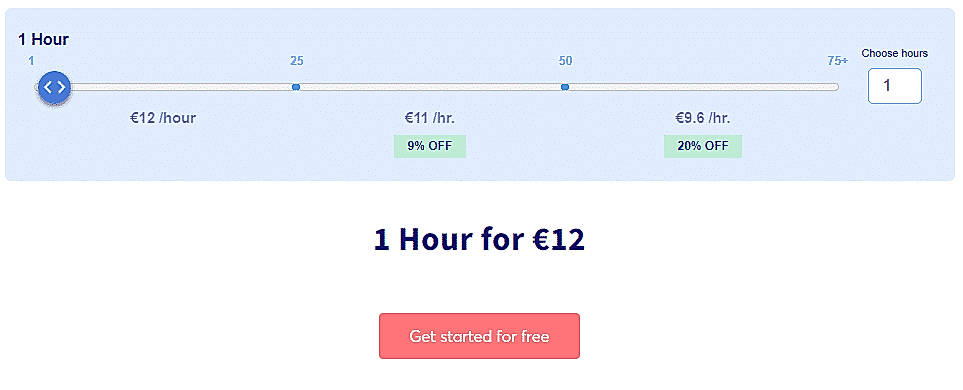
Disclaimer: The pricing details were last updated on 24/04/2020 from the vendor website and may be different from actual. Please confirm with the vendor website before purchasing.
Learn more about HappyScribe Pricing
91% SW Score The SW Score ranks the products within a particular category on a variety of parameters, to provide a definite ranking system. Read more
Featured

79% SW Score The SW Score ranks the products within a particular category on a variety of parameters, to provide a definite ranking system. Read more

87% SW Score The SW Score ranks the products within a particular category on a variety of parameters, to provide a definite ranking system. Read more

73% SW Score The SW Score ranks the products within a particular category on a variety of parameters, to provide a definite ranking system. Read more
74% SW Score The SW Score ranks the products within a particular category on a variety of parameters, to provide a definite ranking system. Read more

77% SW Score The SW Score ranks the products within a particular category on a variety of parameters, to provide a definite ranking system. Read more

83% SW Score The SW Score ranks the products within a particular category on a variety of parameters, to provide a definite ranking system. Read more


76% SW Score The SW Score ranks the products within a particular category on a variety of parameters, to provide a definite ranking system. Read more

How to Upload a F...
How to Share a Fi...
How to Create a T...

Transcript

Subtitle
What is HappyScribe used for?
HappyScribe is Video Editing Software. HappyScribe offers the following functionalities:
Learn more about HappyScribe features.
What are the top alternatives for HappyScribe?
Here`s a list of the best alternatives for HappyScribe:
Does HappyScribe provide API?
Yes, HappyScribe provides API.
Vendor Details
Dublin, Ireland Founded : 2017Contact Details
Not available
https://www.happyscribe.co/
Social Media Handles
SaaSworthy may receive compensation from some vendors featured on this page. This does not influence our editorial evaluation or ratings. [email protected]

Looking for the right SaaS
We can help you choose the best SaaS for your specific requirements. Our in-house experts will assist you with their hand-picked recommendations.

Want more customers?
Our experts will research about your product and list it on SaaSworthy for FREE.


