MEET CLARA - THE AI BEHIND SMARTER SOFTWARE CHOICES
MEET CLARA - THE AI BEHIND SMARTER SOFTWARE CHOICES
MEET CLARA - THE AI BEHIND SMARTER SOFTWARE CHOICES
|
91% SW Score The SW Score ranks the products within a particular category on a variety of parameters, to provide a definite ranking system. Read more 
View Details
|
89% SW Score The SW Score ranks the products within a particular category on a variety of parameters, to provide a definite ranking system. Read more 
View Details
|
92% SW Score The SW Score ranks the products within a particular category on a variety of parameters, to provide a definite ranking system. Read more 
View Details
|
72% SW Score The SW Score ranks the products within a particular category on a variety of parameters, to provide a definite ranking system. Read more 
View Details
|
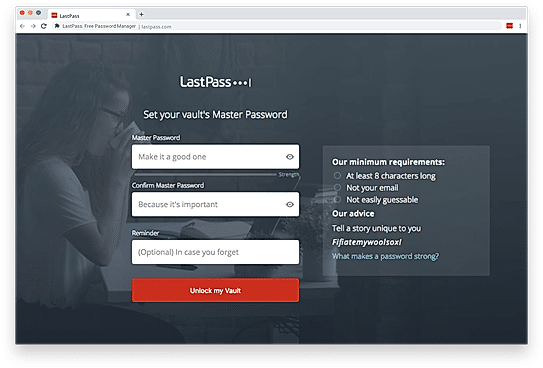
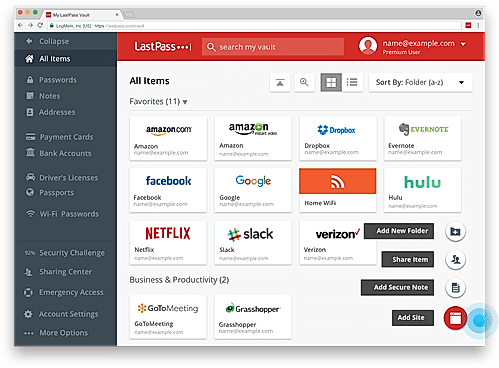
| Description | Lastpass stores your passwords online and prepopulates them automatically when needed. It stores passwords in encrypted form and lets you access them through various options like its browser extensions, mobile apps or simply via logging in to your Lastpass account by using just one master password. In case the master password is missing, LastPass allows a password hint, pre-set by the user, thereby making access simple and hassle-free. It even supports bookmarklets. Lastpass automates form filling and password generation, along with site-sharing, site logging and two-factor authentication through various methods. This particular feature is not very common with other password management softwares. LastPass also offers an enterprise solution that lets the companies share credentials within and outside the organization without disclosing passwords. Last, but not the least, LastPass even allows offline functionality through its apps which are available for smartphones with iOS, Windows and Android as their operating systems. Read more | NordPass is a password manager that stores all complex logins and credentials and lets users access them from anywhere. It easily remembers all passwords, auto-fill online forms and users need not have to undergo the hassle of resetting their passwords again. The software stores and organizes login details, private notes, credit cards, etc., in a secure password vault, and users can gain access to this using just a single Master Password, whenever they need it. With this software, users no longer need to share passwords or log in credentials over email or messenger apps, as they can share such crucial details safely and securely. Also, there are special encryption algorithms added to it, which helps in protecting all sensitive information successfully. These include golden cryptology standards and even the latest algorithms that are considered to be the future of internet encryption. Whenever users require a new password, they can use this secure technology and generate a unique password and meet the given requirements of the website. Read more | Bitwarden is an open-source password manager that offers the easiest and safest way for teams and individuals to store/share data from devices. This AI-based manager makes sure that users’ private information is protected with end-to-end encryption before it ever leaves a device. Its source code, features and infrastructure security are vetted and improved by a global community. The system works with any device, known browsers as well as niche browsers. Unlike other password managers, Bitwarden leaves users free to roam. It enables teams and individuals the power to create and manage unique passwords so that they can strengthen privacy and boost productivity online, from any device or location. With Bitwarden users can protect their online data. Furthermore, the system conducts regular third-party security audits and is compliant with Privacy Shield, GDPR, HIPAA, SOC2 and CCPA security standards. Bitwarden helps access insightful reports to reveal weak, reused passwords and other helpful security metrics. Its other features include a directory connector, customer support, detailed event logs and flexible integrations. Read more | Firefox Lockwise is an online application that offers safe access to saved passwords on the Mozilla Firefox browser. All it takes for Lockwise to run smoothly on the system is a download and installation process. Passwords, or ‘credentials’ as the technical term is, is an essential component associated with every website that requires a login before proceeding. While browsers always offer to remember these credentials until they are changed, without certain pieces of information handy, users can’t decode their passwords. This is exactly where Firefox Lockwise comes to the rescue. The application generates every password ever saved as soon as it recognises the user on the other end. However, customers must use the Firefox browser to operate the Firefox Lockwise application seamlessly. Credentials here are stored in the safest, encrypted format to disallow any breach of privacy. Using the browser and the Firefox Lockwise app simultaneously sends information to Mozilla that includes editing, viewing and copying data, whether the user is new or an existing one. Read more |
| Pricing Options |
|
|
|
|
| SW Score & Breakdown |
91% SW Score The SW Score ranks the products within a particular category on a variety of parameters, to provide a definite ranking system. Read more
|
89% SW Score The SW Score ranks the products within a particular category on a variety of parameters, to provide a definite ranking system. Read more
|
92% SW Score The SW Score ranks the products within a particular category on a variety of parameters, to provide a definite ranking system. Read more
|
72% SW Score The SW Score ranks the products within a particular category on a variety of parameters, to provide a definite ranking system. Read more
|
| SaaSworthy Awards | # 1 Most Worthy # 3 Highly Rated | # 1 Rising SaaS |
Not Available
|
Not Available
|
| Total Features |
11 Features
|
9 Features
|
11 Features
|
5 Features
|
| Common Features for All |
Backup/Restore
Mobiles Password Management
Multifactor Authentication
Offline Functionality
Password Encryption
Password Generator
Password Reset
Saved Cards
Secure Password Sharing
Single Sign-On (SSO)
Third-party Integration
Websites Password Management
|
Backup/Restore
Mobiles Password Management
Multifactor Authentication
Offline Functionality
Password Encryption
Password Generator
Password Reset
Saved Cards
Secure Password Sharing
Single Sign-On (SSO)
Third-party Integration
Websites Password Management
|
Backup/Restore
Mobiles Password Management
Multifactor Authentication
Offline Functionality
Password Encryption
Password Generator
Password Reset
Saved Cards
Secure Password Sharing
Single Sign-On (SSO)
Third-party Integration
Websites Password Management
|
Backup/Restore
Mobiles Password Management
Multifactor Authentication
Offline Functionality
Password Encryption
Password Generator
Password Reset
Saved Cards
Secure Password Sharing
Single Sign-On (SSO)
Third-party Integration
Websites Password Management
|
| Organization Types Supported |
|
|
|
|
| Platforms Supported |
|
|
|
|
| Modes of Support |
|
|
|
|
| API Support |
|
|
|
|
| User Rating |
|
|
|
Not Available
|
| Rating Distribution |
|
|
|
Not Available
|
| User Sentiments |
Secure Password Storage, Cross-Platform Compatibility, Password Generator, Autofill Functionality Browser Extension Issues, Mobile App Usability, Sharing Functionality Complexity, Occasional Syncing Issues |
Excellent Customer Support, Ease of Use, Cross-Platform Functionality, Strong Security Slow Autofill Functionality, Occasional Software Glitches, Invasive Auto-Password Suggestions, Limited Offline Functionality |
Not Available
|
Not Available
|
| Review Summary |
Overall, LastPass is a comprehensive password manager that simplifies secure access to various online accounts. It excels in user-friendliness, offering an intuitive interface and mobile applications for convenient password management across devices. However, some users have reported occasional syncing issues and concerns about the company's recent security breaches. While LastPass provides robust features like multi-factor authentication and password sharing, some users have encountered limitations in sharing passwords with non-LastPass users. Additionally, its pricing plans may not suit all budgets, particularly for larger teams or enterprise-level usage. |
Users generally appreciate NordPass for its user-friendly interface, strong security features, and ability to sync passwords across devices. However, some users have experienced occasional glitches and bugs, and a few have raised concerns about the company's privacy policy. Overall, NordPass is a reliable and convenient password manager that offers a good balance of security and ease of use. |
Bitwarden receives high praise for its secure password management, robust features, and accessibility with a fully free plan. Users appreciate its easy-to-use interface, secure storage, and cross-platform compatibility. Bitwarden's open-source nature provides transparency and security assurance. However, some users find the user interface and setup process somewhat intricate, particularly for non-technical users. While Bitwarden offers a solid solution, it could benefit from improved customer support and a more streamlined user experience across platforms. |
Not Available
|
| Read All User Reviews | Read All User Reviews | Read All User Reviews |
AI-Generated from the text of User Reviews
| Pricing Options |
|
|
|
|
|
Pricing Plans
Monthly Plans
Annual Plans
|
Free (Single Users and Families) Free Premium (Single Users and Families) $3.00 $3.00 per month Families (Single Users and Families) $4.00 $4.00 per month Teams (Business Plans) $4.00 $4.00 per user / month Business (Business Plans) $6.00 $6.00 per user / month |
Free Free Premium $2.49 $2.49 per month |
Basic Account (Personal Plan) Free Premium Account (Personal Plan) $10.00 $10.00 per year Family Organization (Personal Plan) $3.33 $3.33 per month Free Organization (Business Plan) Free Team Organization (Business Plan) $3.00 $3.00 per user / month Enterprise Organization (Business Plan) $5.00 $5.00 per user / month |
Firefox Lockwise Free |
|
View Detailed Pricing
|
View Detailed Pricing
|
View Detailed Pricing
|
View Detailed Pricing
|
Get personalized recommendations from our experts on call
Trusted by more than 5 Million users across the globe.
Thank you for the enquiry. One of our software analysts will contact you soon.
| Screenshots |
+ 1 More
|
Not Available |

+ 4 More
|
Not Available |
| Videos |

+ 2 More
|

|
+ 5 More
|
|
| Company Details | Located in: Virginia, United States | Located in: Panama City, Panama | Located in: Santa Barbara, CA Founded in: 2015 | Located in: San Francisco, CA |
| Contact Details |
Not available |
Not available |
Not available |
Not available |
| Social Media Handles |
|
|
|
Not available |

Looking for the right SaaS
We can help you choose the best SaaS for your specific requirements. Our in-house experts will assist you with their hand-picked recommendations.

Want more customers?
Our experts will research about your product and list it on SaaSworthy for FREE.