MEET CLARA - THE AI BEHIND SMARTER SOFTWARE CHOICES



Atera |
98% SW Score The SW Score ranks the products within a particular category on a variety of parameters, to provide a definite ranking system. Read more 
View Details
|
70% SW Score The SW Score ranks the products within a particular category on a variety of parameters, to provide a definite ranking system. Read more 
View Details
|
Featured
98% SW Score The SW Score ranks the products within a particular category on a variety of parameters, to provide a definite ranking system. Read more 
NinjaOne (NinjaRMM) |
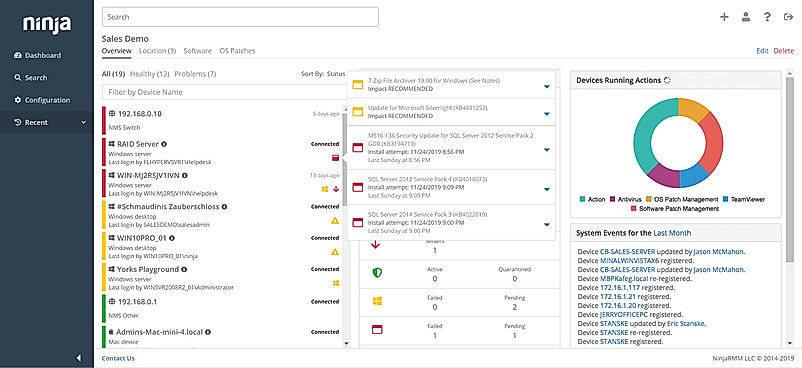
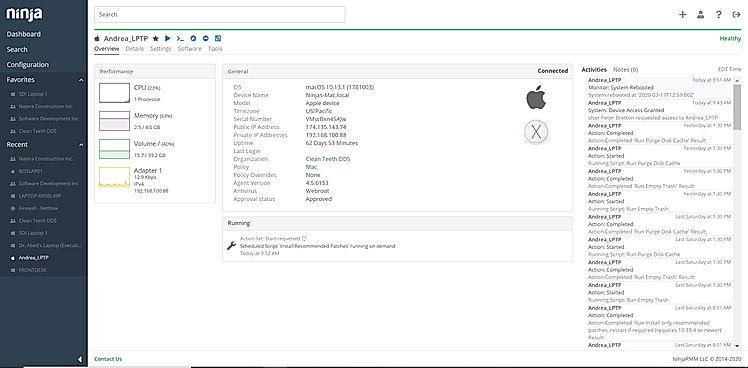
| Description | Patch My PC software is a web-based platform explicitly built to help users deploy and patch the large-scale list of third-party applications. This software is expert in offering automated patching and deployment of third party application that comprises the features for installation, configuration and malware detection. Patch My PC helps users gain notifications using newsletter and RSS (really simple syndication) feed consisting of CVE IDs. Users can expand their business using the existing SCCM (System Centre configuration manager) site system and compliance records with Patch My PC. Moreover, it also helps to acquire insights with reporting dashboards to estimate the business workflows. So overall, Patch My PC software's only aim is to simplify the enterprise's work process by properly managing, updating, and deploying third-party applications. Undisputedly, it greatly assists organizations using Intune feature on Microsoft configuration manager that kept their third-party application well informed and up-to-date. Read more | PDQ Deploy is a software deployment tool that enables companies to deploy custom scripts, update their third party software and make effective configuration changes. Apart from Windows patch management and deployment of software, PDQ Deploy also helps users to execute scripts, copy needed files, force reboots and send messages to users. The tool enables companies to automate their various processes by scripting commands and scripts using their preferred language. PDQ Deploy comes with a Package Library that includes more than 250 popular applications that are ready to deploy. Some of these applications are Google Chrome, Zoom, Microsoft Cumulative Updates and Adobe Reader DC. The working of the PDQ Deploy is also very simple. Users just need to select the software that they want to deploy and create a schedule for deploying new versions automatically. In the next step, they can identify a group of machines that requires a new version of the selected software. After that, the tool will deploy the new versions automatically. Read more | NinjaOne automates the hardest parts of IT, delivering visibility, security, and control over all endpoints for more than 20,000 customers. The NinjaOne platform increases productivity while reducing risk and IT costs. Organizations use NinjaOne, including its wide range of IT and security integrations, for use cases such as endpoint management, patch management, mobile device management, software deployment, remote access, endpoint backup, and more. Read more |
| Pricing Options |
|
|
|
| SW Score & Breakdown |
98% SW Score The SW Score ranks the products within a particular category on a variety of parameters, to provide a definite ranking system. Read more
|
70% SW Score The SW Score ranks the products within a particular category on a variety of parameters, to provide a definite ranking system. Read more
|
98% SW Score The SW Score ranks the products within a particular category on a variety of parameters, to provide a definite ranking system. Read more
|
| Organization Types Supported |
|
|
|
| Platforms Supported |
|
|
|
| Modes of Support |
|
|
|
| API Support |
|
|
|
| User Rating |
Not Available
|
Not Available
|
|
| Rating Distribution |
Not Available
|
Not Available
|
|
| User Sentiments |
Not Available
|
Not Available
|
Ease of Use, Fast and Reliable Remote Access, Comprehensive Patch Management, Excellent Customer Support Limited Third-Party Software Patching Support, Limited MacOS Support, Inadequate Reporting Functionality, Occasional Software Bugs |
| Review Summary |
Not Available
|
Not Available
|
The general consensus among reviewers is that NinjaRMM is a comprehensive and powerful RMM tool that offers a wide range of features to help MSPs streamline their operations. It is praised for its user-friendly interface, customizable dashboards, and robust reporting capabilities. However, some users have expressed concerns about the occasional occurrence of bugs and glitches, as well as the need for improved documentation and customer support. Overall, NinjaRMM is a solid choice for MSPs seeking a feature-rich and reliable RMM solution, though there is room for improvement in terms of stability and support. |
| Pros & Cons |
|
|
Not Available
|
| Read All User Reviews |
AI-Generated from the text of User Reviews
| Pricing Options |
|
|
|
|
Pricing Plans
Monthly Plans
Annual Plans
|
Enterprise Patch $2.00 $2.00 per year Enterprise Plus $3.50 $3.50 per year Enterprise Premium $5.00 $5.00 per year |
Free PDQ Deploy Free PDQ Deploy $1,000.00 $1,000.00 per user / year |
NinjaOne Custom |
|
View Detailed Pricing
|
View Detailed Pricing
|
View Detailed Pricing
|
Get personalized recommendations from our experts on call
Trusted by more than 5 Million users across the globe.
Thank you for the enquiry. One of our software analysts will contact you soon.

ManageEngine Patch Connect Plus
PDQ Deploy Vs ManageEngine Patch Connect Plus
|
|||
| Screenshots | Not Available | Not Available |
+ 3 More
|
| Videos |
+ 1 More
|
|

+ 4 More
|
| Company Details | Located in: Denver, Colorado Founded in: 2011 | Founded in: 2001 | Located in: Austin, TX |
| Contact Details |
+1 866-343-3083 https://patchmypc.com/ |
Not available https://www.pdq.com/pdq-deploy/ |
+1 888 542-8339 https://www.ninjaone.com/ |
| Social Media Handles |
|
|
|
What are the key differences between Patch My PC and PDQ Deploy?
What are the alternatives to Patch My PC?
What are the alternatives to PDQ Deploy?
Which product is better for managing large-scale third-party applications?
Which product is better for automating software deployment?
SaaSworthy may receive compensation from some vendors featured on this page. This does not influence our editorial evaluation or ratings. [email protected]

Looking for the right SaaS
We can help you choose the best SaaS for your specific requirements. Our in-house experts will assist you with their hand-picked recommendations.

Want more customers?
Our experts will research about your product and list it on SaaSworthy for FREE.