
 MEET CLARA - THE AI BEHIND SMARTER SOFTWARE CHOICES



This profile is currently managed by the official vendor through the SaaSworthy Vendor Portal. Product details, features, pricing, and media assets are maintained directly by the company.

 Deep Dive with Clara AI
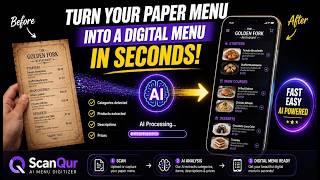
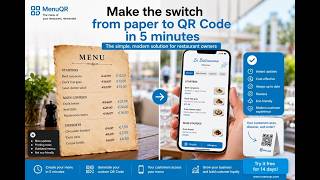
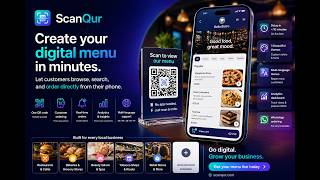
ScanQur is a digital menu platform for restaurants, cafés, and retail shops to create QR code-based catalogs. Merchants establish a digital presence through account creation, menu addition, and QR code publication. The platform supports multilingual menus in English, French, Arabic, Spanish, and Portuguese, with automatic language detection based on customer device settings. Scanqur offers customizable design themes and integrates WhatsApp ordering, enabling customers to submit orders via messaging. Built-in analytics track QR code scans, menu views, and product performance. Merchants can organize offerings, upload photos, set prices, and manage availability, with updates instantly reflected in the digital catalog. High-resolution QR codes are generated for placement on tables, windows, packaging, and receipts.
Read more


Pricing
SW Score Breakdown
Platforms Supported
Organization Types Supported
API Support
Modes of Support
Reservation Management
Real-Time Availability
Online Reservations
Reporting & Analytics
Table Management
Allows effortless management of table layouts, seating arrangements, and reservations with real-time updates.Guest Management
Automated Confirmations & Reminders
Waitlist Management
Customer Database
Helps with a collection of data assembled from each customer.Order Management
Helps tracking, monitoring, supervising, and meeting deadlines concerning ordered goods in an automated and systematic wayMarketing Management
Documents, tracks and also helps to access all data pertaining to the marketing departmentEmployee Management
Helps in automating, managing and accessing the data related to the employed staffs, records vital data, etc. in the enterpriseTraining Management
Automates the documenting processes involved in training management and records the performance of employees during training sessionsVendor Management
Helps to manage necessary data concerning vendors and allows easy accessReporting & Analytics
Returns & Refund Management
Customer Management
Multi-channel Order Management
Order Routing & Fulfillment
Inventory Integration
Order Processing & Tracking
Payment Processing
Helps to manage automated transactions across various online channelsFree Trial
Available
No Credit Card Required, Get Started for Free
Free to start, honest as you grow /Year
Scanqur is in early access: build your digital menu, download your QR code and serve customers today, free and without a credit card. Paid plans with advanced features are on the way, and the Starter plan will stay affordable for small businesses.
98% SW Score The SW Score ranks the products within a particular category on a variety of parameters, to provide a definite ranking system. Read more

92% SW Score The SW Score ranks the products within a particular category on a variety of parameters, to provide a definite ranking system. Read more

92% SW Score The SW Score ranks the products within a particular category on a variety of parameters, to provide a definite ranking system. Read more
90% SW Score The SW Score ranks the products within a particular category on a variety of parameters, to provide a definite ranking system. Read more

90% SW Score The SW Score ranks the products within a particular category on a variety of parameters, to provide a definite ranking system. Read more

90% SW Score The SW Score ranks the products within a particular category on a variety of parameters, to provide a definite ranking system. Read more

86% SW Score The SW Score ranks the products within a particular category on a variety of parameters, to provide a definite ranking system. Read more

86% SW Score The SW Score ranks the products within a particular category on a variety of parameters, to provide a definite ranking system. Read more

85% SW Score The SW Score ranks the products within a particular category on a variety of parameters, to provide a definite ranking system. Read more

84% SW Score The SW Score ranks the products within a particular category on a variety of parameters, to provide a definite ranking system. Read more

How to Digitize a...
Best Free Digital...
Comment créer un ...
Create a Digital ...

Your free QR menu...

Votre menu QR gra...

منيو الباركود الم...

merchant dashboard

Templates list
What is Scanqur?
Who uses Scanqur?
How is Scanqur different from other QR menu tools?
How long does it take to get a menu live?
Do I need a website or any technical skills?
How much does Scanqur cost?
Do you take a commission on orders?
Are there limits on the number of products, menus or updates?
What happens when paid plans launch?
Is there a contract or a lock-in?
How does the AI menu scanner work?
Can customers order from the menu?
Does Scanqur handle reservations?
Is the menu multilingual?
Can I customize how the menu looks?
Can I customize the QR code itself?
What analytics do I get?
Can customers leave reviews?
How do I know my menu looks professional before publishing?
Can my staff help manage the menu?
What is ScanQur used for?
ScanQur is Restaurant Reservations Software. ScanQur offers the following functionalities:
Learn more about ScanQur features.
What are the top alternatives for ScanQur?
Here`s a list of the best alternatives for ScanQur:
Does ScanQur provide API?
No, ScanQur does not provide API.
Vendor Details
Founded : 2026Contact Details
Not available
https://scanqur.com
Social Media Handles


SaaSworthy may receive compensation from some vendors featured on this page. This does not influence our editorial evaluation or ratings. [email protected]

Looking for the right SaaS
We can help you choose the best SaaS for your specific requirements. Our in-house experts will assist you with their hand-picked recommendations.

Want more customers?
Our experts will research about your product and list it on SaaSworthy for FREE.


