
 MEET CLARA - THE AI BEHIND SMARTER SOFTWARE CHOICES



Audit, batch-edit, and track complex Excel formulas and named ranges.
This profile is currently managed by the official vendor through the SaaSworthy Vendor Portal. Product details, features, pricing, and media assets are maintained directly by the company.

 Deep Dive with Clara AI
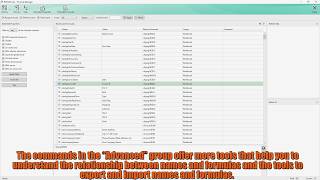
Formula Manager for Excel is a desktop add-in built by Uniform Software to help financial modelers, analysts, and developers audit and automate complex spreadsheets. Operating directly from a dedicated tab on the Excel ribbon, it replaces Excel's native Name Manager with two-way dependency tracking, pattern-based batch tools, and structural diagnostics. Key Features • Two-Way Dependency Mapping: Trace complex formula networks across worksheets using dedicated "Referred By" and "Refers To" panels. • Advanced Explorer Window: Search, sort, and browse all defined names, range formulas, and table names with browser-style selection history. • Pattern-Based Batch Naming: Generate sequential range names or formula patterns across rows and columns using sequence wildcards (e.g., Region??). • Extended Property Diagnostics: Filter metadata to isolate broken #REF! errors, hidden names, 3D ranges, relative references, and unused formulas. • Export/Import Grid Workflow: Export definitions into an editable worksheet grid, execute bulk updates, perform automated syntax checks, and re-import changes. • Automated Safety Backups: Automatically save timestamped workbook backups prior to executing any batch operation. • Scope Conversion: Convert defined name scopes between workbook-wide (global) and worksheet-specific (local) in batch.
Read more


Pricing
Platforms Supported
Organization Types Supported
API Support
Modes of Support
Visualization Tools
Simple graph visualization for analyzing connections and relationships.Real-time Collaboration
Helps more than one person to work on the same file simultaneouslyCloud Storage
Provides an online storage space to store dataDatabase Connectivity
SQL integration, BI tool connectorsAI Copilot
An AI-powered virtual assistant that accomplishes tasks and pursues goals on a user's behalf.Macros Automation
Record and run repetitive tasksTemplate Library
Ready-to-use layouts and customizable themes.Free Trial
Available
No Credit Card Required, Get Started for Free
Monthly Subscription $23.90 $2.39 per user / month
Monthly subscription. Volume discount available through Microsoft Marketplace.
98% SW Score The SW Score ranks the products within a particular category on a variety of parameters, to provide a definite ranking system. Read more

88% SW Score The SW Score ranks the products within a particular category on a variety of parameters, to provide a definite ranking system. Read more

80% SW Score The SW Score ranks the products within a particular category on a variety of parameters, to provide a definite ranking system. Read more
80% SW Score The SW Score ranks the products within a particular category on a variety of parameters, to provide a definite ranking system. Read more

79% SW Score The SW Score ranks the products within a particular category on a variety of parameters, to provide a definite ranking system. Read more
79% SW Score The SW Score ranks the products within a particular category on a variety of parameters, to provide a definite ranking system. Read more

78% SW Score The SW Score ranks the products within a particular category on a variety of parameters, to provide a definite ranking system. Read more

78% SW Score The SW Score ranks the products within a particular category on a variety of parameters, to provide a definite ranking system. Read more

78% SW Score The SW Score ranks the products within a particular category on a variety of parameters, to provide a definite ranking system. Read more

78% SW Score The SW Score ranks the products within a particular category on a variety of parameters, to provide a definite ranking system. Read more

Getting Started

The Explorer

Export Formulas a...

Import Formulas a...

Globalize Names

The Architecture
What is Formula Manager for Excel?
Formula Manager for Excel is a desktop add-in developed by Uniform Software that adds a dedicated tab to the Excel ribbon. It equips financial modelers, accountants, and spreadsheet developers with tools to audit, edit, and batch-create defined names, range formulas, and table names.
How does Formula Manager assist with spreadsheet auditing?
It features a central Explorer window with dedicated two-way dependency tracking panels ("Referred By" and "Refers To"). Users can apply diagnostic property filters to isolate structural errors across worksheets, including broken #REF! references, hidden names, 3D ranges, relative references, external links, and unused formulas.
Can I manage named ranges and formulas in bulk?
Yes. Formula Manager provides two primary batch tools:
Pattern-Based Naming: Automatically generates sequential range names (e.g., Region??) or formula patterns across rows and columns using wildcard syntax.
Export/Import Grid: Exports all workbook definitions into an editable worksheet grid, allowing users to perform bulk updates, validate formula syntax, and safely re-import definitions.
How does the app protect workbooks from data corruption during batch operations?
The add-in includes an automated backup mechanism that saves timestamped copies of your workbook prior to executing any batch generation, scope change, or bulk grid import.
Can I switch defined name scopes between global and local?
Yes. Formula Manager allows you to convert defined names between workbook-wide (global) and worksheet-specific (local) scopes in batch.
What are the system requirements for Formula Manager for Excel?
Operating System: Windows 10 (version 19041.0 or higher) or Windows 11.
Software: Desktop edition of Microsoft Excel.
How is Formula Manager deployed and licensed?
Formula Manager for Excel is distributed through two official channels:
Microsoft Store: For individual users using standard Microsoft accounts.
Microsoft Marketplace: For enterprise deployment across organizations via the Microsoft 365 Admin Center.
Is a free trial available?
What is Formula Manager for Excel used for?
Formula Manager for Excel is Spreadsheets Software. Formula Manager for Excel offers the following functionalities:
Learn more about Formula Manager for Excel features.
What are the top alternatives for Formula Manager for Excel?
Does Formula Manager for Excel provide API?
No, Formula Manager for Excel does not provide API.
Vendor Details
Founded : 2024Contact Details
Not available
https://uniformsoftware.com/formula-manager
Social Media Handles
Not available

This research is curated from diverse authoritative sources; feel free to share your feedback at [email protected]

Looking for the right SaaS
We can help you choose the best SaaS for your specific requirements. Our in-house experts will assist you with their hand-picked recommendations.

Want more customers?
Our experts will research about your product and list it on SaaSworthy for FREE.


