MEET CLARA - THE AI BEHIND SMARTER SOFTWARE CHOICES

JobNimbus |
98% SW Score The SW Score ranks the products within a particular category on a variety of parameters, to provide a definite ranking system. Read more 
Visit Website
|
95% SW Score The SW Score ranks the products within a particular category on a variety of parameters, to provide a definite ranking system. Read more 
Visit Website
|
88% SW Score The SW Score ranks the products within a particular category on a variety of parameters, to provide a definite ranking system. Read more 
Visit Website
|
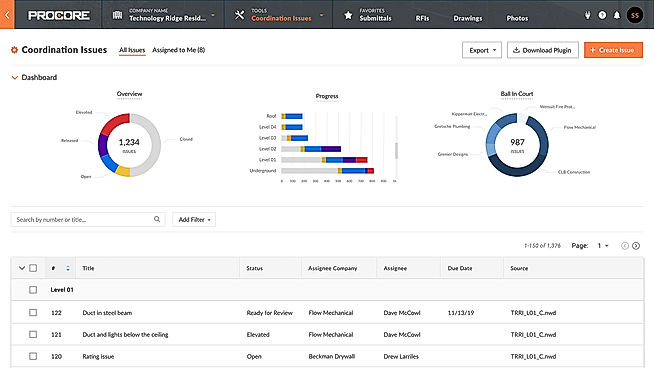
| Description | A cloud-based construction management software that is designed for a variety of construction firms such as engineering firms, architectural and designing firms, office buildings, industrial plants, retail centres, universities, general construction management firms as well as specialty subcontractors. It enables the users in associating on projects and increases efficiency by strengthening communication among the co-workers through sharing documents, graphics, RFIs, schedules, contracts, submittals etc. These project data can be edited and shared from the job site so that the firm owners can keep an eye on the workflow. All the project docs can be accessed from any web-connected device. Read more | Autodesk BIM 360 is a part of Autodesk Construction Cloud, which connects workflows, people, and data to help you build better. It assists the user in reducing risk, raising quality, and completing projects on schedule and under budget. With Autodesk BIM 36, you can predict safety concerns, manage quality proactively, automate operations, and decrease rework to keep prices down and schedules on track. You can also improve decision-making speed and accuracy, link your teams, and anticipate project outcomes with BIM 360. You can additionally save time by avoiding data duplication, experimenting with new procedures, and having all of your data in one location. Users can create a digital strategy that integrates and organizes data from different initiatives, resulting in usable data that drives innovation and improves business decisions with this smart software. To follow your project and make choices in the field, users can also centralize their project data and access the information they need in real-time, anywhere. The software additionally offers integrations with 70+ software connectors for smooth functioning of operations and functions. Read more | e-Builder Enterprise is a cloud-based construction business management solution that is completely integrated, owner-centric, and focused only on satisfying the demands of facility owners and construction professionals. It acts as a single repository for everything, from in-built documentation to BIM reference models to warranty information after the project is completed. e-Builder Enterprise offers an end-to-end PMIS (project management information solution) that delivers results from design and capital planning through commissioning. Using capital planning tools of e-Builder Enterprise, you can rapidly systematize the process of keeping all stakeholders up to speed on planned and authorized project statuses. You can manage your CIP's design phase with ease from a single control point, and handle submissions and approvals with suppliers, partners, and stakeholders. Additionally, all design files include automated version control, allowing you to redline and mark up drawings as required. It automates procedures that guarantee that designs are assessed in a timely way, as well as allowing you to monitor and select design flaws. The integrated modules of e-Builder Enterprise remove data silos and provide real-time monitoring and visibility throughout the whole project. Read more |
| Pricing Options |
|
|
|
| SW Score & Breakdown |
98% SW Score The SW Score ranks the products within a particular category on a variety of parameters, to provide a definite ranking system. Read more
|
95% SW Score The SW Score ranks the products within a particular category on a variety of parameters, to provide a definite ranking system. Read more
|
88% SW Score The SW Score ranks the products within a particular category on a variety of parameters, to provide a definite ranking system. Read more
|
| SaaSworthy Awards | # 1 Most Worthy # 1 Fastest Growing | # 2 Most Worthy # 4 Fastest Growing | # 16 Most Popular # 8 Highly Rated |
| Total Features |
15 Features
|
15 Features
|
12 Features
|
| Common Features for All |
Accounting Integration
Budget Tracking (Job Costing)
CRM
Change Orders
Commercial Projects
Contract Management
Contractors
Equipment Tracking
Estimating
Incident Reporting
Mobile Access
Offline Access
RFI & Submittals
Residential
Subcontractor Management
|
Accounting Integration
Budget Tracking (Job Costing)
CRM
Change Orders
Commercial Projects
Contract Management
Contractors
Equipment Tracking
Estimating
Incident Reporting
Mobile Access
Offline Access
RFI & Submittals
Residential
Subcontractor Management
|
Accounting Integration
Budget Tracking (Job Costing)
CRM
Change Orders
Commercial Projects
Contract Management
Contractors
Equipment Tracking
Estimating
Incident Reporting
Mobile Access
Offline Access
RFI & Submittals
Residential
Subcontractor Management
|
| Organization Types Supported |
|
|
|
| Platforms Supported |
|
|
|
| Modes of Support |
|
|
|
| API Support |
|
|
|
| User Sentiments |
User Friendly Interface, Extensive Project Management Tools, Drawing Management, Excellent Customer Support High Cost, Occasional Software Crashes, Lack of Financial Tool Flexibility, Slow Loading Times |
Real-Time Collaboration, Cloud-Based Platform, Seamless Model Sharing, Comprehensive Project Management Tools Occasional Performance Issues, Convoluted Interface, Limited Offline Functionality, Inconsistent Mobile App Experience |
Not Available
|
| Review Summary |
Procore is a highly-rated construction management platform praised for its user-friendly interface, time-saving features, and comprehensive functionality. Users highlight its ease of use, particularly on mobile devices, and the effectiveness of its tools for managing drawings, RFIs, submittals, change orders, and punch lists. While some users cite the cost as a potential drawback for smaller companies, Procore's robust features and integration capabilities, coupled with exceptional customer support, make it a popular choice for many in the construction industry. |
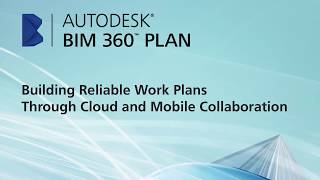
Users applaud BIM 360's robust features for construction management, praising its user-friendly interface, seamless collaboration tools, and comprehensive project management capabilities. They appreciate its ability to centralize project data, streamline communication, and improve coordination among project stakeholders. However, some users have reported occasional technical glitches and a need for improved customer support. Overall, BIM 360 is a well-received construction management software that offers a comprehensive suite of tools to enhance project efficiency and collaboration, catering to the needs of construction professionals. |
Not Available
|
AI-Generated from the text of User Reviews
| Pricing Options |
|
|
|
|
Pricing Plans
Monthly Plans
Annual Plans
|
Procore Custom |
Autodesk BIM 360 Custom |
Capital Program Pricing Custom Named User Custom FedRAMP-In Process Government Custom Professional Services Custom |
|
View Detailed Pricing
|
View Detailed Pricing
|
View Detailed Pricing
|
Get personalized recommendations from our experts on call
Trusted by more than 5 Million users across the globe.
Thank you for the enquiry. One of our software analysts will contact you soon.
| Screenshots |
+ 4 More
|
Not Available | Not Available |
| Videos |

+ 3 More
|
+ 2 More
|

+ 2 More
|
| Company Details | Located in: Carpinteria, CA Founded in: 2003 | Located in: San Rafael, California | Located in: Sunrise, Florida Founded in: 1995 |
| Contact Details |
+1 (866) 477-6267 |
(800) 646-0796 |
+1 800-580-9322 |
| Social Media Handles |
|
|
|

Looking for the right SaaS
We can help you choose the best SaaS for your specific requirements. Our in-house experts will assist you with their hand-picked recommendations.

Want more customers?
Our experts will research about your product and list it on SaaSworthy for FREE.