MEET CLARA - THE AI BEHIND SMARTER SOFTWARE CHOICES

Remini |
98% SW Score The SW Score ranks the products within a particular category on a variety of parameters, to provide a definite ranking system. Read more 
View Details
|
96% SW Score The SW Score ranks the products within a particular category on a variety of parameters, to provide a definite ranking system. Read more 
View Details
|
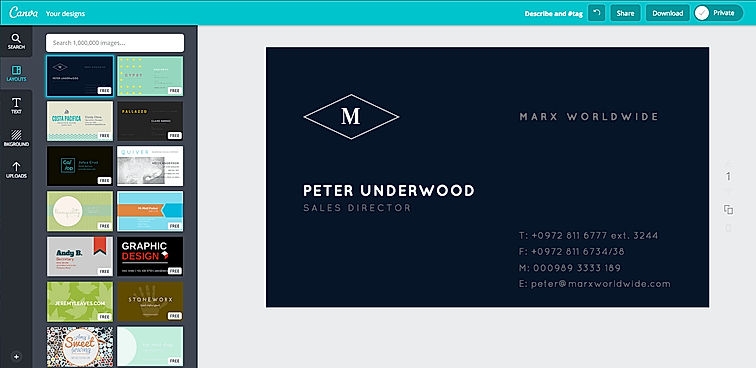
| Description | Canva offers a simple design platform for users to create quality graphic designs. This online design application has simple drag and drop tool which makes designing easy for the users. It has around 8000 default templates that you can use to create appealing designs. It also allows you to create custom designs that holds your brand name. In addition, this software supports configuration and collaboration using which designs can be viewed and modified by multiple users. It is an user-friendly application with millions of texts and fonts that you can use in order to create presentations and social media graphics. Read more | Fotor is an online photo editing platform that lets users edit, add effects, and perform special touch-ups to transform photos and portraits into something beautiful. The online image editing suite allows users to adjust the color, light, size, and add other effects. It offers HDR effects and filters to make photos appear how the user wants. The software offers portrait retouching facilities and allows users to use different beauty features and render a makeover, increase radiance, add highlights, etc. It has handy tools including the image shape editing option, where one can drag and drop the photos and set different designs with the preset shape of their choice. Fotor also has numerous text options to choose from. One can even pick up countless pretty stickers, including shapes, clip arts and icons under different themes and styles, and design photos accordingly. There are various design tools such as drop shadow, distribution, alignment, color options, and more, which would contribute highly to designing the images. With Fotor, users can accent their ideas with preset templates, which they can put on posters, photo cards, Facebook covers, YouTube banners, and other sites. The software also helps users to create several designs within minutes. Read more |
| Pricing Options |
|
|
| SW Score & Breakdown |
98% SW Score The SW Score ranks the products within a particular category on a variety of parameters, to provide a definite ranking system. Read more
|
96% SW Score The SW Score ranks the products within a particular category on a variety of parameters, to provide a definite ranking system. Read more
|
| SaaSworthy Awards | # 1 Most Worthy # 1 Fastest Growing |
Not Available
|
| Organization Types Supported |
|
|
| Platforms Supported |
|
|
| Modes of Support |
|
|
| API Support |
|
|
| User Rating |
|
|
| Rating Distribution |
|
|
| User Sentiments |
User-friendly interface, Extensive library of templates and design elements, Value for money, Extensive integration options Poor Customer Service, Confusing account cancellation process, Technical issues and bugs with mobile application, Limited video editing functionality |
User-Friendly Interface, Extensive Photo Editing Features, AI Image Enhancement Capabilities, Effective Background Removal Tool AI Headshot Generator Accuracy, Subscription Management Issues, Occasional App Performance Issues, Limited Free Trial Functionality |
| Review Summary |
Canva is a user-friendly graphic design platform that empowers individuals and businesses to create stunning visuals. Reviewers praise its intuitive interface, extensive template library, and wide range of customization options. Many users highlight Canva's value for money, as it offers a feature-rich platform at an affordable price. However, some reviewers mention occasional glitches and limitations in the free version. Overall, Canva is a highly recommended tool for non-designers who seek an easy and efficient way to create professional-looking designs. Its user-centric approach and commitment to innovation have earned it a loyal customer base. |
Overall, Fotor receives generally favorable reviews from users, earning an average rating of 4.5 out of 5 stars. Reviewers praise its user-friendly interface, extensive editing features, and wide range of templates and effects. Additionally, Fotor's mobile app is appreciated for its convenience and functionality. However, some users mention occasional technical glitches and limited advanced editing options. |
| Read All User Reviews | Read All User Reviews |
AI-Generated from the text of User Reviews
| Pricing Options |
|
|
|
Pricing Plans
Monthly Plans
Annual Plans
|
Canva Free Free Canva Pro $10.00 $15.00 per user / month Canva for Teams $8.33 $10.00 per user / month Canva Enterprise Custom Teachers Custom Schools and Districts Custom Canva for Campus Custom |
Fotor Basic (Premium Plans) Free Fotor Pro (Premium Plans) $3.33 $8.99 per month Fotor Pro+ (Premium Plans) $7.49 $19.99 per month Fotor Enterprise Custom One-time Payment (Credits Plans) $11.99 $11.99 One-time Payment Subscription Plan (Credits Plans) $0.02 $0.05 per month |
|
View Detailed Pricing
|
View Detailed Pricing
|
Get personalized recommendations from our experts on call
Trusted by more than 5 Million users across the globe.
Thank you for the enquiry. One of our software analysts will contact you soon.
| Screenshots |
|
Not Available |
| Videos |

+ 1 More
|
+ 4 More
|
| Company Details | Located in: Sydney, Australia | Located in: Chengdu, China Founded in: 2009 |
| Contact Details |
Not available |
Not available |
| Social Media Handles |
|
|

Looking for the right SaaS
We can help you choose the best SaaS for your specific requirements. Our in-house experts will assist you with their hand-picked recommendations.

Want more customers?
Our experts will research about your product and list it on SaaSworthy for FREE.