

Smartsheet is one of the most versatile platforms in the collaborative work management space — powering use cases from project planning to enterprise-wide portfolio oversight. With a flexible user subscription model, diverse feature sets, and multiple add-on options, Smartsheet caters to individuals, teams, and global enterprises alike.
In this guide, SaaSworthy breaks down:
- Smartsheet’s pricing tiers (Pro, Business, Enterprise, Advanced Work Management)
- Seat types and user permissions
- Premium add-ons and app pricing
- Which plan is right for your use case
- SaaSworthy’s final verdict
- And 10 key FAQs to help you decide confidently
But before you dive deep, have a look at our shortlist of top project management software:
Table of Contents
Smartsheet Pricing Plans Overview
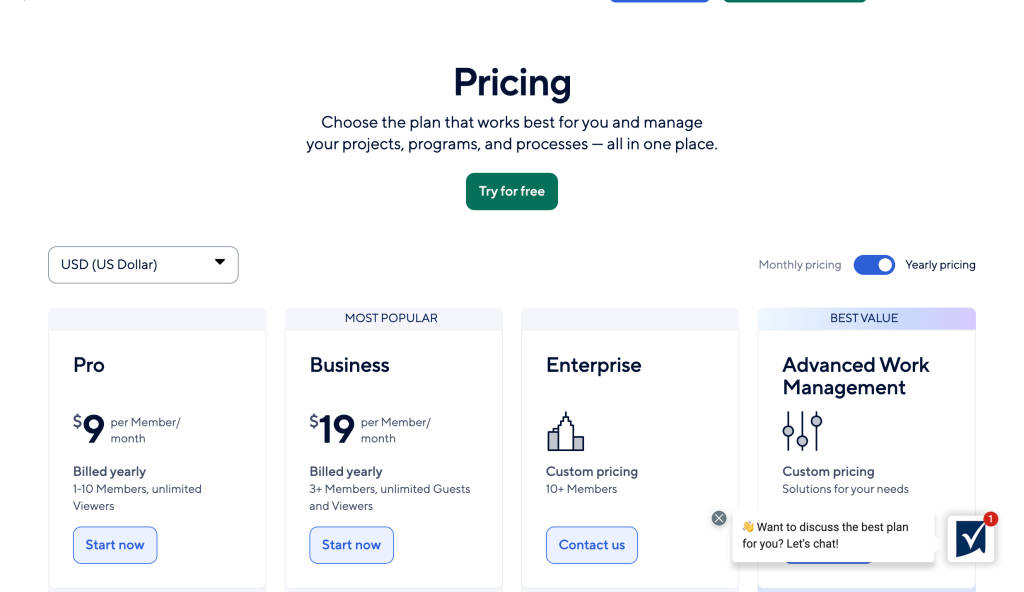
| Plan | Price (Billed Annually) | Best For | User Limitations |
|---|---|---|---|
| Pro | $9/user/month | Individuals & small teams | 1–10 Members, unlimited Viewers |
| Business | $19/user/month | Mid-sized teams & departments | 3+ Members, unlimited Guests/Viewers |
| Enterprise | Custom pricing | Large companies & regulated industries | 10+ Members |
| Advanced Work Management | Custom pricing | Enterprise PMO & high-scale operations | Based on need |
Smartsheet Plan Breakdown
95 % SW Score The SW Score ranks the products within a particular category on a variety of parameters, to provide a definite ranking system. Read more

What is Smartsheet and how does it work?
An intuitive project management software and collaboration tool that is useful for small and mid-size organizations to track and manage various types of work. Besides project management, it assists organizations to manage event schedules, sales pipelines, marketing campaigns, HR and product development. It has a spreadsheet-like interface that offers a number of handy tools such as card view, gantt charts, reporting and file sharing, work automation etc. It is a top-rated business application that can be integrated with leading web apps like Dropbox, Zapier as well as Google Apps and Salesforce. More than 80,000 businesses and millions of users across 175 countries rely on Smartsheet.
Read moreSW Score Breakdown
- Features 100%
- Reviews 98%
- Momentum 68%
- Popularity 69%
- Free Trial Available
- Starts at $9.0. Offers Custom plan.
Pro Plan – $9/user/month (billed annually)
Smartsheet’s Pro plan is ideal for individuals and small teams (up to 10 members) who need a reliable way to manage projects and tasks. It includes unlimited sheets, forms, and reports, along with multiple views like Gantt, table, calendar, and board. You get 250 monthly automations to streamline repetitive workflows and unlimited free Viewers to share updates easily. While it lacks admin controls and advanced features like workload tracking, it’s perfect for straightforward project tracking and lightweight collaboration. If you’re just starting with Smartsheet or need a simple, affordable solution, the Pro plan provides solid functionality at a low cost.
Best for: Individuals and small teams managing basic projects and tasks.
Key Features:
- Unlimited sheets, forms, and reports
- Gantt, calendar, table, and Kanban views
- 250 automations/month
- Rich formulas and free Viewers
SaaSworthy Insight: The Pro plan is cost-effective but lacks advanced workflow management, making it ideal for straightforward, tactical execution.
Business Plan – $19/user/month (billed annually)
The Business plan is best suited for growing teams or departments needing greater collaboration, control, and automation. It includes everything in the Pro plan plus unlimited automations, 1 TB attachment storage, admin-level controls, Timeline view, and team workload tracking. Crucially, it supports unlimited free Guests, allowing you to collaborate with external partners or clients without incurring extra costs. These features make it ideal for marketing teams, PMOs, operations units, and cross-functional project groups. For businesses that want scalable work management with better visibility and governance, the Business plan offers an excellent balance of features, flexibility, and value.
Best for: Cross-functional teams, client-facing operations, and internal projects.
Includes everything in Pro, plus:
- Unlimited automations
- Timeline and workload view
- 1 TB attachment storage
- Admin controls
- Unlimited Guests (external collaborators)
SaaSworthy Tip: If your work involves multiple stakeholders or clients, the unlimited Guest access in the Business plan is a huge advantage.
Enterprise Plan – Custom Pricing
The Enterprise plan is built for large organizations requiring robust security, governance, and system-wide visibility. It includes everything in the Business plan and adds key enterprise features like AI-powered summaries and charts, SAML-based SSO, Work Insights, Enterprise Plan Manager, and directory integrations. It also enables unlimited attachment storage and Collections to organize assets at scale. This tier supports regulatory compliance, centralized IT controls, and advanced reporting. With SLA-backed uptime, it’s suitable for industries such as healthcare, finance, and government. If your organization needs a secure, scalable platform for strategic work execution, the Enterprise plan is the right fit.
Best for: Large organizations that need governance, data visibility, and security.
Includes everything in Business, plus:
- AI formulas, summaries, and charts
- SAML-based Single Sign-On (SSO)
- Collections and directory integrations
- Work Insights for usage analytics
- Enterprise Plan Manager
- Unlimited attachment storage
SaaSworthy Insight: With SAML SSO and advanced reporting, the Enterprise plan aligns well with compliance-driven industries like healthcare, finance, or government.
Advanced Work Management Plan – Custom Pricing
The Advanced Work Management plan is Smartsheet’s most powerful offering, designed for enterprises managing complex portfolios and workflows across systems. It includes everything in the Enterprise plan, plus access to premium apps and connectors like Control Center, Dynamic View, Data Shuttle, DataMesh, Calendar App, Pivot App, and integrations with Salesforce and Jira. These tools support automation, data centralization, role-based visibility, and high-level governance. It also comes with premium support options for mission-critical operations. If you’re running a large PMO or coordinating programs across regions and tools, this plan gives you the full suite to scale efficiently and securely.
Best for: Enterprises managing multiple portfolios across tools and departments.
Includes everything in Enterprise, plus:
- Control Center: Portfolio-level automation
- Dynamic View: Role-based data visibility
- Data Shuttle & DataMesh: Advanced data import/export and unification
- Salesforce & Jira Connectors
- Calendar & Pivot Apps
- Premium Support
SaaSworthy Tip: If you’re using Smartsheet to replace or integrate with enterprise tools like Salesforce, Advanced Work Management offers unmatched ROI.
Add-Ons Available for Business and Enterprise Plans
| Add-On | Description | Starting Price |
|---|---|---|
| Dynamic View | Manage stakeholder access dynamically | From $125/month |
| Data Shuttle | Import/export data from external systems | From $20/month |
| Control Center | Portfolio automation & governance | Contact Sales |
| Calendar App | Custom, interactive calendars | Contact Sales |
| Pivot App | Excel-like pivot tables inside Smartsheet | Contact Sales |
| Brandfolder | Digital asset management for creative teams | Contact Sales |
| Resource Management | Resource planning, time tracking, and forecasting | Contact Sales |
SaaSworthy Insight: Instead of purchasing add-ons individually, consider the Advanced Work Management plan to access all premium features in one go.
Understanding Smartsheet’s User Subscription Model
Smartsheet offers clear role-based access through four seat types:
| Seat Type | Description |
|---|---|
| Member | Full access to create/edit content (paid seat) |
| Provisional Member | 90-day free trial of full features before becoming a paid Member |
| Guest | External users with edit/comment rights |
| Viewer | Internal/external users with view-only access |
Admins can easily change seat types and monitor user activity for accurate billing.
SaaSworthy Tip: The Provisional Member feature is great for short-term contractors or evaluating new users before committing to licenses.
SaaSworthy’s Verdict
Smartsheet offers scalable and flexible pricing designed for a wide range of organizations — from solopreneurs to global enterprises. With its modular add-ons and transparent user roles, it ensures teams pay only for what they use.
Our Take:
- Best for Individuals: Pro Plan
- Best for Teams/Departments: Business Plan
- Best for Enterprise Compliance: Enterprise Plan
- Best for PMOs and Multi-system Ops: Advanced Work Management Plan
- If you’re serious about scaling project execution across people, platforms, and priorities — Smartsheet is well worth the investment.
Smartsheet Pricing FAQs
Is there a free version of Smartsheet?
Yes, Smartsheet offers a free trial but does not have a free-forever plan. All plans require a paid subscription after the trial ends.
Does Smartsheet offer monthly billing?
Yes, Smartsheet supports both monthly and annual billing. However, yearly billing offers better value.
What’s the difference between a Viewer and a Guest?
Viewers can only view content, while Guests (external users) can comment or edit, depending on permissions.
What happens to a Provisional Member after 90 days?
They automatically convert to a paid Member unless their seat type is changed by an admin.
Can I switch between Smartsheet pricing plans?
Yes, you can upgrade, downgrade, or cancel your plan anytime, subject to Smartsheet’s user agreement.
Are add-ons available with all Smartsheet pricing plans?
Most add-ons are only available for Business and higher plans, either as individual purchases or bundled with Advanced Work Management.
Does Smartsheet integrate with Salesforce or Jira?
Yes, through premium connectors available in the Advanced Work Management plan.
What forms of payment does Smartsheet accept?
Smartsheet accepts credit cards, ACH, PayPal, and wire transfers (for large enterprise purchases).
Is there a version of Smartsheet for government agencies?
Yes, Smartsheet Gov is available for U.S. federal agencies, with its own pricing and compliance model.
Does Smartsheet support international currencies?
Yes, Smartsheet supports multiple currencies including USD, EUR, GBP, AUD, JPY, and more.
