

A project management software enables project managers, stakeholders, and users to increase the efficiency of any project delivery. This software is used for various tasks and functions, such as project planning, change management, resource allocation, manage budget, documentation, quality management, etc. Project stakeholders can also use this task to collaborate and communicate with all the people involved. The primary functions of a project management software include:
– Project Planning
– Task Management
– Calendar and Contact Sharing
– Time Tracking
– Bug and error management

There are a number of project management software available which cater to business of all sizes and types. Among the various software available, ProofHub and Wrike are two of the most popular software. In this post, we will look at the comparison of ProofHub vs. Wrike which will help you to determine which among them is the best software for your business.
Table of Contents
What is ProofHub?
ProofHub is one of the best cloud-based project management software used by small, medium, and large businesses. This multilingual interface allows seamless collaboration between project stakeholders, teammates, and clients to ensure that the project remains on track and is completed within the set deadlines.
This software offers a number of benefits and features to its users which has resulted in it winning numerous awards and recognitions.

ProofHub can be used for multiple functionalities which have made it one of the best project management software in the market today.
What is Wrike?
Wrike is another great project management software used by businesses of all sizes for effective project collaboration and teamwork. With this software, teams can finish their work more efficiently and stay on top of all their projects. Wrike is considered as one of the best project management software for remotely located offices. This all-in-one tool offers various collaboration and customization tools that make your work easier and flexible.

Wrike is considered as one of the best project management software that enables its user to work more efficiently and successfully.
Comparison between ProofHub vs. Wrike
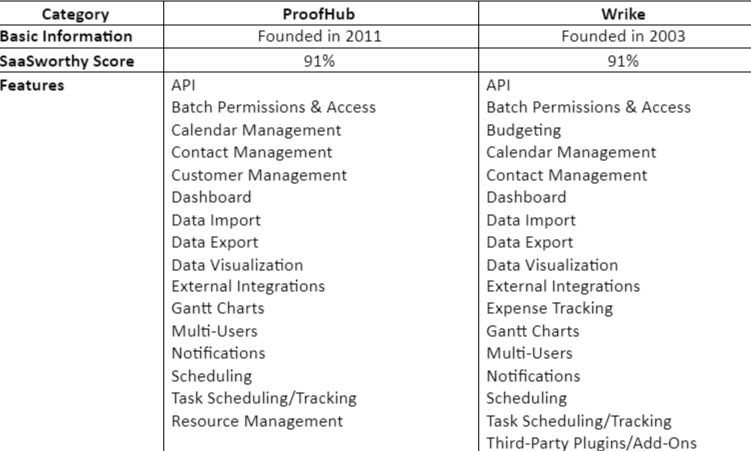
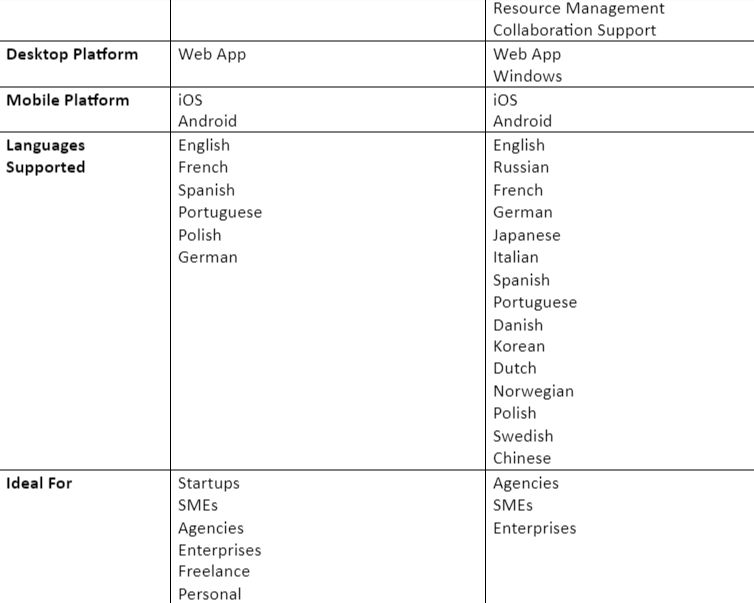
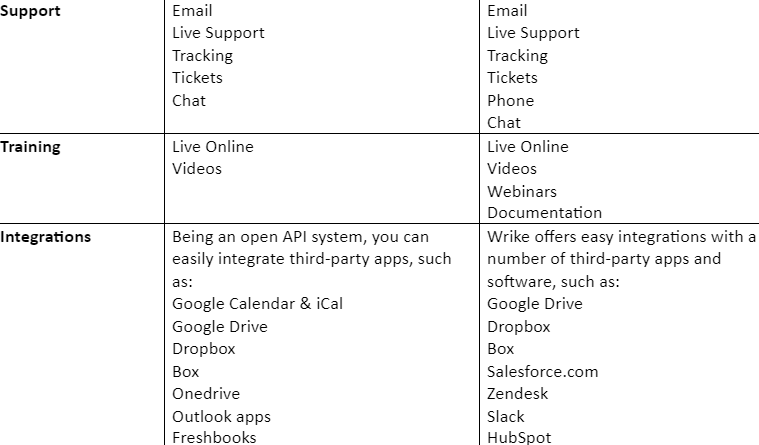
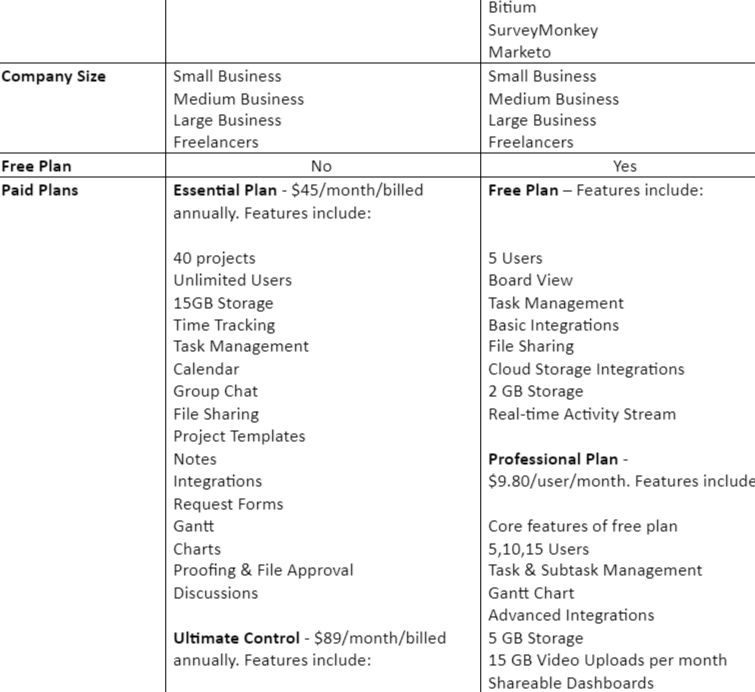
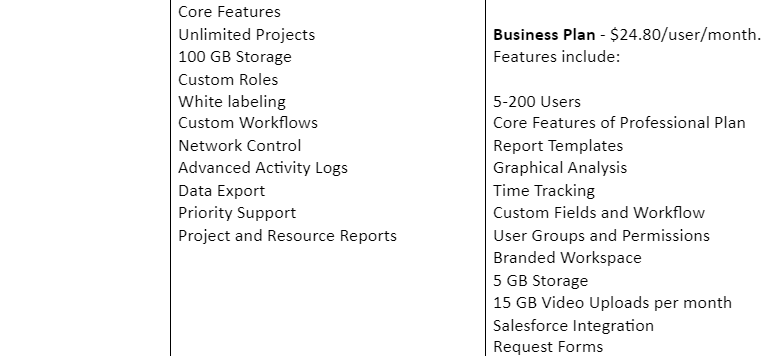
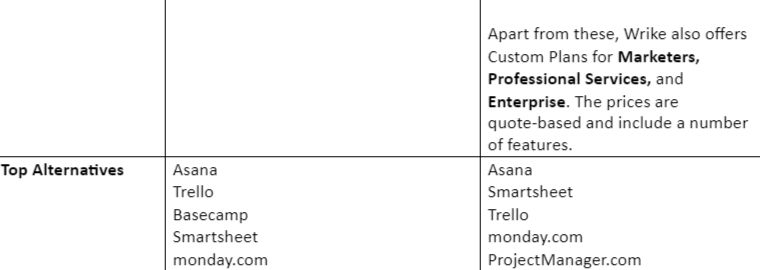
So, which one is better – ProofHub or Wrike? Well, both this software offers a wide range of features and benefits. They are also different in terms of their pricing plans, functionalities, etc. All these factors can make it quite challenging for you to choose the right collaboration software for your business.
Here is a brief comparison of ProofHub vs. Wrike which will give you a clearer picture of both the software and ultimately enable you to choose the best software for your business.

Frequently Asked Questions
1. Do these software offer API?
| ProofHub | Wrike |
| Yes | Yes |
2. Who can benefit from the software?
| ProofHub | Wrike |
| ProofHub is suitable for everyone – from freelancers to large enterprises. | Wrike is suitable for businesses of all sizes – small, medium, and large. |
3. Is the multi-user option available in the software?
| ProofHub | Wrike |
| Yes | Yes |
4. What is the software mainly used for?
| ProofHub | Wrike |
| ProofHub is primarily a project management software used to have better collaboration between teams and individuals. The software enables users to stay on top of their projects and ensure their success. | Wrike is a project management software that enables improved collaboration and effective project management. It is especially helpful for remotely working teams to collaborate and be in sync with each other, ensuring timely completion of the projects. |
5. Is third-party integration possible?
| ProofHub | Wrike |
| Yes, you can integrate various third-party apps like Google Drive, Dropbox, Box, OneDrive, etc., with ProofHub. | Yes, Wrike offers third-party integration with apps like OneDrive, Gmail, Salesforce, Google Drive, Slack, etc. |
6. What type of customer support does the software offer?
| ProofHub | Wrike |
| ProofHub has a dedicated team for customer support. It also offers other channels, such as Live Chat, Help Page, YouTube Video Tutorials, etc. | Wrike provides interactive training to its customers and also provides videos, how-to guides, community forums, etc. |
7. What are the different platforms with which the software is compatible?
| ProofHub | Wrike |
| ProofHub is compatible with both desktop apps and mobile platforms. It is compatible with Android, iOS, Windows. | Wrike is compatible with both desktop apps and mobile platforms, such as Mac, Windows, Android, iOS. |
Pros and Cons
Every software irrespective of what features they offer, come with their own set of pros and cons. Knowing about these pros and cons can assist you in choosing the right software for your business needs.

ProofHub Pros
– ProofHub is a one-stop-shop that offers all the necessary tools for effective collaboration, planning, and management under one roof.
– As a manager, you will have complete control in assigning roles, determining user access, communicate with your team using the mobile app, and more.
– You can add unlimited users and manage multiple projects.
– All the communication is centralized, resulting in quicker and easier communication.
ProofHub Cons
– There is no budgeting feature.
– There is no option to set up recurring tasks.

Wrike Pros
– Wrike offers a number of tools for enterprise work management features, such as the Wrike Proof tool, Gantt Charts, Workflow Statuses, etc.
– It comes with built-in time tracking software.
– You can access several in-depth metrics, such as milestones, task duration, conflicts, top performers, tracked time, etc.
– Online safety via two-factor authentication.
Wrike Cons
– The mobile app comes with limited functionality.
– Project tracking features are limited.
– Difficulty in navigating the interface.
Conclusion
Both ProofHub and Wrike have their own set of features and benefits. When it comes to choosing Project Management Software for your company, you need to be clear with your requirements. This will enable you to compare various software available and find the one that suits your requirements the best. We recommend that you check each feature in detail, compare between the different pricing plans, understand the pros and cons, and then opt for one of these Project Management Software.
