

FreshBooks has long been a go-to accounting solution for freelancers, self-employed professionals, and small businesses. Its strength lies in automation, intuitive invoicing, and real-time expense tracking. But how much does FreshBooks cost in 2026, and is it worth it compared to competitors like QuickBooks or Xero?
Here’s a detailed breakdown of FreshBooks pricing, plan features, expert insights, competitor comparisons, and what Reddit users are saying. But before we dive in, let’s look at our shortlist of top accounting software:
Table of Contents
What is FreshBooks?
95 % SW Score The SW Score ranks the products within a particular category on a variety of parameters, to provide a definite ranking system. Read more

What is Freshbooks and how does it work?
An accounting software focused on providing expert accounting services to small scale businesses. It is best suited for self-employed professionals, small scale agencies, firms and consultancies. The software expertise in handling accounting tasks related to billing, invoicing and expense tracking. Freshbooks time tracking feature will provide you information so that you can invoice your bill for exactly what you’re worth. This easy-to-use software also provides a mobile app which allows you to keep a check on the accounting processes all the time. Freshbooks was awarded as “Leader in the Fall 2017 Small-Business Accounting Grid Report” based on customer satisfaction and market presence.
Read moreSW Score Breakdown
- Features 100%
- Reviews 99%
- Momentum 72%
- Popularity 70%
- Free Trial Available
- Starts at $6.30. Offers Custom plan.
FreshBooks is a cloud-based accounting and invoicing software designed for freelancers, self-employed professionals, and small to mid-sized businesses. It simplifies financial management by offering intuitive tools for invoicing, expense tracking, time logging, project management, and reporting. Unlike traditional accounting software, FreshBooks focuses on ease of use and client-centric workflows, making it especially popular among service providers, consultants, and agencies who need to bill clients quickly and track profitability with minimal complexity.
FreshBooks Pricing Plans at a Glance
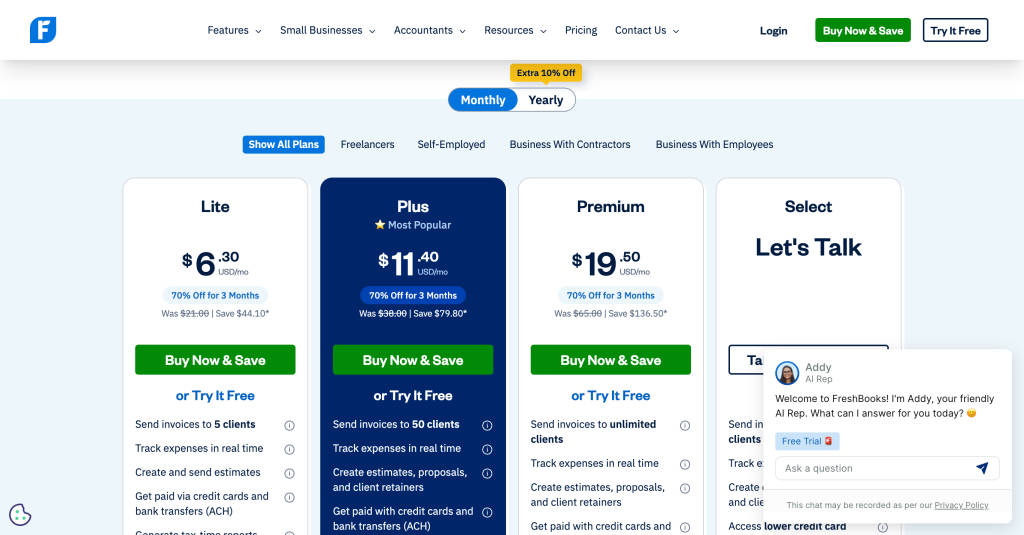
FreshBooks offers four main tiers: Lite, Plus, Premium, and Select. Plans differ based on client caps, invoicing tools, reporting depth, and customization.
1. Lite Plan – $6.30/month (Was $21, save 70% for 3 months)
Best for: Freelancers and solopreneurs who need basic invoicing.
Key features:
-
Invoices for up to 5 clients
-
Real-time expense tracking
-
Estimates and basic reports
-
Accept payments via credit cards and ACH
-
Tax-time reports
SaaSworthy Insight: Lite is budget-friendly but can feel restrictive quickly. If you anticipate growth or work with more than a handful of clients, upgrading to Plus saves future migration hassle.
2. Plus Plan – $11.40/month (Was $38, save 70% for 3 months) ⭐ Most Popular
Best for: Small businesses and contractors who need automation and better reporting.
Key features:
-
Up to 50 billable clients
-
Proposals, client retainers, estimates
-
Automated late payment reminders
-
Expense receipt scanning
-
Double-entry reports & bank reconciliation
-
Accountant access
SaaSworthy Insight: Plus is FreshBooks’ sweet spot. The 50-client limit covers most small businesses, and automation (reminders, proposals, retainers) reduces manual work.
3. Premium Plan – $19.50/month (Was $65, save 70% for 3 months)
Best for: Growing businesses with multiple projects and unlimited clients.
Key features:
-
Unlimited invoicing and clients
-
Project profitability tracking
-
Customized email templates and signatures
-
Recurring invoices and advanced proposals
-
Bill receipt scanning with line items
-
Advanced double-entry reports
SaaSworthy Insight: Premium is best for scaling businesses, especially agencies or consultancies juggling multiple projects. Profitability tracking gives real-time visibility into margins.
4. Select Plan – Custom Pricing (Talk to Sales)
Best for: Established firms with high billing volumes.
Key features:
-
Unlimited clients with advanced invoicing
-
Lower payment processing fees
-
White-label branding on emails
-
Priority support + dedicated account manager
-
Easy Switch data migration
-
2 free team member accounts included
-
Customized onboarding
SaaSworthy Insight: Select caters to agencies and enterprises with high-volume transactions. The biggest draw isn’t features but cost optimization (lower transaction fees) and dedicated support.
Feature Comparison: Lite vs Plus vs Premium vs Select
| Feature | Lite ($6.30) | Plus ($11.40) | Premium ($19.50) | Select (Custom) |
|---|---|---|---|---|
| Billable Clients | 5 | 50 | Unlimited | Unlimited |
| Proposals & Retainers | – | ✔ | ✔ | ✔ |
| Automated Reminders | – | ✔ | ✔ | ✔ |
| Project Profitability | – | – | ✔ | ✔ |
| Customized Email Templates | – | – | ✔ | ✔ |
| Remove FreshBooks Branding | – | – | – | ✔ |
| Dedicated Support | – | – | – | ✔ |
FreshBooks Add-ons
-
Team Members: $11/user/month
-
Advanced Payments: $20/month (included in Select)
-
Payroll: $40/month + $6 per employee
SaaSworthy Insight: Add-ons can significantly increase costs. For example, a 5-person team adds $55/month on top of your base plan. Factor these into your budget.
Discounts and Free Trial
-
70% off for 3 months for new customers
-
30-day free trial with full features
-
Money-back guarantee: 30 days
SaaSworthy Insight: The 70% discount makes FreshBooks one of the cheapest entry points into professional accounting software, but pricing normalizes after 3 months. Always budget for post-discount costs.
Competitor Pricing: FreshBooks vs QuickBooks vs Xero vs Wave
| Software | Starting Price (Monthly) | Best for | Standout Feature |
|---|---|---|---|
| FreshBooks | $6.30 (Lite) → $21 post-discount | Freelancers & SMBs | Client-focused invoicing + project profitability |
| QuickBooks Online | $30 (Simple Start) | SMBs needing detailed accounting | Comprehensive reporting & tax filing tools |
| Xero | $15 (Early Plan) | Global businesses & multi-currency | Unlimited users + global compliance |
| Wave | Free (with transaction fees) | Microbusinesses & startups | Basic invoicing & accounting at no cost |
SaaSworthy Insight: FreshBooks is cheaper upfront with discounts but closer to QuickBooks pricing after renewal. Xero’s unlimited users make it attractive for distributed teams, while Wave is unbeatable for bootstrapped startups.
Decision Matrix: Which Plan Should You Choose?
| Business Type | Recommended Plan | Why |
|---|---|---|
| Freelancers / Solopreneurs | FreshBooks Lite (short-term) or Plus (long-term) | Lite is cheap but Plus avoids hitting client caps quickly. |
| Small Businesses / Contractors | FreshBooks Plus | Balanced automation, proposals, and 50-client cap fit most needs. |
| Agencies / Growing Teams | FreshBooks Premium | Unlimited clients, profitability tracking, and advanced billing. |
| Enterprises / High-Volume Billing | FreshBooks Select | Lower transaction fees, white-labeling, and dedicated support. |
| Global SMBs | Xero | Multi-currency support and unlimited users outshine FreshBooks. |
| Businesses with Complex Tax Needs | QuickBooks Online | Strongest for detailed reporting and accountant-friendly tools. |
| Microbusinesses on a Budget | Wave | Free entry point, though limited in features. |
What Redditors Think About FreshBooks
FreshBooks is often discussed in r/smallbusiness and r/freelance.
-
Ease of Use: “Way simpler than QuickBooks. I got paid faster because clients could pay online instantly.”
-
Client Caps: “Lite was useless after 2 months. Had to upgrade to Plus as soon as I crossed 5 clients.”
-
Pricing Concerns: “The intro discount is great, but $38/month after is pricey unless you’re maximizing every feature.”
-
Support: “FreshBooks actually has people on the phone, unlike other SaaS where you’re stuck with bots.”
Overall sentiment: FreshBooks is praised for usability and invoicing, but pricing tiers and client caps are common pain points.
Expert Verdict: Is FreshBooks Worth It?
FreshBooks strikes a balance between affordability and functionality.
-
For freelancers: The Lite plan is affordable but restrictive. If you anticipate growth, the Plus plan is a safer long-term choice.
-
For small businesses: Plus and Premium offer scalability, automation, and reporting at competitive price points compared to QuickBooks or Xero.
-
For enterprises: Select is designed for high-volume billing with premium support, making it a good fit for agencies and professional service firms.
Alternatives to Consider
-
QuickBooks Online: Better suited for accountants and complex reporting.
-
Xero: Strong for multi-currency and global businesses.
-
Wave: Free but limited, ideal for microbusinesses.
Final Thoughts
FreshBooks pricing in 2026 remains competitive, especially with its introductory discount. It’s designed to grow with your business, from freelancers just starting out to enterprises handling high-volume billing.
Best Value Pick: FreshBooks Plus ($11.40/month) – balances automation, scalability, and affordability.
If you’re looking for ease of use and client-centric features, FreshBooks is hard to beat. But if global expansion or advanced accounting is your priority, QuickBooks or Xero may be better long-term fits.
FAQs on FreshBooks Pricing
How do client limits work in FreshBooks?
Each plan sets a cap on billable clients (Lite = 5, Plus = 50, Premium = Unlimited). If you exceed the limit, you must upgrade.
Can FreshBooks replace QuickBooks Online?
For small businesses, yes. But QuickBooks offers deeper accounting functionality suited for mid-size enterprises.
How much does FreshBooks charge per transaction?
Rates vary by payment method, but Select customers access lower transaction fees.
Does FreshBooks include payroll?
Payroll is an add-on starting at $40/month plus $6 per employee.
