

Webinars, also known as online seminars or webcasts, have become an effective way for businesses to host virtual events and connect with audiences remotely. Organizations use webinar platforms for activities such as team meetings, product demonstrations, customer training, online classes, sales presentations, and employee onboarding. As digital communication continues to grow, webinars have emerged as a powerful tool for lead generation and audience engagement, with studies showing that nearly 76% of businesses generate more leads through webinars. Unlike traditional events that require venues, travel, and extensive logistics, webinars can be organized easily through online platforms where attendees can join from anywhere using their computer or mobile device. Features like screen sharing, live chat, polls, and Q&A sessions also help improve audience interaction, making webinar software a convenient, cost-effective, and scalable solution for businesses of all sizes.
Top Webinar Software in 2026
Out of all the options available in the market today, the following are the top webinar software available for businesses in 2026.
Riverside
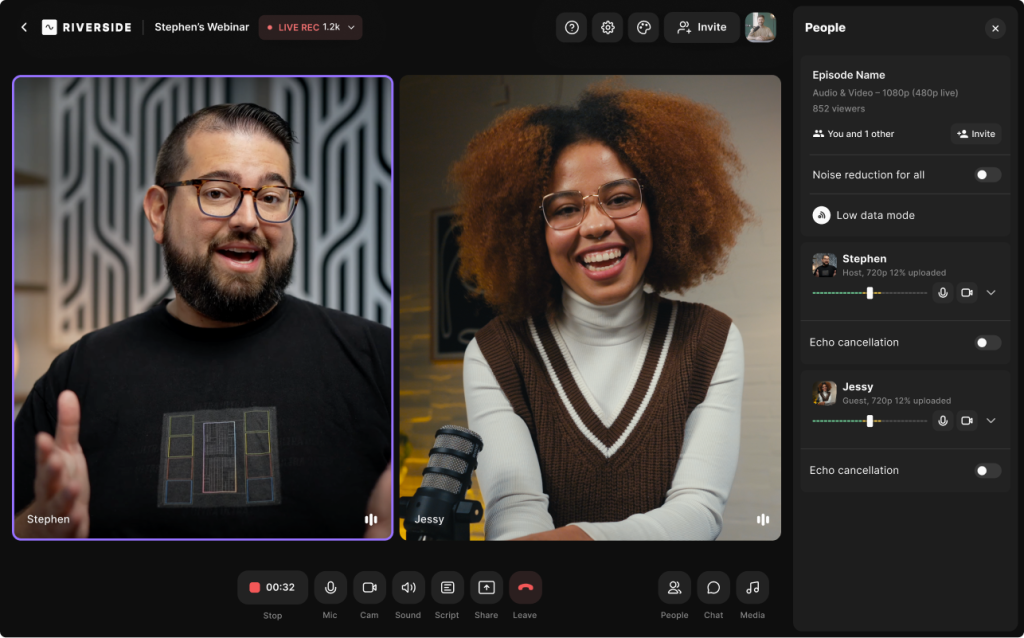

Riverside is one of the best platforms for recording high-quality podcasts, webinars, and video interviews remotely. It offers several advanced features that help creators and businesses record studio-quality audio and video directly from their browser. The platform is simple to use and allows hosts and guests to join sessions easily through a shared link without requiring complex setup.
Riverside provides a reliable recording environment with high-resolution audio and video capture. The platform records each participant locally on their device and uploads the files to the cloud, ensuring that poor internet connections do not affect recording quality. Users can record interviews, podcasts, webinars, and video content while managing multiple participants in a single session.
Riverside also includes built-in tools such as screen sharing, transcription, live streaming, and editing capabilities that help streamline the entire content creation process. Recording settings, layouts, and branding elements can be customized based on user needs, making it suitable for both individual creators and teams.
The key features of Riverside include –
-
Local audio and video recording
-
Separate audio and video tracks
-
Screen sharing
-
Live streaming
-
Podcast recording
-
AI transcription
-
Text-based video editing
-
Guest invitation links
-
Magic clips for social media
-
Cloud backups
-
Multi-participant recording
-
Analytics and reporting
Technical attributes
| Attribute | Details |
|---|---|
| Customer support | Online customer support available during business hours |
| API integration | Available |
| Deployment | Web/Cloud |
| Scalability | Suitable for individuals, small businesses, medium businesses, and large enterprises |
| SW score | 94 |
| Alternatives | Zoom, SquadCast, Zencastr, StreamYard |
Pricing
Riverside offers a free plan with basic recording features. Paid subscription plans provide additional capabilities such as longer recording limits, higher video quality, and advanced editing tools. Pricing details for advanced plans are available on request or through the official website.
Zoho Meeting
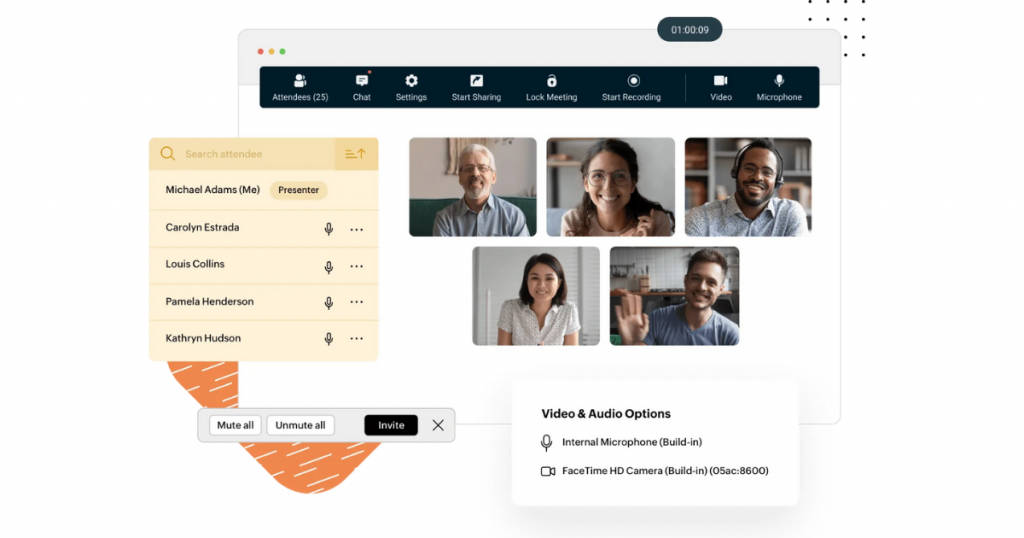
Zoho Meeting is a powerful web conferencing tool. It offers a complete platform that can be used for both conducting online meetings and organizing webinars. It allows users to organize grand-scale live webinars. It enhances organizer-consumer interaction and also boosts customer engagement rate with the brand.
Marketing officials use this platform for product launching, conferences, presentations, and promotional events. Users can directly operate this software on the web without having to download it on the system. It also comes with additional tools for generating in-built reports, reminders, RSVP scheduling, etc. There is also an option for the organizers to record the live webinar, save and share it with the attendees for future reference.
Zoho Meeting is an affordable webinar tool with advanced features for organizing business collaborations as well. Users can share audio files, videos, photos, documents, more on their screen that are simultaneously visible to all the participants. It can be very well be utilized by big enterprises with a distributed workforce to get real-time feedback on projects. It also comes with in-built tools that provide effective data security against potential cyber threats.
The key features of Zoho Meeting as a webinar software include –
- Automatic invites
- Analytics and reports
- Zoho CRM integration
- Live chat
- Voting polls
- Screen sharing
- Attendee management
- Q&A
- On-demand webinars
- Multi-presenter functionality
- Reminders
- Mobile phones compatibility
- VoIP sharing
- Webinar registration widget
- Customized registration form
- Advanced moderator controls
- Email customization
Technical attributes
| Customer support | 24/7 online customer support |
| API integration | Yes |
| Deployment | Web/Cloud, Mobile phones- Android and iOS |
| Scalability | Best fit for freelancers, large enterprises, medium enterprises, and small businesses |
| SW score | 92 |
| Alternatives | Webinar Jam, GoToWebinar, ReadyTalk Webinar |
Pricing
Zoho meeting offers a freemium plan with limited features for users to try. They do not charge any fee for their freemium plan. They also offer a free trial on all their subscription plans. Pricing for subscription plans starts at $2.50/month
Zoom
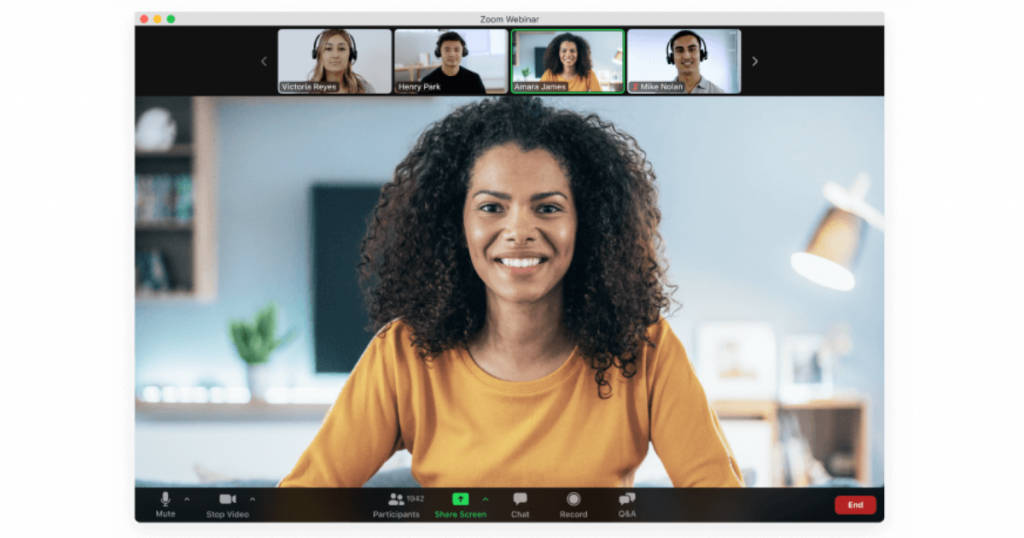
Zoom is the most popular webinar software for automated marketing. It is a cloud-based VoIP best suited for video conferencing and business collaborations. It offers a range of advanced in-built tools with HD audio and video functionality, telephone dial-in support, dual-screen compatibility, and more.
Zoom supports group messaging, whiteboarding, and co-annotations for improved user experience. The customizable webinar interface of Zoom also increases brand visibility and customer engagement that can lead to new business opportunities. This software can be used directly on the web without having to download it in the system. It is also compatible with mobile phones; both iOS and Android operating systems.
Zoom allows presenters to share files, photos, videos, and audio on the shared screen that can be viewed by all the participants in real-time. It also works well with third-party integrations like teleconferencing for audio-based webinars. Organizers can generate and share direct URL links with all the participants. Attendees can simply click on the link to join the webinar without any hassle. Zoom provides SSL encryption-based security to the users’ data. It protects their digital assets from potential malware.
The key features of Zoom as a webinar software include –
- Audio conferencing
- Company branding
- Domain management
- Webinar recording feature
- Mobile phones compatibility
- Multi-presenter functionality
- Third-party integration
- Attendee management
- Q&A
- Live chat
- Analytics and reports
- Cloud storage
- Premier support
- Voice and HD screening
Technical attributes
| Customer support | 24X7 online customer support |
| API integration | NA |
| Deployment | Web/Cloud, Mobile phones- Android and iOS, Windows, Mac |
| Scalability | Best fit for large enterprises, medium enterprises, and small businesses |
| SW score | 98 |
| Alternatives | Whereby, BlueJeans, join.me |
Pricing
Zoom offers a free version with limited features that users can either access on the web or install on their computer systems and mobile phones. It also offers paid subscription plans that start at $149.90/year.
GoToWebinar
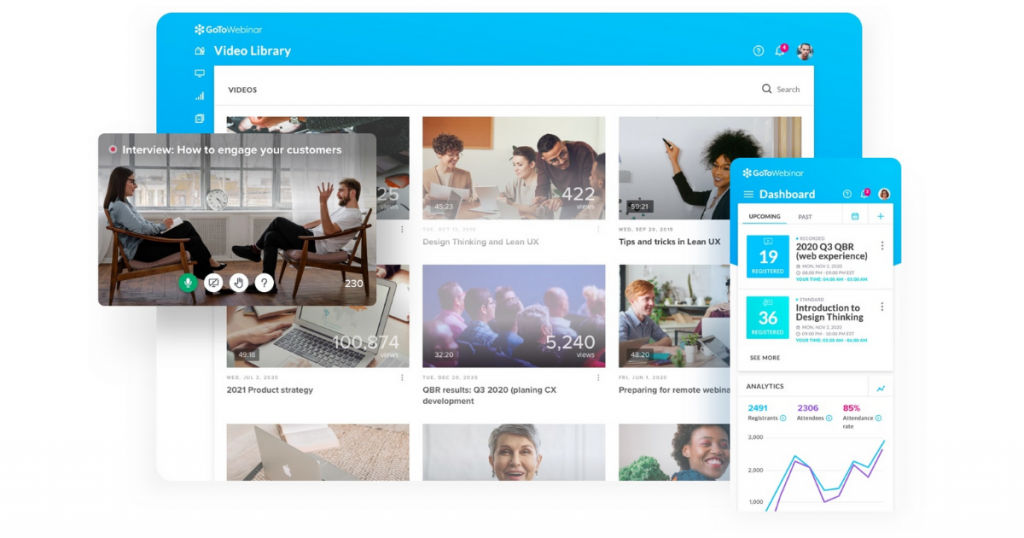
GoToWebinar is an integrated platform for marketing automation. It comes with an in-built CRM support that helps in managing customer relations. Users can conduct live webinar events on this platform for large audiences, which offers better engagement rates than conventional marketing videos.
GoToWebinar supports high-quality audio and video streaming for the best user experience. It also supports live chats and has a slide-in questions feature that allows attendees to interact with the presenter in real-time and have their queries attended. Users can customize the webinar interface for better brand visibility. They can add brand-specific colors, logos, images and more, to make it more brand-specific.
On the GoToWebinar platform, organizers can share presentations, photos, and videos on a shared screen that can be viewed by all the attendees in real-time. It provides a secure platform for users’ data. It has in-built data security tools that protect the digital assets of the users from potential malware. GoToWebinar also supports video recording of live webinars that can be stored and shared with the participants for future reference.
The key features of GoToWebinar include –
- Audio conferencing
- Customizable interface
- Online payment
- Webinar recording feature
- On-demand webinars
- Mobile phones compatibility
- Reminders
- Multi-presenter functionality
- Third-party integration
- Attendee management
- Q&A
- Live chat
- Social sharing
- Voting polls
- Analytics and reports
- Cloud storage
- Full-service registrations
- Custom branding
- Automated Emails
- VoIP support
Technical attributes
| Customer support | 24/7 live online customer support |
| API integration | Yes |
| Deployment | Web/Cloud, Mobile phones- Android and iOS, Windows, Mac |
| Scalability | Suitable for freelancers, large enterprises, medium enterprises, and small businesses |
| SW score | 98 |
| Alternatives | Zoom Video Webinar, Livestorm, Webinar Jam |
Pricing
GoToWebinar offers a 7-day free trial on all its subscription plans that supports up to 100 attendees. Their paid plans start at $89/year. You can also get discounts of up to 20% if you choose the yearly billing cycle.
ClickMeeting
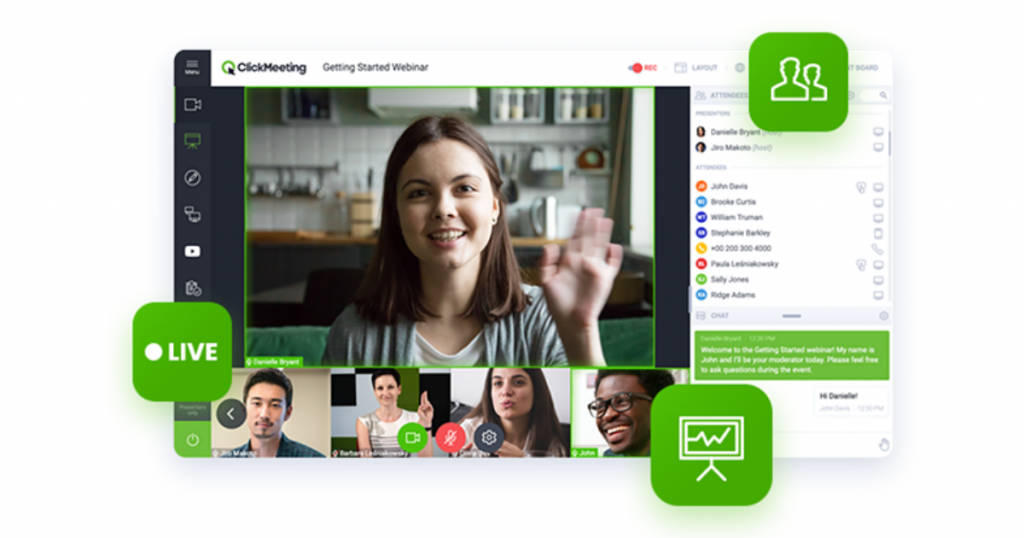
ClickMeeting is best for organizing corporate or branded webinars for a large group of digital audiences. It can be used as a platform for improving customer engagements and generate new business leads. Users can personalize the webinar interface as per their requirements. They can also customize the features to make the webinar more brand-specific. Users can add logos, use brand-specific colors, and more to increase brand visibility in the events.
ClickMeeting is compatible with both computer systems and mobile devices. It supports Android and iOS operating systems in mobile devices and Windows and Mac in the computer systems. Organizers can generate a direct URL link and share it with all the attendees. Participants can simply click on the link to join the event on the web without the hassle of downloading it into their system.
ClickMeeting also possesses social media integration tools that allow users to conduct YouTube and Facebook Live events. In addition, users can also perform polls, surveys, Whiteboard, and more through this platform. ClickMeeting software performs regular analytics and generates reports that help enterprises optimize their operations and campaigns for establishing better customer relations.
The key features of ClickMeeting include –
- Attendee management
- Q&A
- On-demand webinars
- Online payments
- Reminders
- Voting polls
- Screen sharing
- Email invites
- Multi-presenter functionality
- Live chat
- Audio and video feeds
Technical attributes
| Customer support | Online customer support |
| API integration | Yes |
| Deployment | Web/Cloud, Mobile phones- Android and iOS, Windows, Mac |
| Scalability | Suitable for large enterprises, medium enterprises, and small businesses |
| SW score | 97 |
| Alternatives | Cisco Webex Events, Livestorm, Webinar Jam |
Pricing
ClickMeeting offers a free trial on all its subscription plans that start at $25/month. It also offers a free plan for 30 days that supports up to 25 attendees, 5 audio feeds, and 4 video feeds.
Key Takeaways
-
Webinars have become an essential digital communication tool for businesses to host virtual events, training sessions, product demonstrations, and customer engagement programs.
-
Webinar software eliminates the need for physical venues and travel, making online events cost-effective, scalable, and globally accessible.
-
Features like screen sharing, live chat, Q&A sessions, polls, and analytics help improve audience interaction and provide valuable insights.
-
Platforms such as Riverside, Zoho Meeting, Zoom, GoToWebinar, and ClickMeeting offer a range of capabilities including recording, live streaming, attendee management, and reporting tools.
-
Choosing the right webinar platform depends on factors like audience size, engagement tools, integrations, recording quality, and pricing.
FAQs
What is webinar software?
Webinar software is an online platform that allows businesses and individuals to host live virtual events such as seminars, training sessions, product demonstrations, and meetings. It typically includes features like video streaming, screen sharing, audience interaction tools, and recording capabilities.
What are the benefits of using webinar platforms?
Webinar platforms offer several benefits including cost savings, remote accessibility, scalability, improved audience engagement, and the ability to host events for large audiences without geographical limitations.
Which are the best webinar software platforms in 2026?
Some of the top webinar platforms in 2026 include Riverside, Zoho Meeting, Zoom, GoToWebinar, and ClickMeeting, each offering unique features for hosting professional webinars and online events.
Can webinars help generate leads for businesses?
Yes. Webinars are widely used for marketing and lead generation. Research shows that around 76% of businesses generate more leads through webinars, as they allow companies to directly interact with potential customers and demonstrate their expertise.
Are there free webinar software options available?
Yes. Many webinar platforms such as Zoom, Zoho Meeting, and Riverside offer free plans or trial versions that allow users to host basic webinars before upgrading to paid plans with advanced features.
What features should you look for in webinar software?
Key features to consider include screen sharing, live chat, polling, Q&A sessions, webinar recording, attendee management, analytics, integrations, and customization options for branding and registration forms.
