

Selecting the right Applicant Tracking System (ATS) can transform your recruitment process, making it more efficient and less stressful for recruiters and candidates alike. With countless options on the market, knowing what to prioritize ensures you pick a system that aligns with your organization’s needs. To help you, here are our top picks:
Table of Contents
Key Factors to Consider when Choosing an ATS

1. User-Friendliness
An ATS should be intuitive and easy to navigate. Complicated interfaces can frustrate your team and slow the hiring process.
- Look for software with clear menus, logical workflows, and helpful prompts.
- Ensure vendors offer training materials, customer support, or even live demos to help your team get up to speed.
2. Integration Capabilities
Your ATS should work seamlessly with tools you already use, like HR systems, payroll software, and job boards.
- Check for compatibility with platforms like LinkedIn, Indeed, and Glassdoor for easier job posting and candidate sourcing.
- Evaluate whether it supports API integrations to connect with other business software.
3. Customization Options
Hiring isn’t one-size-fits-all. Choose an ATS that adapts to your organization’s unique needs.
- Assess its flexibility in designing workflows, application forms, and email templates.
- Look for systems that allow tailoring at different stages of the recruitment process.
4. Reporting and Analytics
Data-driven hiring decisions save time and money. Robust analytics help you identify bottlenecks and optimize processes.
- Ensure the ATS can track metrics like time-to-hire, candidate drop-off rates, and source efficiency.
- Look for dashboards that provide actionable insights and generate custom reports.
5. Candidate Experience
The ATS should make applying easy and enjoyable for candidates.
- Features like mobile-friendly applications, automated status updates, and personalized communication improve engagement.
- A smooth application process reflects positively on your company’s brand.
Also read: Mobile-First SaaS Solutions Statistics to Watch Out for in 2025
Step-by-Step Guide: How to Choose an Applicant Tracking System Easily
Step 1: Understand What an ATS Does
Before you start evaluating tools, know what you’re looking for.
An Applicant Tracking System helps you:
-
Automate job postings across platforms
-
Collect, sort, and manage candidate resumes
-
Track applicants through stages of hiring
-
Collaborate with hiring teams
-
Ensure compliance and reporting
Step 2: Identify Your Hiring Needs
Ask:
-
How many people do we hire annually?
-
Do we recruit for multiple locations or departments?
-
What channels bring in the most applicants?
-
Do we need integrations with HR tools, CRMs, or job boards?
-
Do we need international or remote hiring capabilities?
This helps you shortlist features you can’t compromise on.
Step 3: List Must-Have Features
Typical features to consider:
-
Job posting and syndication
-
Resume parsing and keyword filtering
-
Candidate communication tools
-
Interview scheduling
-
Custom hiring workflows
-
Reporting and analytics
-
Integrations (HRIS, calendars, Slack, etc.)
-
Mobile access
-
DEI tools or anonymized screening
Create a spreadsheet with “Must-have”, “Nice-to-have”, and “Not needed” categories.
Step 4: Set Your Budget
Understand:
-
Do you prefer monthly billing or annual contracts?
-
Will you be charged per recruiter, per job, or per applicant?
-
Are there onboarding or customization fees?
💡 Set a budget range and check for scalable pricing models that grow with your team.
Step 5: Research and Shortlist Vendors
Look for:
-
User reviews (G2, Capterra, TrustRadius)
-
ATS tools used by similar-sized companies
-
Free trials or live demos
-
Case studies from your industry
Shortlist 3–5 ATS platforms that check most of your boxes. Popular options include:
-
Breezy HR (best for SMBs)
-
Greenhouse (great for scaling startups)
-
Workable (strong for collaborative hiring)
-
Lever (ideal for data-driven hiring)
-
iCIMS / SAP SuccessFactors (enterprise-grade)
Step 6: Request Demos & Ask the Right Questions
During demos, ask:
-
How customizable is the pipeline?
-
Can we automate email follow-ups?
-
How do integrations work?
-
Can we track time-to-hire and source performance?
-
What does onboarding and support look like?
-
Is data export easy in case we switch systems?
Test the user interface: It should feel intuitive for both recruiters and hiring managers.
Step 7: Evaluate Support and Security
Key checkpoints:
-
Is customer support live or ticket-based?
-
Is there a knowledge base or live training?
-
Does it comply with GDPR/EEOC/etc.?
-
Is data encrypted and stored securely?
For larger teams, ask about uptime guarantees and SLAs.
Step 8: Trial the Product (If Available)
Try using:
-
A test job posting
-
Resume upload and parsing
-
Candidate stage movement
-
Team collaboration features
Evaluate speed, ease of use, and the mobile experience.
Step 9: Get Team Feedback
Involve:
-
Recruiters (who’ll use it daily)
-
Hiring managers (who’ll review/interview)
-
HR team (for reporting and compliance)
Collect feedback using a simple scorecard or poll on:
-
Ease of use
-
Feature completeness
-
Customization
-
Value for money
Step 10: Make Your Decision and Plan Rollout
Once selected:
-
Sign the contract and confirm onboarding timelines
-
Assign an internal owner for ATS implementation
-
Schedule training sessions for your team
-
Set up templates, workflows, and integrations
Set benchmarks (e.g. reduced time-to-hire, better candidate experience) to measure ROI after 3–6 months.
Final Tip:
Don’t overbuy. A lean, easy-to-use ATS that fits your current hiring volume is often better than a complex enterprise solution packed with features you don’t need (yet).
Implementation Process
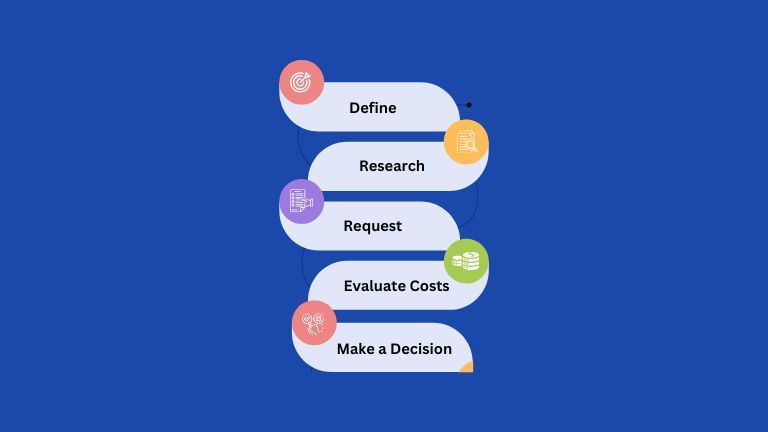
1. Define Your Requirements
Pinpoint the features and functionality you need based on team size, application volume, and existing workflows.
2. Research Options
- Use online reviews, industry forums, and recommendations from peers to narrow down choices.
- Look for case studies or testimonials to see how the ATS has worked for companies like yours.
3. Request Demos
- Ask vendors for a hands-on demonstration to understand how the system works in real-world scenarios.
- Involve team members who will use the system daily for feedback.
4. Evaluate Costs
- Compare subscription-based pricing with one-time fees.
- Factor in additional costs for training, implementation, or premium features.
5. Make a Decision
- Engage key stakeholders, from recruiters to HR managers, in the decision-making process.
- Ensure the chosen ATS aligns with your broader business objectives.
Choosing the right ATS isn’t just about ticking boxes—it’s about finding a system that supports and enhances your hiring goals. By prioritizing user-friendliness, integration, customization, analytics, and candidate experience, your organization can boost efficiency and attract top talent.
Key Takeaways
- Prioritize User-Friendliness: Opt for an intuitive system that reduces complexity for recruiters and candidates. Training materials and demos are a plus.
- Ensure Seamless Integration: Compatibility with tools like job boards, HR systems, and payroll software is critical. Look for API support.
- Customize to Your Needs: Flexible workflows, forms, and templates make the ATS adaptable to your hiring process.
- Leverage Analytics: Data-driven insights help identify hiring bottlenecks and improve efficiency.
- Focus on Candidate Experience: Mobile-friendly applications and clear communication enhance your brand image.
FAQs: How to Choose an Applicant Tracking System Easily
1. What features are essential in an ATS for small businesses?
Look for a user-friendly interface, basic reporting tools, and integration with major job boards. Scalability is important if your business plans to grow.
2. How do I determine if an ATS integrates with my existing tools?
Check vendor specifications for supported platforms and API capabilities. During demos, ask how the ATS syncs with your HR systems or payroll software.
3. What is the average cost of an ATS?
Costs vary by system, but most range from $60 to $120 per user/month. Some vendors offer tiered pricing, while others charge a one-time fee with additional costs for premium features.
4. How can I ensure my team adopts the ATS effectively?
Choose a system with robust training resources and customer support. Involve key users in the decision-making process and provide onboarding sessions.
5. What should I look for to improve the candidate experience?
Features like mobile-friendly applications, automated status updates, and a simple, clear application process can enhance engagement and reflect positively on your company.
