Close Menu
  • Categories
    • Top Software
    • Statistics
    • Research Reports
    • Guides
    • Software Reviews
    • SaaS Talks
  • Resources
    • SW Score Methodology
    • SaaS Terms Glossary
  • Browse Software
Facebook X (Twitter) Instagram
SaaSworthy Blog | Top Software, Statistics, Insights, Reviews & Trends in SaaSSaaSworthy Blog | Top Software, Statistics, Insights, Reviews & Trends in SaaS
  • Categories
    • Top Software
    • Statistics
    • Research Reports
    • Guides
    • Software Reviews
    • SaaS Talks
  • Resources
    • SW Score Methodology
    • SaaS Terms Glossary
  • Browse Software
SaaSworthy Blog | Top Software, Statistics, Insights, Reviews & Trends in SaaSSaaSworthy Blog | Top Software, Statistics, Insights, Reviews & Trends in SaaS
Home»Guides»How to Use MidJourney: A Comprehensive Guide
Guides

How to Use MidJourney: A Comprehensive Guide

Shashank TripathiBy Shashank Tripathi4 Mins ReadJuly 29, 2024
Facebook Twitter LinkedIn Reddit Email
Table of Contents
  1. What is Midjourney?
  2. FAQs

Midjourney is a cutting-edge AI program that has revolutionized the way we create and perceive art. It’s a versatile tool that can transform simple text prompts into stunning visual masterpieces. This article will provide you with a step-by-step guide on how to use Midjourney to unlock your artistic potential.  

Table of Contents

  • What is Midjourney?
    • Getting Started with Midjourney
    • Creating Your First Image
    • Tips for Effective Prompt Writing
    • Exploring Advanced Features
  • FAQs
    • How do I write effective prompts for Midjourney?

What is Midjourney?

Midjourney is an AI-powered image generator that operates within the Discord platform. It leverages sophisticated machine learning algorithms to interpret text descriptions (prompts) and translate them into unique images. The possibilities are virtually endless, allowing you to create art in various styles, from realistic photographs to abstract paintings.  

Getting Started with Midjourney

  1. Join Discord: If you haven’t already, create a Discord account and download the app. Discord is a communication platform where Midjourney resides.  
  2. Join the Midjourney Server: Visit the Midjourney website and click on “Join the Beta.” This will direct you to the official Midjourney Discord server. Accept the invitation to join.  
  3. Choose a Plan: Midjourney offers different subscription plans with varying levels of usage. Select a plan that suits your needs.  
  4. Navigate to a Newbie Channel: Within the Midjourney server, you’ll find channels designated for beginners (e.g., #newbies-123). Join one of these channels to start experimenting.  

Also read: How to Design the Correct YouTube Thumbnail

Creating Your First Image

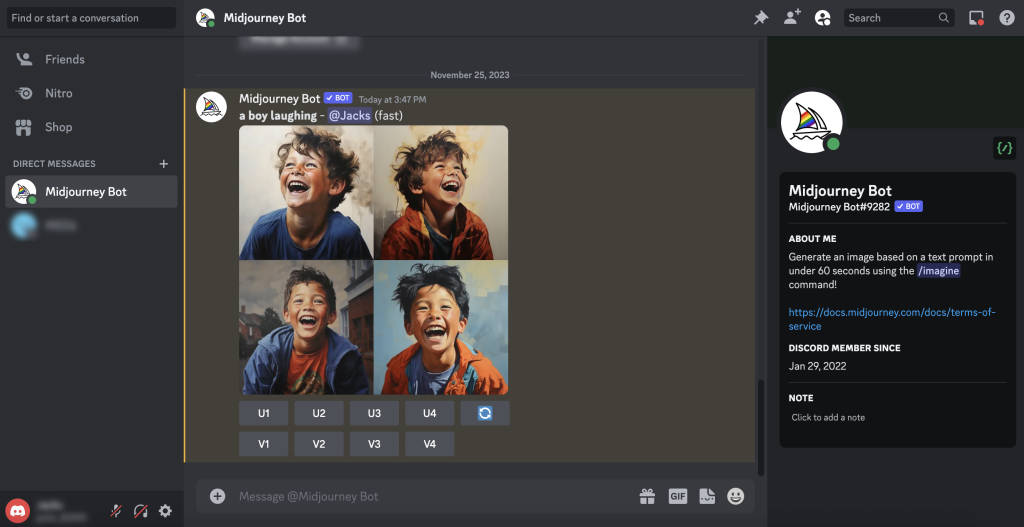
  1. Use the /imagine Command: In the newbie channel, type “/imagine” followed by a space and your text prompt. For example, “/imagine a photorealistic image of a majestic lion in the African savanna.”  
  2. Wait for the AI to Generate Images: Midjourney will process your prompt and generate four different image options based on your description. This usually takes about a minute.  
  3. Upscale or Create Variations: You can choose to upscale one of the generated images to improve its resolution or create variations of the image you like best.
  4. Save Your Image: Once you’re satisfied with your creation, you can save the image to your device.

Tips for Effective Prompt Writing

  • Be Specific: The more detailed your prompt, the better Midjourney can understand your vision. Include information about the subject, style, colors, lighting, and any other relevant details.  
  • Experiment with Styles: Try using different keywords to influence the artistic style of your image. For example, “oil painting,” “watercolor,” “pixel art,” or “cyberpunk.”
  • Use Reference Images: You can include URLs of reference images in your prompt to guide Midjourney’s interpretation.  

Exploring Advanced Features

Midjourney offers a variety of advanced features, such as:

  • Image Weighting: This allows you to control the influence of a reference image on the generated image.  
  • Custom Models: You can train your own custom models to generate images with a specific style or theme.

Midjourney is a powerful tool that can unleash your creativity and empower you to create stunning artwork. With a little practice and experimentation, you’ll be able to master this AI-powered art generator and bring your imagination to life.

Disclaimer: While Midjourney is incredibly versatile, it’s important to be aware of its limitations. The AI is still under development and may sometimes produce unexpected results. Additionally, Midjourney is not a substitute for human creativity and artistic skills. It is a tool to enhance and augment your creative process.  

FAQs

How do I write effective prompts for Midjourney?

Be as specific as possible in your descriptions. Include details about the subject, style, colors, lighting, and any other relevant details. Experiment with different keywords and reference images to achieve the desired results.

Can I use Midjourney for free?

Midjourney offers a limited free trial to new users. After that, you’ll need to subscribe to one of their paid plans to continue using the service.

What are some advanced features of Midjourney?

Midjourney offers several advanced features like image weighting (controlling the influence of a reference image), custom models (training AI on specific styles), and remix mode (combining multiple images).

Previous Article10 Best Workforce Planning Software for Tech Companies in 2025
Next Article Free Photoshop Alternatives 2024: Top 10 Best Photo Editors
Shashank Tripathi

Shashank is an IT engineer with a knack for breaking down complex tech topics into easy-to-understand insights. With over four years of experience, he specializes in writing about SaaS, IT asset management, cybersecurity, enterprise IT, and more. His work has been featured on platforms like HuffPost and CoJournal, where he blends technical expertise with an engaging writing style. Passionate about innovation, he continues to explore the ever-evolving world of technology, making it accessible for readers across industries.

Related Posts

How to Track Brand Visibility in AI Search: Tools, Metrics, and Strategies

August 14, 2026

QuickBooks Pricing: Plans, Features & Which Version Is Right for You? (2026)

August 13, 2026

BambooHR Pricing Explained: Plans, Costs & Hidden Fees (2026)

August 13, 2026

Top 10 Free Cloud-Based Quantum Machine Learning Services in 2026

July 27, 2026
Editor's Picks

Best Visitor Management Software for 2026

August 12, 2026

Should You Choose Talkroute in 2026? A Complete Buyer’s Guide

July 10, 2025

Troubleshooting Common Issues in Panopto: A Practical Guide

November 14, 2024

NinjaOne Acquires Dropsuite to Unify Backup and Endpoint Management

July 11, 2025

Gusto Pricing Explained: Which Plan Is Right for Your Business in 2026?

April 7, 2026

ClickUp Pricing Plans & Features (2026): Is It Still the Best All-in-One Work Platform?

April 6, 2026

Top 50 Onboarding Statistics for 2026

March 11, 2026

45 Key Remote Work Statistics To Look Out For

March 12, 2026

Best Employer of Record (EOR) Services for February 2026

February 18, 2026

Freshdesk Pricing Plans 2026: Which Plan Is Right for Your Support Team

February 3, 2026
Recent Posts

How to Track Brand Visibility in AI Search: Tools, Metrics, and Strategies

August 14, 2026

QuickBooks Pricing: Plans, Features & Which Version Is Right for You? (2026)

August 13, 2026

BambooHR Pricing Explained: Plans, Costs & Hidden Fees (2026)

August 13, 2026

Best Visitor Management Software for 2026

August 12, 2026

Best AI Agents for Content Creation, Sales, Marketing, and Customer Support in 2026

August 10, 2026

Is Animoto Worth It in 2026? SaaSworthy’s Expert Take on the Video Creation Platform

August 7, 2026

Best MSP Backup Solutions in 2026: Comparing NinjaOne, Acronis, Veeam, Datto, NAKIVO & More

August 4, 2026

Best Enterprise Patch Management Software in 2026: NinjaOne vs Automox vs Intune

August 4, 2026

Best AI Video Generators: Top Tools for Product Demos and Marketing Videos

August 3, 2026

5 Best Whiteboard Software for Collaboration & Brainstorming in 2026

July 30, 2026

Subscribe now!

Power up your business growth through innovation! Subscribe to our monthly newsletter for cutting-edge SaaS insights and to stay ahead of the curve with the latest trends in software

About
  • Home
  • All Categories
  • Blog
  • SW Score Methodology
  • SaaS Terms Glossary
Vendors
  • Get Listed
Legal
  • Privacy Policy
  • Terms of Use
  • Cookie Policy
SaaSworthy
Facebook X (Twitter) LinkedIn Instagram

[email protected]

©2026 SaaSworthy.com

Type above and press Enter to search. Press Esc to cancel.